# Introducing Rivalz

Intelligent Finance, Secured by the Rivalz Network

Rivalz is building **an execution layer for intelligent finance** — infrastructure that lets AI agents safely run your money across the global financial stack.

At the core is the **Rivalz Network**: a specialized chain secured by zNode validators.\
It acts as the coordination and verification layer for agent activity — recording strategy decisions, validating oracle outputs and powering incentives with $RIZ — so agents can operate autonomously while ownership of assets always stays with the user.

#### The Rivalz Stack: Core Modules

**1.** [**MOZAI — DeFAI Agents / Execution Layer**](/mozai)

**MOZAI is the agent layer for money - a MoneyOS**\
It exposes a suite of autonomous, non-custodial strategy agents that can:

* allocate liquidity across DeFi primitives.
* react to market conditions in real time.
* execute transactions under strict on-chain limits.

Users fund smart wallets they own; MOZAI agents handle the strategy and execution, while all actions remain transparent and reversible on-chain.

**2.** [**ADCS — AI Oracle & Connectivity**](/adcs-ai-oracles)

It is an AI Oracle layer that lets agents and dApps request: strategy recommendations, risk assessments, model-driven signals, AI inference al in a **verifiable** way on-chain.

**3.** [**OCY — AI-Native Data Layer**](/ocy-data)

OCY is backed by a distributed node network, giving agents low-friction access to the state they need without every strategy re-implementing its own data pipeline.

**4.**[ **zNodes — Validators & Security**](/znode-validators)

They are the validator set of the Rivalz Network and the verification layer for intelligent finance: securing the chain and consensus, validating AI oracle outputs and strategy decisions, enforcing global safety rules around what agents are allowed to do, issuing attestations that high-impact actions (like large reallocations) have passed network checks.

**5.** [**$RIZ — Incentive & Value Layer**](/riz-token)

It is the native token of the Rivalz Network and underpins: staking and rewards for zNodes, fees and incentives for MOZAI strategies, consumption and priority of ADCS oracle requests, future governance over risk parameters, listings and protocol upgrades.

RIZ ties the modules together economically, turning Rivalz from a set of tools into a self-sustaining network.

### Expore Rivalz:

* Buy $RIZ - [Uniswap](https://app.uniswap.org/explore/tokens/base/0x67543CF0304C19CA62AC95ba82FD4F4B40788dc1?inputCurrency=NATIVE) , [Kucoin](https://www.kucoin.com/trade/RIZ-USDT) , [Gate](https://www.gate.com/trade/RIZ_USDT) , [MEXC](https://www.mexc.com/exchange/RIZ_USDT) , [Bitkan](https://bitkan.com/trade/RIZ-USDT)
* [Stake and earn $RIZ ](https://stake.rivalz.ai/)
* Earn yield on MOZAI (Soon)
* [Build together with our AI Oracles ](/adcs-ai-oracles/create-an-adapter)

\
See other systems and products built by Rivalz [here.](/other)


# MOZAI

MOZAI is the MoneyOS, the DeFAI layer of Rivalz: a set of agents that operate non-custodial smart wallets on behalf of users.

Think of it as **agent-native infrastructure for money**:

* capital lives in non-custodial smart wallets.
* agents compete to run strategies on top.
* the Rivalz Network verifies that every action is safe and valid before the agent can execute real transactions.

***

#### How it works?

MOZAI treats each Agent strategy as an **agent + smart wallet** pair.

* The **smart wallet** is a smart contract that can hold assets, positions and claims in external DeFi protocols.
* The agent is an off-chain process that can propose actions for the vault, but only within the ruleset encoded on-chain.

Strategies differ only by:

* which assets they accept.
* which protocols are whitelisted.
* which objective the agent optimizes (e.g. stable yield, blue-chip yield, later LP or hedging).

From the user’s perspective, MOZAI is simple:\
Pick a strategy → fund the agent → let it run.

From the network perspective, each MOZAI position is just another address interacting with DeFI under strict policy enforcement.

***

#### Architecture

At a high level, MOZAI works like this:

> **User (EOA) → creates a MOZAI Smart Wallet → Agent → powered by ADCS / OCY / zNodes → DeFi protocols → Yield returned to the User.**

MOZAI runs on the following

* **Data Layer** – a blend of our own DefiLama-style and Nansen-style data streams, providing the agents with low-latency.
* **Risk Control** - every position and protocol comes with a wide set of risk metrics early-exit triggers.
* **AI Layer** – determines what actions are worth taking and selects the best optimization models (ADCS).
* **Agent Execution Layer** – turns decisions into intents and handles execution.&#x20;
* **On-Chain Layer** – agentic smart wallet infrastructure.

The agent never holds private keys. All power is mediated through the vault contract and its on-chain policy.

***

#### Safety model

MOZAI is non-custodial by design:

* the vault is a contract controlled by the user’s EOA.
* agent permissions are constrained to a fixed set of calls and limits.
* high-impact reallocations can be gated behind zNode attestations.
* any attempt to act outside the configured policy simply reverts.

The user can always withdraw from the vault back to their EOA, independent of MOZAI’s off-chain services, as long as the underlying chain and protocols are live.

***

#### Current scope

In its initial version, MOZAI focuses on **lending and yield**:

* single-asset vaults (e.g. USDC) on supported chains.
* curated sets of lending and yield protocols.
* agents that periodically rebalance across these venues based on best performance.

The goal is straightforward: move away from manual “farm rotation” and towards continuous, rules-driven allocation, without changing the non-custodial model users are used to.

***

#### Direction

The same architecture extends naturally to:

* LP management, leverage and perps strategies.
* external strategy authors plugging their own agents into the same infrastructure.
* multi-chain deployment where the Rivalz Network remains the coordination and verification layer while vaults live on the execution chains.

MOZAI is the first surface where this pattern is visible: agents, oracles and validators coordinating around a vault the user still owns. Everything else in Rivalz is built to make that loop reliable at larger scale.

The plan:\
1\. Everything users do on-chain can be done better by agents.\
2\. Show more use-cases and amplify adoption.\
2\. Grow TVL.


# MOZAI Rewards

MOZAI generates a base yield on your deposited stablecoins through its underlying DeFi strategies, and on top of that you can earn an additional **APY boost** by staking $wRIZ.

Your base yield is continuously added to your MOZAI portfolio and can be tracked directly on the main MOZAI interface.

When you stake **$wRIZ**, you unlock an additional APY boost that is paid in **$wRIZ**. This boost sits on top of the base yield generated by MOZAI’s strategies, creating an extra reward layer for long-term supporters.

*All percentages shown as **APY** refer to an **annual percentage yield**, meaning they represent the return rate on a yearly basis.*&#x20;

## **Base Yield vs. APY Boost**

MOZAI generates yield by deploying your stablecoins into curated DeFi strategies.

* Base yield: the yield generated by the underlying DeFi protocols used by MOZAI (Morpho, AAVE & Fluid).
* APY boost: an extra reward, paid in **$wRIZ**, that depends on how much $wRIZ you have staked and on whether you are a zNode holder.

The APY boost does not change the behaviour or risk profile of the underlying vaults. Instead, it is an additional reward stream on top, fully powered by the Rivalz ecosystem.


# $wRIZ Staking Tiers

By staking $wRIZ, you qualify for one of the following reward tiers:

<figure><img src="/files/iSZ9nsbNAetxannYplNe" alt=""><figcaption></figcaption></figure>

The more $wRIZ you stake, the higher your APY boost.\
The APY boost is always distributed in **$wRIZ**, on top of the yield your stablecoins already generate inside MOZAI.

## **zNode Holder Benefits**

zNode holders are some of the earliest and most committed pillars of the Rivalz ecosystem. MOZAI recognises that.

All **zNode holders** are treated as if they were in **Tier 3** by default.

This means:

* Even without staking 3,000,000 $wRIZ, a zNode holder starts from a **+3.00% APY boost**, paid in **$wRIZ**.
* If a zNode holder also stakes enough $wRIZ to qualify for Tier 4 or Tier 5, the higher tier applies.

In short: zNodes guarantee you a strong baseline boost, and staking $wRIZ lets you go even further.


# ADCS - AI Oracles

**Status:** ADCS v1 is live.

> ELI5: Via ADCS you can build DAPPs that can request AI inference, Data and Agentic action.&#x20;

The Agentic Data Coordination System (ADCS) is the connectivity module and the next evolution in data infrastructure tailored specifically for AI Agents. Designed to revolutionize the future of Artificial Intelligence, ADCS builds an expansive data network that emphasizes rapid validation and ultra-low latency. \
\
Contributing to world abstraction, ADCS abstracts data coordination and intelligence retrieval for AI agents by connecting them to decentralized data sources. It facilitates interaction with the blockchain via oracles, enabling seamless communication between on-chain and off-chain components. By bridging AI applications with decentralized data and blockchain interactions, ADCS enhances the operational efficiency of AI agents and strengthens their integration into the decentralized ecosystem.\
\
It also provides real-time data and intelligence to AI applications built on Vord, integrating seamlessly with Nostrings and Rome to feed AI agents the data they need to operate efficiently in real-time environments. This critical infrastructure enables AI-driven systems to make informed decisions at scale, paving the way for a more automated and intelligent on-chain ecosystem. ADCS makes an agentic future not only possible but inevitable.

## ADCS: The Next Evolution in Data Infrastructure for AI Agents

The Agentic Data Coordination System (ADCS) is engineered to revolutionize the future of Artificial Intelligence by constructing an expansive data network specifically tailored for AI Agents. Emphasizing rapid validation and ultra-low latency, ADCS serves as the critical infrastructure that empowers AI Agents to operate efficiently in real-time environments. By enabling AI-driven systems to make informed decisions at scale, ADCS paves the way for a more automated and intelligent on-chain ecosystem. With ADCS, the agentic future is not only possible but also inevitable.

## Why We Built ADCS

In today’s rapidly evolving digital landscape, the convergence of Artificial Intelligence (AI) and blockchain technology is transforming how data is processed and decisions are made. AI’s ability to analyze vast amounts of data in real-time, combined with blockchain’s decentralized, secure, and immutable framework, is revolutionizing data-driven decision-making at scale.

One of the most groundbreaking developments in this area is the rise of Onchain AI Agents—intelligent systems that operate directly within blockchain networks, providing decentralized AI services that are transparent, secure, and highly efficient.

However, AI Agents require validated and aggregated data across a broader spectrum than traditional oracles can provide—ranging from pricing data to blockchain indexing and protocol analytics. This is where ADCS steps in. We built ADCS to serve as the middleware for these advanced AI ecosystems, facilitating the flow of high-quality, real-time data streams to enable AI Agents to make accurate, data-driven decisions on-chain.

## How Can ADCS Be Used?

ADCS is an exceptionally flexible platform that empowers users to build a wide variety of applications and services tailored to their specific needs and use cases. This flexibility creates opportunities for developing diverse solutions across different sectors, including Decentralized Finance (DeFi), supply chains, healthcare, and many other industries where data is crucial for optimizing processes and improving operational efficiency.

### Decentralized Finance (DeFi)

ADCS provides real-time, validated data feeds tailored to the unique needs of DeFi applications. These feeds encompass everything from price feeds and on-chain transaction data to cross-chain liquidity and decentralized governance metrics. This high-quality data empowers AI Agents to perform sophisticated operations within the DeFi ecosystem, enabling more intelligent, efficient, and automated processes such as:

* AI-Driven Trading Strategies: Leveraging real-time data to execute trades based on predictive analytics and market trends.
* Risk Monitoring and Mitigation: Continuously assessing market risks and adjusting strategies to minimize potential losses.
* DeFi Credit Scoring: Evaluating the creditworthiness of participants using comprehensive data analysis to facilitate lending and borrowing activities.

### Healthcare

ADCS delivers critical insights derived from patient records, clinical trial data, and medical device metrics. These insights empower AI Agents to enhance healthcare delivery and decision-making through various innovative processes, including:

* Predictive Health Analytics: Anticipating patient health trends and potential issues before they arise, enabling proactive interventions.
* Clinical Decision Support: Assisting healthcare professionals in making informed decisions by providing data-driven recommendations.
* Personalized Medicine: Tailoring treatments to individual patient profiles based on comprehensive data analysis.

### Supply Chain

ADCS offers valuable insights into inventory levels, demand forecasts, supplier performance, and logistics metrics. This high-quality data empowers AI Agents to optimize supply chain operations through various innovative processes such as:

* Demand Forecasting: Accurately predicting future demand to ensure optimal inventory levels and reduce stockouts or overstock situations.
* Supplier Performance Optimization: Assessing and improving supplier reliability and efficiency based on performance data.
* Logistics Optimization: Streamlining transportation and distribution processes to minimize costs and enhance delivery times.
* Inventory Management: Automating inventory tracking and replenishment to maintain optimal stock levels and reduce waste.

Beyond the showcased examples, ADCS unlocks a world of possibilities across various other industries such as Traditional Finance (TradFi), gaming, entertainment, and more. Its versatile and robust data infrastructure can drive innovation, enhance operational efficiencies, and enable intelligent automation in sectors where real-time, high-quality data is paramount. Whether it’s optimizing financial analytics, creating immersive gaming experiences, or delivering dynamic content in entertainment, ADCS provides the foundational support needed to transform data-driven applications and services.


# Data and Intelligence Access

## ADCS: The Next Evolution in Data Infrastructure for AI Agents

The Agentic Data Coordination System (ADCS) is engineered to revolutionize the future of Artificial Intelligence by constructing an expansive data network specifically tailored for AI Agents. Emphasizing rapid validation and ultra-low latency, ADCS serves as the critical infrastructure that empowers AI Agents to operate efficiently in real-time environments. By enabling AI-driven systems to make informed decisions at scale, ADCS paves the way for a more automated and intelligent on-chain ecosystem. With ADCS, the agentic future is not only possible but also inevitable.

## Why We Built ADCS

In today’s rapidly evolving digital landscape, the convergence of Artificial Intelligence (AI) and blockchain technology is transforming how data is processed and decisions are made. AI’s ability to analyze vast amounts of data in real-time, combined with blockchain’s decentralized, secure, and immutable framework, is revolutionizing data-driven decision-making at scale.

One of the most groundbreaking developments in this area is the rise of Onchain AI Agents—intelligent systems that operate directly within blockchain networks, providing decentralized AI services that are transparent, secure, and highly efficient.

However, AI Agents require validated and aggregated data across a broader spectrum than traditional oracles can provide—ranging from pricing data to blockchain indexing and protocol analytics. This is where ADCS steps in. We built ADCS to serve as the middleware for these advanced AI ecosystems, facilitating the flow of high-quality, real-time data streams to enable AI Agents to make accurate, data-driven decisions on-chain.

## How Can ADCS Be Used?

ADCS is an exceptionally flexible platform that empowers users to build a wide variety of applications and services tailored to their specific needs and use cases. This flexibility creates opportunities for developing diverse solutions across different sectors, including Decentralized Finance (DeFi), supply chains, healthcare, and many other industries where data is crucial for optimizing processes and improving operational efficiency.

### Decentralized Finance (DeFi)

ADCS provides real-time, validated data feeds tailored to the unique needs of DeFi applications. These feeds encompass everything from price feeds and on-chain transaction data to cross-chain liquidity and decentralized governance metrics. This high-quality data empowers AI Agents to perform sophisticated operations within the DeFi ecosystem, enabling more intelligent, efficient, and automated processes such as:

* AI-Driven Trading Strategies: Leveraging real-time data to execute trades based on predictive analytics and market trends.
* Risk Monitoring and Mitigation: Continuously assessing market risks and adjusting strategies to minimize potential losses.
* DeFi Credit Scoring: Evaluating the creditworthiness of participants using comprehensive data analysis to facilitate lending and borrowing activities.

### Healthcare

ADCS delivers critical insights derived from patient records, clinical trial data, and medical device metrics. These insights empower AI Agents to enhance healthcare delivery and decision-making through various innovative processes, including:

* Predictive Health Analytics: Anticipating patient health trends and potential issues before they arise, enabling proactive interventions.
* Clinical Decision Support: Assisting healthcare professionals in making informed decisions by providing data-driven recommendations.
* Personalized Medicine: Tailoring treatments to individual patient profiles based on comprehensive data analysis.

### Supply Chain

ADCS offers valuable insights into inventory levels, demand forecasts, supplier performance, and logistics metrics. This high-quality data empowers AI Agents to optimize supply chain operations through various innovative processes such as:

* Demand Forecasting: Accurately predicting future demand to ensure optimal inventory levels and reduce stockouts or overstock situations.
* Supplier Performance Optimization: Assessing and improving supplier reliability and efficiency based on performance data.
* Logistics Optimization: Streamlining transportation and distribution processes to minimize costs and enhance delivery times.
* Inventory Management: Automating inventory tracking and replenishment to maintain optimal stock levels and reduce waste.

Beyond the showcased examples, ADCS unlocks a world of possibilities across various other industries such as Traditional Finance (TradFi), gaming, entertainment, and more. Its versatile and robust data infrastructure can drive innovation, enhance operational efficiencies, and enable intelligent automation in sectors where real-time, high-quality data is paramount. Whether it’s optimizing financial analytics, creating immersive gaming experiences, or delivering dynamic content in entertainment, ADCS provides the foundational support needed to transform data-driven applications and services.


# Design Components

The Agentic Data Coordination System (ADCS) integrates both on-chain and off-chain components to seamlessly provide off-chain data access to on-chain applications. This hybrid architecture ensures efficient and reliable data flow between decentralized applications (dApps) and external data sources. By harmonizing these components, ADCS supports robust AI-driven decision-making processes, leveraging trustworthy data to enhance the performance and accuracy of on-chain operations. This design not only optimizes data accessibility and processing but also maintains the integrity and scalability essential for dynamic, real-time environments.

Building on this architecture, ADCS employs key off-chain components like the Adaptor, which defines the structure of inference requests, and ADCS Nodes that handle data retrieval, storage, and processing to ensure AI agents receive high-quality data. On the on-chain side, components such as the CoordinatorBase Contract act as a bridge between on-chain applications and off-chain AI agents, the Consumer Contract interfaces with user applications to request and handle inferences, the Oracle Router directs data requests to appropriate oracles, and Oracles securely connect AI agents and smart contracts to external data sources using techniques like Zero-Knowledge Proofs. Together, these components enable ADCS to deliver real-time, reliable data to dApps, fostering effective AI-driven decisions while maintaining scalability and security.


# Off-chain Components

The Off-chain Components of the Agentic Data Coordination System (ADCS) are essential for managing and processing data outside the blockchain environment. These components ensure that AI Agents receive high-quality, reliable data for informed decision-making. The key elements include:

## Adaptor:

Defines the structure and parameters of inference requests, ensuring consistent and accurate data processing.

## ADCS Nodes:

**ADCS nodes** plays a crucial role in aggregating and processing data from various providers, ensuring that the data ecosystem operates effectively and securely, No matter If the user's request involves inference or not. Here’s a breakdown of the **key components** of **ADCS nodes**:

* Fetcher Node
* Data Storage
* Data Providers

<figure><img src="/files/bBO6rNaSUolxFfcdZBoU" alt=""><figcaption><p>ADCS Node</p></figcaption></figure>


# Adaptor

The Adaptor is a critical parameter for off-chain inference that acts as a template, dictating the structure and content of inference requests. Users define the specific parameters for the schema used in off-chain inference as follows:

* Request Instructions: This contains detailed guidelines about the nature of the request, including various parameters such as variables, consumer contracts, event requests, and required user fees.
* Reference Data: The data that the inference should reference or utilize, including any necessary context or historical data.
* Response Format: The expected structure of the inference response, which ensures the output is formatted correctly for subsequent workflows. This could be a boolean, JSON, or Integer format depending on the use case.

Users can define multiple Adaptor, each tailored to specific requirements, with each adaptor being uniquely identified by a randomly generated **jobID** during the creation process. These **jobIDs** serve as crucial identifiers in **Consumer contracts**, ensuring accurate referencing.

## How to create an Adaptor

### 1. Parameter Specification

To create an **adaptor**, you need to specify several essential parameters that define its functionality, capabilities, and communication requirements. These parameters ensure that the adapter is correctly configured to facilitate interactions between different systems, particularly between on-chain and off-chain environments. Here are the critical parameters:

* Name (String): Name of the adaptor.
* Provider: Choose a data provider (**Currently, We provide a list of providers. You can choose one that fits your requirements).**
* Network: The network you wish to deploy on (Base, Rivalz, Arbitrum).
* Description(String): Provides a brief description of what the adapter does.
* Variables (String): Defines the adapter’s variables in a comma-separated string format for easy processing and validation.
* Category ID(Number): The ID of the category this adaptor belongs to.
* Output Type ID(Number): Specifies the ID of the output type that the adapter will produce. ( **Currently, We support four different types of output:** **Bool**, **Bytes**, **Uint256, StringAndBool** **)**
* Prompt: Describe the specific actions or functionality you want your consumer contract to perform.

During the generation process, the system will automatically create a unique JobID in a format compatible with Solidity's `bytes32` type. This JobID serves as a unique identifier and must be generated before the creation of the adaptor.

For example **jobID**: 0x1b364865ca3e6bb5ada098d0ea96f9e9369b5693cacede79d1352334c4213ac2

### 2. Step-by-step guide on how to approach building an adaptor

1. Visit the Rivalz ADCS at <https://adcsdev.rivalz.ai/> . Next, select **"Connect Wallet"** in the header to login the website.

<figure><img src="/files/lphR2LGmztjEj0rq9xGt" alt=""><figcaption></figcaption></figure>

2. Click "**Your Adaptor**" and then Click the "**Create Adaptor**" button.

<figure><img src="/files/zR0ihe7gZD2FbkHWcF3v" alt=""><figcaption></figcaption></figure>

3. **Create your adaptor**

In this example, I would like to build a simple application designed to gather real-time token price data. From this foundation, you can expand the functionality by integrating AI agents to analyze the data, providing users with actionable insights.

For example, by leveraging AI-driven models, you can develop **PriceIntel**, an advanced system that evaluates current and historical token price trends to help predict future movements. Based on this analysis, the AI agent can assess whether the price of a specific token is likely to increase or decrease, offering actionable predictions for users in the context of:

* **Trading**: Deciding when to buy or sell tokens based on predictive trends.

<figure><img src="/files/bMy1AFp3ufNE8n1ycnBU" alt=""><figcaption></figcaption></figure>

After defining all the necessary information for your adaptor, click the '**Create Adaptor**' button.

<figure><img src="/files/NI0wIBYv0C5jHEWH4dgv" alt=""><figcaption></figcaption></figure>

Congratulations! You have successfully created an adaptor !


# ADCS Nodes

The ADCS Nodes are the foundational elements of the Agentic Data Coordination System (ADCS), orchestrating the seamless aggregation, processing, and security of data within the network. These nodes ensure that data flows efficiently and reliably between external sources and on-chain applications, supporting robust AI-driven decision-making processes.

## Key Components of ADCS Nodes

### Fetcher Nodes

Responsible for intelligently retrieving and aggregating data from diverse external sources. They utilize structured data adapters to ensure data is collected efficiently and accurately.

### Data Storage:

Manages the storage of various data formats, including structured, unstructured, and semi-structured data. This component ensures scalability, security, and compatibility with AI applications through solutions like traditional databases, OrbitDB, and VectorDB.

### Data Providers:

Supply essential data feeds and streams to the ADCS ecosystem. They offer both scheduled data feeds for historical analysis and real-time data streams for immediate processing needs.

<figure><img src="/files/uVY3py6TiaWxZ7roPtGA" alt=""><figcaption><p>ADCS Node</p></figcaption></figure>


# Fetcher Nodes

Fetcher Nodes are essential components of the Agentic Data Coordination Service (ADCS), designed to intelligently retrieve, process, and aggregate data from diverse external sources. By leveraging a structured data adapter framework, Fetcher Nodes ensures that requestors have access to standardized and high-quality data structures. These nodes serve as pivotal data provision points for oracles within the ADCS system, guaranteeing the supply of reliable information necessary for efficiently fulfilling consumer requests.

## Key Features of Fetcher Nodes

### 1. Fetcher Intelligent Data Retrieval

The Fetcher is responsible for intelligently fetching data from designated sources based on predefined configurations. It ensures efficient and accurate data retrieval by adhering to the specifications set within the data adapter, optimizing the process for both speed and reliability.

### 2. Data Adapter - Standardized Data Interaction

The Data Adapter framework ensures compatibility and standardization across various data sources. Each adapter is identified by a unique adapter hash, which guarantees that the data retrieved by the Fetcher is correctly structured and compatible for aggregation. This standardization is critical for maintaining data integrity throughout the ADCS ecosystem.

### 3. Aggregator Component - Data Aggregation and Consensus

The Aggregator consolidates data retrieved from multiple Fetchers, providing the final aggregated data. Each Fetcher Node maintains both a local aggregate and a global aggregate. The Aggregator processes data using methods such as median or majority voting to ensure accuracy and relevance. The Raft consensus mechanism is employed to achieve agreement among all nodes on the global aggregate, maintaining consistency and reliability across the network.

<figure><img src="/files/A299TkT6ySnHGPxq7dXI" alt=""><figcaption><p>Data Aggregation</p></figcaption></figure>

## Raft Consensus Mechanism

To ensure that all nodes in the network agree on the global aggregate data, ADCS utilizes the Raft consensus mechanism. This process involves several critical steps:

### 1. Leader Election:

A leader node is elected among the Fetcher Nodes. The leader manages the log replication process and ensures synchronization across all follower nodes.

### 2. Log Entry Creation:

The leader proposes the global aggregate data by creating a new log entry containing the aggregated data. This log entry is then sent to all follower nodes for replication.

### 3. Log Replication:

Each follower node receives the proposed log entry from the leader and appends it to its own log. Followers send acknowledgments back to the leader to confirm receipt and storage of the log entry.

### 4. Commitment of the Log Entry:

Once the leader receives acknowledgments from a majority of the nodes, it considers the log entry committed. The leader updates the state machine and finalizes the global aggregate, ensuring that all nodes reflect the agreed-upon data.

<figure><img src="/files/xIAsuUZSvHsyFAzp9yQ1" alt=""><figcaption><p>Raft Consensus</p></figcaption></figure>


# Data Storage

Data Storage within the Agentic Data Coordination Service (ADCS) is designed to support a wide variety of data formats, including structured, unstructured, and semi-structured data. ADCS offers a range of storage systems to accommodate these diverse formats, ensuring scalability, security, and compatibility with AI applications. The comprehensive data storage solutions include traditional databases and advanced distributed databases tailored for modern AI and machine learning needs.

* **Structured data** refers to information that is organized in a format that is easily understandable by both humans and machines. In structured data, the elements or fields are clearly defined, and there is a well-defined schema or model that governs the relationships and properties of these elements. This organization allows for efficient storage, retrieval, and analysis of data.

  Structured data is typically found in **relational databases**, **spreadsheets**, and other **tabular formats**. Each piece of data is assigned to a specific category or field, and relationships between different pieces of data are explicitly defined. The use of **schemas** ensures that the data adheres to a specific structure, which simplifies operations like querying, filtering, and aggregating data.

  Examples of structured data include tables with rows and columns, where:

  1. Each **column** represents a specific attribute or property (e.g., "Name" "Age", "Salary").
  2. Each **row** corresponds to a unique record or entry (e.g., an employee's details in a company's database).

  Structured data is commonly used in a variety of applications, including **business databases**, **financial systems**, and **information management systems**, where organization and consistency are critical. This format allows for easy reporting, automation, and analysis through tools like SQL, ensuring data integrity and seamless interaction between systems.

***

* **Unstructured data** refers to information that does not have a predefined schema or structure, making it more difficult to organize, search, and analyze compared to structured data. Common examples include **text files, PDFs, images, videos, audio files**, and other media types. Unlike structured data, unstructured data doesn’t fit neatly into a traditional row-and-column database model.

  Although unstructured data can technically be stored in relational databases as **Binary Large Objects (BLOBs)**, it is generally more suitable for **file systems** or **object storage** systems, especially due to its large size and unique requirements for **backup** and **compliance**.

  However, **metadata** and **vector embeddings** associated with unstructured data still need to be stored in databases to make this data discoverable and usable.

  1. **Metadata** typically includes information such as **file name**, **URI**, **size**, **type**, **owner**, and **creation date**. It may also contain deeper details like **extracted text**, **object boundaries**, and other context-relevant data.
  2. This metadata can be stored in either a **structured** or **semi-structured** format, such as a **JSON column** or a combination of both.

  To further enhance the usability of unstructured data, machine learning models can be employed to generate **metadata** or **vector embeddings**. These embeddings are useful for **searching**, **analyzing**, and building **real-time AI applications**.

***

* **Semi-structured** data exists in the gray area between structured and unstructured data. It has some organizational structure but leaves room for flexibility and undefined elements. Common formats for semi-structured data include **XML**, **JSON**, **Avro**, and **Parquet**. Data from sources like sensors and server logs can easily fall into this category, as it often appears in or can be converted to formats like JSON or CSV.

  Some data vendors even classify **HTML code** and **emails** as semi-structured. For example, an email can be represented as a JSON object with fields like sender, recipient, subject, and timestamp. However, if the email includes attachments such as media files or PDFs, it may also be considered unstructured data.


# Data Providers

Providers are crucial to the Agentic Data Coordination Service (ADCS) ecosystem, supplying the essential data that power AI-driven applications and services. Based on the specific data requirements defined within the Adaptor, they can deliver various types of data. However, there are two primary providers: **Classic Data** and **Inference Data (AI Data).** Classic Data and Inference Data, each serving different purposes and use cases within the network.

## 1. Classic Data <a href="#types-of-data-providers" id="types-of-data-providers"></a>

**Classic data** typically consists of two primary types:

1. **Data Feeds**: Provides periodic or scheduled updates at specific intervals.
2. **Data Streams**: Delivers continuous, real-time data for applications requiring instant updates.

{% hint style="info" %}
Currently, the Data Stream is not yet supported, but it will be available soon.
{% endhint %}

**Data feeds:** consist of pre-packaged, processed data sets that are delivered at scheduled intervals, such as hourly, daily, or weekly. These feeds typically provide structured data, meaning the data is already organized into a clear format—such as tables, rows, and columns—and is often aggregated to offer insights or summary information. Data feeds are particularly useful when regular updates are needed, but real-time data isn't critical. They are commonly employed in scenarios like market updates, financial reports, or periodic weather forecasts, where the focus is on trends and insights rather than immediate reactions.

**Characteristics:**

* Structured and aggregated
* Delivered at defined intervals (e.g., every hour, day)
* Used for historical analysis, insights, and trend monitoring
* Easier to process due to its structured format

**Example Providers:**

* **CoinMarketCap**: Provides cryptocurrency pricing, market cap, and volume data at regular intervals, useful for tracking trends in the digital asset space.
* **Binance**: Offers structured historical data feeds for cryptocurrency prices, trading volumes, and order books, often used by traders and analysts.
* **Bloomberg**: Supplies pre-packaged financial data at regular intervals, including stock indices, commodities, and market insights.

### Workflow for Data Verification <a href="#types-of-data-providers-1" id="types-of-data-providers-1"></a>

1. Before data providers can contribute to the ADCS as a Data Hub, they must first complete their registration through the dashboard using their wallet or any authentication method capable of signing the data which ensures secure and verifiable identity management.
2. After signing and registering the wallet, they can start providing data.
3. Validators evaluate the data submitted by providers by executing the same processes as the providers. If the results match, it indicates that the provider is performing well and will receive a positive score. The reputation score is determined by the number of accurate submissions made by the provider; higher accuracy contributes to a positive growth in reputation. Conversely, if the results do not align, the provider will be flagged as potentially malicious.
4. Once validators have compared the data submitted by providers with their own results, they reach a consensus on the accuracy of the submissions. After this validation, proof is generated to demonstrate that the data has been assessed and found to be accurate. This proof includes hashes of the validated data, along with relevant metadata, and is subsequently submitted on-chain to ensure transparency and immutability. By storing this proof on the blockchain, the integrity of the validation process is preserved, allowing for easy verification and accountability within the ADCS framework.

<figure><img src="/files/UbFO7DEvh2EzIyzrGKD0" alt=""><figcaption><p>ADCS Reputation System</p></figcaption></figure>

### Benefits for Data Providers <a href="#benefits-for-data-providers" id="benefits-for-data-providers"></a>

Participating as a Provider within ADCS offers several advantages:

* Monetization Opportunities - Providers can monetize their data by selling or renting their data feeds and streams within the Intel Market, creating revenue streams from their data assets.
* Enhanced Trust and Reliability - The ADCS Reputation System ensures that only trusted and reliable data is utilized, increasing the value and trustworthiness of the providers’ data offerings.
* Scalability and Flexibility - Providers can offer a wide range of data types and formats, catering to diverse applications and industries within the ADCS network. This flexibility allows Data Providers to scale their offerings based on demand and market needs.

By contributing high-quality data, Data Providers play a pivotal role in maintaining a robust and reliable data ecosystem, empowering AI Agents to make informed and accurate decisions across various domains.

## 2. Inference Data (AI Data) <a href="#id-2.-inference-data-ai-data" id="id-2.-inference-data-ai-data"></a>

**Inference Data** refers to the results or outputs produced by an artificial intelligence (AI) model after processing raw input data. This data can be used for various applications, including decision-making, recommendations, and identifying patterns in large datasets. In the context of AI-powered systems, Inference Data is crucial because it reflects how an AI model interprets and responds to real-world data.

**Characteristics:**

* It can come in various formats, including numerical values, categorical labels, probabilities, or even more complex outputs like text or images.
* Driven by Input Data: It is highly dependent on the input it receives. A slight change in the input can lead to different outputs.
* Dynamic and Adaptive: Inference Data can change as new input data is processed by the model. AI systems adapt to new patterns, and their output may evolve over time as more data is fed into the model, improving accuracy and predictions.

### **Providers:**

For Inference providers, we currently support the following:

* **Llama**
* **Gemini**

Upcoming providers include:

* **Anthropic**
* **OpenAI**


# On-chain Components

The Agentic Data Coordination System (ADCS) includes key on-chain components that enable secure and efficient interactions between blockchain smart contracts and off-chain AI agents. These components are:

## **CoordinatorBase Contract**

&#x20;Acts as a bridge between on-chain applications and off-chain AI agents. It manages inference requests from Consumer Contracts by emitting events to notify AI agents when a new inference is needed. After AI agents perform computations off-chain, they submit results back to the CoordinatorBase Contract, which verifies the authenticity and integrity of the responses using cryptographic techniques.

## Consumer Contract

Deployed by users, it serves as an intermediary between user requirements and ADCS’s AI inference capabilities. Inheriting functionalities from the CoordinatorBase Contract, it can request inferences and handle responses. By interfacing with multiple oracles via the Oracle Router, it enhances the reliability and accuracy of inferences by gathering data from various sources.

## Oracle Router

Responsible for directing data requests to appropriate oracles based on user specifications and the nature of the data required. It dynamically selects oracles according to criteria like data specialization and performance metrics, ensuring efficient data retrieval and optimizing responses for accuracy and timeliness.

## Oracle

Connects AI agents and smart contracts to external data sources. Oracles acquire data from outside the blockchain, perform validation checks, and transmit it back to the blockchain ecosystem. Using Zero-Knowledge Proofs (ZKPs), oracles verify data correctness without revealing sensitive information, maintaining data confidentiality and integrity.


# Coordinator Base

The CoordinatorBase Contract serves as a crucial bridge between on-chain smart contracts and off-chain AI agents within the Agentic Data Coordination Service (ADCS) architecture. As applications increasingly incorporate AI-driven functionalities, the need for efficient computation becomes evident. However, executing AI computations directly on the blockchain poses significant challenges due to high computational costs and inherent limitations.

To address these challenges while maintaining decentralization and security, ADCS introduces a solution where AI agents perform computations or inferences off-chain. This approach preserves the core principles of decentralization by avoiding reliance on centralized servers, which can compromise security and transparency.

## Off-chain Inference Workflow

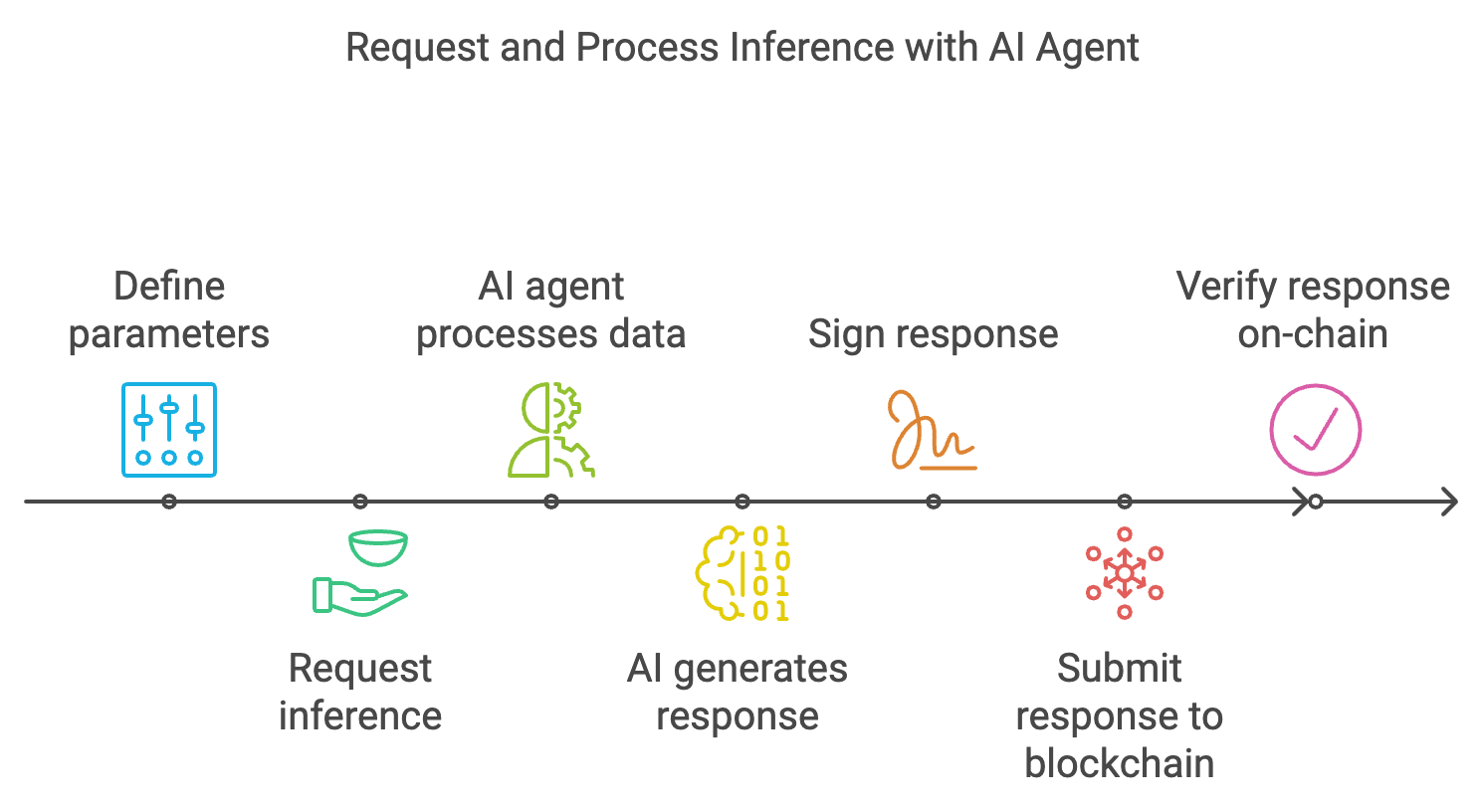
1. **Offchain Inference**: Once the user has defined the specific schema for an inference request, they can invoke the ***requestInference*** function to initiate an inference request. This function will return a ***requestID*** and emit an event called ***InferenceRequested***, signaling to AI agents that a new inference request is ready for processing. Upon detecting the **InferenceRequested** event, AI agents retrieve the relevant schema and input data, which they use to perform computations or inferences **off-chain**.
2. **Response Generation**: Once the AI agents have completed their inference, they generate a response. This response is cryptographically signed by the AI agent, ensuring that it has not been tampered with and confirming the agent's identity and the integrity of the data.
3. **Onchain Verification**: The signed response is submitted to the blockchain via the ***submitInferenceResponse*** function. Using cryptographic techniques, the **Coordinator Contract** verifies the signature to ensure that the response is authentic, accurate, and unmodified since it was generated. Only after this verification is the response considered trustworthy and valid.&#x20;

<figure><img src="/files/xwgatkIVDczKdTFdeUtZ" alt=""><figcaption><p>Inference Workflow</p></figcaption></figure>


# Consumer Contract

Before engaging in AI-driven decision-making within the Agentic Data Coordination Service (ADCS), users must first deploy a Consumer Contract. This contract serves as a crucial intermediary between the user’s specific requirements and the AI inference capabilities of the system. Functioning similarly to a class in object-oriented programming, the Consumer Contract inherits key functionalities from the Coordinator Contract, enabling it to manage the intricate request and response processes essential for effective inference operations.

## Primary Responsibilities

The Consumer Contract has two primary responsibilities:

**1. Request Inference:** It requests an inference from the Coordinator Contract by providing the necessary input data.

**2. Handle Response:** It receives and processes the inference response to make decisions or trigger further actions within the application.

## Example Use Case: High-Risk Trading

Users interested in high-risk trades, such as options trading, require a decision-making process informed by solid reasoning, data analysis, and critical thinking. To facilitate this, they deploy a Consumer Contract and define the necessary parameters within the schema, which might include:

* Trade Parameters - The type of trade (e.g., options), risk appetite, targeted assets, and the amount of funds they are willing to invest.
* Data Sources: Reference data from resources like live market prices, volatility indicators, historical performance data, and economic indicators.
* Decision Logic: Criteria used by the AI agent to make a decision, such as specific price movements, technical indicators, or market conditions.

### Initiating an Inference Request

The Consumer Contract requests an inference from the Coordinator Contract by calling the ***`requestInference`*** function, providing the necessary input data:

* Defined Schema: Specifies the structure and parameters of the inference request.
* User’s Account ID: Identifies the user initiating the request.
* Callback Gas Limit: The maximum amount of gas that can be used for processing the response, helping manage computational resources and costs.

Here is an example of how this function might be implemented:

```
function requestTradeDecision(bytes calldata schema, uint64 accId, uint32 callbackGasLimit) external 
returns (uint256) {
    uint256 requestId = requestInference(schema, accId, callbackGasLimit);
    emit TradeDecisionRequested(requestId, msg.sender);
    return requestId;
}
```

In this function:

* schema: The defined schema outlining the inference request parameters.
* accId: The user’s account ID for authentication.
* callbackGasLimit: The gas limit for processing the response.
* The function emits a TradeDecisionRequested event with the requestId and the caller’s address.

### Handling the Inference Response

Once the required number of responses is received from the oracles, the Consumer Contract processes the aggregated insights to determine whether to execute the trade or take another action. This is done by implementing the ***`handleInferenceResponse`*** function, which processes the response data:

```
// For example:
function handleInferenceResponse(uint256 requestId, bytes calldata responseData) external {
    require(msg.sender == address(coordinator), "Only coordinator can call this function");
    // Process the response data to make a trade decision
    string memory decision = abi.decode(responseData, (string));
    if (keccak256(abi.encodePacked(decision)) == keccak256(abi.encodePacked("trade"))) {
        // Logic to execute the trade
        emit TradeDecisionMade(requestId, "trade");
    } else if (keccak256(abi.encodePacked(decision)) == keccak256(abi.encodePacked("not trade"))) {
        // Logic to not execute the trade
        emit TradeDecisionMade(requestId, "not trade");
    }
}
```

In this function:

* It verifies that only the Coordinator Contract can call this function.
* Decodes the response data to obtain the decision made by the AI agent.
* Uses keccak256 hashing to compare strings securely.
* Executes logic based on whether the decision is “trade” or “not trade.”
* Emits a TradeDecisionMade event with the requestId and the decision.

## Scalability and Oracle Integration

The Consumer Contract is designed to be highly scalable, allowing it to interface with multiple oracles via Oracle Routers. Instead of relying on a single source of truth, the contract gathers data from various oracles, increasing the reliability and accuracy of the inferences made. The Consumer Contract collects results from multiple oracles and checks if it has received the required number of fulfilled requests. For instance, in options trading, the contract may require a certain number of successful responses before proceeding.

Once this condition is met, the ***`handleInferenceResponse`*** function is triggered to process the aggregated insights. Based on these insights, the Consumer Contract determines whether to execute the trade or take another action, enhancing decision-making through AI-driven analysis.

By deploying a Consumer Contract within the ADCS framework, users can harness the power of AI and blockchain technology to make informed, data-driven decisions in a decentralized and secure manner.


# Oracle Router

The Oracle Router is a critical component within the Agentic Data Coordination Service (ADCS), responsible for directing data requests to the appropriate oracles based on user specifications and data requirements. It plays a pivotal role in ensuring that data retrieval is efficient, accurate, and aligned with the needs of the application.

## Functionality

When the Coordinator Contract receives a request from a Consumer Contract, it performs a detailed analysis of the request. This includes understanding the type of data required and evaluating specific parameters or filters defined by the user, such as data source preferences, required data freshness, or acceptable latency.

Based on this analysis, the Coordinator routes the request to the Oracle Router, which dynamically selects the most suitable oracles for fulfilling the request. Selection criteria may include:

* Data Specialization: Oracles that specialize in the specific type of data needed.
* Performance Metrics: Oracles with proven reliability, low latency, and high accuracy.
* Cost Efficiency: Oracles that offer competitive pricing for their services.
* Reputation Scores: Oracles with high trust and reputation within the ADCS network.

By intelligently directing requests, the Oracle Router enhances scalability and reliability. It distributes requests among multiple oracles, preventing overloading any single oracle and optimizing resource utilization within the network. This approach also improves response times by leveraging the fastest available oracles and mitigates the impact of potential oracle failures or slowdowns.


# Oracle

In the Agentic Data Coordination Service (ADCS), Oracles serve as vital intermediaries that connect AI agents and smart contracts to external data sources. They play a crucial role in bridging the on-chain and off-chain worlds, enabling blockchain applications to access real-world data necessary for their operations.

## Role and Function

### Data Acquisition

Oracles receive requests for data and fetch the required information from external sources, which can include APIs, databases, web services, IoT devices, and more.

### Data Verification

Before relaying data to AI agents or smart contracts, oracles may perform initial validation checks to ensure data integrity and correctness.

### Data Transmission

Oracles transmit the acquired data back to the requesting entities within the blockchain ecosystem, facilitating informed decision-making and triggering smart contract executions.

## Security Considerations

Transmitting raw data through oracles introduces potential security risks, particularly when dealing with sensitive or proprietary information. These risks include:

* Data Tampering - Unauthorized modification of data during transmission can lead to incorrect or malicious outcomes.
* Interception and Unauthorized Access - Sensitive data could be intercepted by malicious actors, compromising confidentiality and privacy.
* Single Point of Failure - Relying on a single oracle can make the system vulnerable to failures or attacks targeting that oracle.

## Mitigation with Zero-Knowledge Proofs (ZKPs)

To address these security concerns, ADCS employs Zero-Knowledge Proofs (ZKPs)— advanced cryptographic techniques that allow one party to prove to another that a statement is true without revealing any additional information.

### Advantages of Using ZKPs

* Data Confidentiality - ZKPs ensure that sensitive information remains hidden during the verification process. The oracle can confirm the validity of the data without accessing or exposing the actual content.
* Trust without Exposure - The system can trust the accuracy of the data provided by the reporter without needing to see the raw data, preventing potential leaks or breaches.
* Protection Against Tampering - ZKPs guarantee that the data has not been altered, as any tampering would invalidate the proof. Only valid, authenticated data is processed, enhancing the integrity of the system.

## Workflow Integration

1. Data Reporting with ZKPs - Data providers generate ZKPs alongside their data submissions, enabling oracles to verify the correctness of the data without accessing the underlying information.
2. Oracle Verification - Oracles use the ZKPs to verify the data’s validity, confirming that it meets the required criteria without revealing sensitive details.
3. Secure Transmission - Verified data is transmitted to AI agents or smart contracts securely, often with additional encryption layers to prevent interception.
4. Consensus Mechanisms - When multiple oracles provide data, consensus algorithms can be employed to aggregate responses, further enhancing reliability and accuracy.

## Enhancing System Security

By integrating oracles with Zero-Knowledge Proofs, ADCS achieves a balance between data accessibility and stringent security requirements. This approach:

* Maintains Data Privacy - Protects sensitive information throughout the data flow process.
* Ensures Data Integrity - Guarantees that the data used in smart contracts and AI computations is accurate and untampered.
* Strengthens Trust - Builds confidence among users and participants in the ADCS ecosystem by demonstrating robust security measures.


# Dapp Example

To help you better understand how a Dapp - ADCS works, let’s dive into the following example together **Meme Coin Trend Application.**

The **Meme Coin Trend** application utilizes cutting-edge AI and blockchain technology to monitor trending meme coins and analyze market data in real time. With an integrated AI agent, the platform autonomously trades meme coins using insights gathered from the ADCS network, ensuring efficient and data-driven trading decisions.

## Step-by-step guide on how to approach building the application <a href="#step-by-step-guide-on-how-to-approach-building-the-application" id="step-by-step-guide-on-how-to-approach-building-the-application"></a>

#### **1. Adapter Definition**: <a href="#id-1.-adapter-definition" id="id-1.-adapter-definition"></a>

Visit [here](/adcs-ai-oracles/design-components/off-chain-components/adaptor) to learn How to create an adaptor.

You need to define an adapter that outlines the necessary parameters.

* Provider: Meme Coin Trend
* Network: Base
* Category : Meme Coin
* Output Type : StringAndBool
* Adaptor Name (String): Meme Coin Trend.
* Description(String): Get a trending meme coin and make decisions which meme coin should buy.
* Prompt: Retrieve the current trending meme coins and analyze market conditions to recommend which meme coin should be bought.

<figure><img src="/files/JZO2eiQ68iKge6mMBFK2" alt=""><figcaption></figcaption></figure>

Once an adaptor is created, the system will generate a unique **JobID**.

**Oxd7....2352** is the JobID for your Meme Coin Trend Adaptor.

<figure><img src="/files/ouEpyivIJkHNvzheZnJG" alt=""><figcaption></figcaption></figure>

#### **2.** Setup Your **Consumer Contract**: <a href="#id-2.-setup-your-consumer-contract" id="id-2.-setup-your-consumer-contract"></a>

Depending on the type of `outputData` you have defined in the adaptor, your consumer contract must inherit from the appropriate ADCS fulfillment contract. Here the outputData is `StringandBool` so the consumer contract will inherit the **ADCSConsumerFulfillStringAndBool.**

Copy

```
// SPDX-License-Identifier: MIT
pragma solidity ^0.8.20;
import "../ADCSConsumerFulfill.sol";
import "@openzeppelin/contracts/access/Ownable.sol";
import "@uniswap/v3-periphery/contracts/interfaces/ISwapRouter.sol";
import "@uniswap/v3-periphery/contracts/interfaces/IPeripheryPayments.sol";
import "@openzeppelin/contracts/token/ERC20/IERC20.sol";
contract MockTradeMemeCoin is ADCSConsumerFulfillStringAndBool,Ownable { }
```

**Struct**

**MemeCoin** is a custom data type used to to represent a meme coin with three properties:

```solidity
 struct MemeCoin {
        string name;
        address addr;
        uint8 decimals;
    }
```

**Contract Variables:**

The **memeCoins** variable represents an array of `MemeCoin` structs, allowing the contract to store multiple meme coins

```solidity
MemeCoin[] public memeCoins 
```

**Constructor:**

```solidity
constructor(
        address _coordinator,
        address _weth,
        address _swapRouter
    ) ADCSConsumerBase(_coordinator) Ownable(msg.sender) {
        WETH = _weth;
        swapRouter = ISwapRouter(_swapRouter);
    }
```

ADCSConsumerBase is an abstract contract that serves as the base for consumer contracts interacting with the ADCS coordinator. It initializes data requests and verifies the fulfillment.

The constructor takes the **Coordinator contract's** address (`_coordinator`) as input and passes it to the base contract. The Coordinator manages the interaction between oracles and consumers, facilitating the flow of data requests and responses.

\_weth: the address of the WETH (Wrapped Ether) token contract.

\_swapRouter: the address of the Uniswap V3 swap router contract, used to interact with the Uniswap decentralized exchange (DEX) to swap tokens

Different Coordinator contract addresses are provided, each tailored to handle a specific output type, such as `uint256`, `bool,` or `bytes`. This allows consumers to interact with oracles in a way that matches the data type of the responses they expect.

#### **Main functions** <a href="#main-functions" id="main-functions"></a>

**Request Functions:**

```solidity
function requestTradeMemeCoin(
        bytes32 jobId,
        uint256 callbackGasLimit
    ) external returns (uint256 requestId) {
        bytes32 typeId = keccak256(abi.encodePacked("stringAndbool"));
        ADCS.Request memory req = buildRequest(jobId, typeId);
        requestId = COORDINATOR.requestData(callbackGasLimit, req);
        emit DataRequested(requestId);
        return requestId;
    }
```

This function Initiates a data request to the ADCS network and requests :

* `_callbackGasLimit`: The maximum amount of gas a user is willing to pay for completing the function.
* `_jobId`: The jobID that the consuming contract is registered to.
* The function uses the `buildRequest()` function to create a request, adds the necessary parameters, and sends it to the **Coordinator**.

**Fulfillment Functions:**

```solidity
function fulfillDataRequest(
        uint256 requestId,
        StringAndBool memory response
    ) internal virtual override {
        string memory tokenName = response.name;
        bool result = response.response;
        // Find memecoin address and decimals by name
        tradeMemeCoin(requestId, tokenName, result);
    }
```

This function is called by the ADCS coordinator to fulfill the data request and trigger a trade.

**TradeMemeCoin Function:**

```solidity
function tradeMemeCoin(uint256 requestId, string memory tokenName, bool result) internal {
        // Find memecoin address and decimals by name
        address memeTokenAddress;
        uint8 tokenDecimals;
        for (uint i = 0; i < memeCoins.length; i++) {
            if (keccak256(bytes(memeCoins[i].name)) == keccak256(bytes(tokenName))) {
                memeTokenAddress = memeCoins[i].addr;
                tokenDecimals = memeCoins[i].decimals;
                break;
            }
        }
        if (memeTokenAddress == address(0)) {
            emit MemecoinNotFound(tokenName);
            return;
        }

        // Execute trade through Uniswap V3
        if (result) {
            // buy memecoin with eth
            IERC20(WETH).approve(address(swapRouter), wethAmountForTrade);
            swapRouter.exactInputSingle(
                ISwapRouter.ExactInputSingleParams({
                    tokenIn: WETH,
                    tokenOut: memeTokenAddress,
                    fee: 3000,
                    recipient: address(this),
                    deadline: block.timestamp + 15 minutes,
                    amountIn: wethAmountForTrade,
                    amountOutMinimum: 0,
                    sqrtPriceLimitX96: 0
                })
            );

            emit TradeSuccess(requestId, wethAmountForTrade, true);
        } else {
            // sell memecoin for eth
            // First approve router to spend our tokens
            uint256 memeCoinAmountInWei = memeCoinAmount * (10 ** tokenDecimals);
            IERC20(memeTokenAddress).approve(address(swapRouter), memeCoinAmountInWei);

            swapRouter.exactInputSingle(
                ISwapRouter.ExactInputSingleParams({
                    tokenIn: memeTokenAddress, // memecoin token
                    tokenOut: WETH, // eth
                    fee: 3000, // 0.3% fee tier
                    recipient: address(this),
                    deadline: block.timestamp + 15 minutes,
                    amountIn: memeCoinAmountInWei,
                    amountOutMinimum: 0, // Set minimum amount out to 0 (should use proper slippage in production)
                    sqrtPriceLimitX96: 0
                })
            );
            emit TradeSuccess(requestId, memeCoinAmountInWei, false);
        }
    }
```

The `tradeMemeCoin` function executes the buy or sell trade on Uniswap V3 based on the data received and triggered by the `fulfillDataRequest` function.

After processing the received data, the `tradeMemeCoin` function is called with the `tokenName` and the `result` (true/false).

* **If `result` is `true`**, the contract performs a **buy** trade by swapping WETH (Wrapped Ether) for the specified meme coin on Uniswap V3.
* **If `result` is `false`**, the contract performs a **sell** trade by swapping the meme coin for WETH on Uniswap V3.

**addMemeCoin Function:** Adds a new memecoin to the list of tradable tokens

```solidity
function addMemeCoin(string memory name, address addr, uint8 decimals) external onlyOwner {
        memeCoins.push(MemeCoin({name: name, addr: addr, decimals: decimals}));
    }
```

**setWethAmountForTrade Function:** Sets the amount of WETH to use for trading.

```solidity
function setWethAmountForTrade(uint256 amount) external onlyOwner {
        wethAmountForTrade = amount;
    }
```

### 3. Deploy the consumer contract <a href="#id-3.-deploy-the-consumer-contract" id="id-3.-deploy-the-consumer-contract"></a>

After defining all necessary functions, the global state, and the Coordinator contract for your consumer contract, the next step is to deploy the contract to the blockchain. [Learn more here](https://github.com/Rivalz-ai/examples).

### 4. How the **Meme Coin Trend Application works** <a href="#id-4.-how-the-meme-coin-trend-application-works" id="id-4.-how-the-meme-coin-trend-application-works"></a>

When receiving a request from the consumer contract, the system listens for the request and then identifies an appropriate AI to process the data.

1. The AI system processes the request, identifying the meme coin (e.g., "Shiba Inu") and making a recommendation (e.g., buy or sell).
2. The **Coordinator contract** receives the result from the AI system and calls the `fulfillDataRequest()` function in the consumer contract, passing the processed result (token name and recommendation).
3. The consumer contract processes the result in the `fulfillDataRequest()` function, which identifies the meme coin (via the name) and calls the `tradeMemeCoin()` function to execute the buy or sell action.
4. The contract interacts with the **Uniswap V3 router** to perform the trade, and once completed, the `TradeSuccess` event is emitted.

### FullCode Example <a href="#fullcode-example" id="fullcode-example"></a>

```solidity
// SPDX-License-Identifier: MIT
pragma solidity ^0.8.20;

import "../ADCSConsumerFulfill.sol";
import "@openzeppelin/contracts/access/Ownable.sol";
import "@uniswap/v3-periphery/contracts/interfaces/ISwapRouter.sol";
import "@uniswap/v3-periphery/contracts/interfaces/IPeripheryPayments.sol";
import "@openzeppelin/contracts/token/ERC20/IERC20.sol";

contract MockTradeMemeCoin is ADCSConsumerFulfillStringAndBool, Ownable {
    using ADCS for ADCS.Request;

    // Store the last received response for testing
    bytes public lastResponse;
    uint256 public lastRequestId;
    uint256 public wethAmountForTrade = 1000000000000000; // 0.001 WETH
    uint256 public memeCoinAmount = 100; // 100 memecoin

    struct MemeCoin {
        string name;
        address addr;
        uint8 decimals;
    }

    MemeCoin[] public memeCoins;

    event DataRequested(uint256 indexed requestId);
    event DataFulfilled(uint256 indexed requestId, bytes response);
    event MemecoinNotFound(string tokenName);
    event TradeSuccess(uint256 indexed requestId, uint256 amountIn, bool isBuy);

    address public immutable WETH;
    ISwapRouter public immutable swapRouter;

    constructor(
        address _coordinator,
        address _weth,
        address _swapRouter
    ) ADCSConsumerBase(_coordinator) Ownable(msg.sender) {
        WETH = _weth;
        swapRouter = ISwapRouter(_swapRouter);
    }

    function setWethAmountForTrade(uint256 amount) external onlyOwner {
        wethAmountForTrade = amount;
    }

    /**
     * @notice Add a new memecoin to the list
     * @param name The name of the memecoin
     * @param addr The contract address of the memecoin
     * @param decimals The decimals of the memecoin
     */
    function addMemeCoin(string memory name, address addr, uint8 decimals) external onlyOwner {
        memeCoins.push(MemeCoin({name: name, addr: addr, decimals: decimals}));
    }

    /**
     * @notice Get the total number of memecoins in the list
     * @return The length of the memecoins array
     */
    function getMemeCoinCount() external view returns (uint256) {
        return memeCoins.length;
    }

    /**
     * @notice Get a memecoin by index
     * @param index The index in the memecoins array
     * @return name The memecoin name
     * @return addr The memecoin contract address
     * @return decimals The decimals of the memecoin
     */
    function getMemeCoin(
        uint256 index
    ) external view returns (string memory name, address addr, uint8 decimals) {
        require(index < memeCoins.length, "Index out of bounds");
        MemeCoin memory coin = memeCoins[index];
        return (coin.name, coin.addr, coin.decimals);
    }

    // Function to request bytes data
    function requestTradeMemeCoin(
        bytes32 jobId,
        uint256 callbackGasLimit
    ) external returns (uint256 requestId) {
        bytes32 typeId = keccak256(abi.encodePacked("stringAndbool"));
        ADCS.Request memory req = buildRequest(jobId, typeId);
        requestId = COORDINATOR.requestData(callbackGasLimit, req);
        emit DataRequested(requestId);
        return requestId;
    }

    function fulfillDataRequest(
        uint256 requestId,
        StringAndBool memory response
    ) internal virtual override {
        string memory tokenName = response.name;
        bool result = response.response;
        // Find memecoin address and decimals by name
        tradeMemeCoin(requestId, tokenName, result);
    }

    function tradeMemeCoin(uint256 requestId, string memory tokenName, bool result) internal {
        // Find memecoin address and decimals by name
        address memeTokenAddress;
        uint8 tokenDecimals;
        for (uint i = 0; i < memeCoins.length; i++) {
            if (keccak256(bytes(memeCoins[i].name)) == keccak256(bytes(tokenName))) {
                memeTokenAddress = memeCoins[i].addr;
                tokenDecimals = memeCoins[i].decimals;
                break;
            }
        }
        if (memeTokenAddress == address(0)) {
            emit MemecoinNotFound(tokenName);
            return;
        }

        // Execute trade through Uniswap V3
        if (result) {
            // buy memecoin with eth
            IERC20(WETH).approve(address(swapRouter), wethAmountForTrade);
            swapRouter.exactInputSingle(
                ISwapRouter.ExactInputSingleParams({
                    tokenIn: WETH,
                    tokenOut: memeTokenAddress,
                    fee: 3000,
                    recipient: address(this),
                    deadline: block.timestamp + 15 minutes,
                    amountIn: wethAmountForTrade,
                    amountOutMinimum: 0,
                    sqrtPriceLimitX96: 0
                })
            );

            emit TradeSuccess(requestId, wethAmountForTrade, true);
        } else {
            // sell memecoin for eth
            // First approve router to spend our tokens
            uint256 memeCoinAmountInWei = memeCoinAmount * (10 ** tokenDecimals);
            IERC20(memeTokenAddress).approve(address(swapRouter), memeCoinAmountInWei);

            swapRouter.exactInputSingle(
                ISwapRouter.ExactInputSingleParams({
                    tokenIn: memeTokenAddress, // memecoin token
                    tokenOut: WETH, // eth
                    fee: 3000, // 0.3% fee tier
                    recipient: address(this),
                    deadline: block.timestamp + 15 minutes,
                    amountIn: memeCoinAmountInWei,
                    amountOutMinimum: 0, // Set minimum amount out to 0 (should use proper slippage in production)
                    sqrtPriceLimitX96: 0
                })
            );
            emit TradeSuccess(requestId, memeCoinAmountInWei, false);
        }
    }

    receive() external payable {}

    function withdraw() external onlyOwner {
        payable(owner()).transfer(address(this).balance);
    }

    function withdrawToken(address token) external onlyOwner {
        IERC20(token).transfer(owner(), IERC20(token).balanceOf(address(this)));
    }
}
```

**We've also built some examples to help you easily understand what you can do with ADCS network** [**here**](https://adcsdev.rivalz.ai/).


# Embed a data provider to AI Agents

With access to trusted and reliable data, AI Agents can unlock their full potential – from making smarter decisions to streamlining processes and drastically improving operational efficiency. ADCS enables you to seamlessly integrate data providers directly into your AI Agents within an off-chain environment, offering unparalleled flexibility and performance.

{% hint style="info" %}
The Embed a data provider to AI Agents feature is coming soon.
{% endhint %}


# Self-Agent Deployment

{% hint style="info" %}
Self-Agent Deployment is currently in development.
{% endhint %}


# Overview

## What is ADCS?

The concept of ADCS is derived from blockchain Data Oracles. While oracles can bring real-world data into the blockchain, ADCS goes beyond traditional oracles by providing both data and inference results from AI agents. Users can now leverage AI capabilities on the blockchain to power their applications. For a practical example of blockchain oracles, see [Chainlink](https://chain.link/), one of the leading decentralized oracle networks.

## Why bring AI to the blockchain?

Integrating AI with blockchain technology creates a powerful synergy that addresses several critical needs in the modern digital ecosystem:

1. **Decentralized AI Decision Making**: By bringing AI to the blockchain, we can create transparent and verifiable AI decision-making processes. This is crucial for applications where trust and accountability are paramount, such as in financial services, healthcare, and supply chain management.
2. **Automated Smart Contracts**: AI can enhance smart contracts by adding intelligent decision-making capabilities, enabling more sophisticated and adaptive contractual agreements that can respond to complex real-world conditions.
3. **Democratization of AI Services**: Blockchain technology can help create a decentralized marketplace for AI services, making advanced AI capabilities accessible to a broader range of users and applications while ensuring fair compensation for AI service providers.
4. **Improved Security and Privacy**: The combination of blockchain's cryptographic security with AI's pattern recognition capabilities can create more robust security systems while maintaining privacy through techniques like federated learning and zero-knowledge proofs.

These capabilities open up new possibilities for decentralized applications (dApps) that can leverage both the trustless nature of blockchain and the intelligent processing power of AI systems.

### Architecture

The ADCS system follows an event-driven architecture where on-chain events trigger off-chain AI inference actions. When blockchain applications emit events, ADCS nodes detect these signals and coordinate the appropriate AI model executions and data processing in response. Below is a high-level diagram of the ADCS structure

<figure><img src="/files/xjBbnjm6N7whfTfn2t4V" alt=""><figcaption></figcaption></figure>


# Core components

## ADCS Oracle Contracts

The ADCS Oracle contracts are the cornerstone of the ADCS platform, responsible for managing data requests and fulfillment between blockchain applications and AI providers. The system is built around the `ADCSCoordinator` contract, which handles oracle registration, request management, and data fulfillment.

### Key Components

#### 1. Oracle Management

The coordinator maintains a registry of authorized oracles with a maximum limit of 255 oracles. Key functions include:

```solidity
function registerOracle(address oracle) external onlyOwner {
    if (sOracles.length >= MAX_ORACLES) {
        revert TooManyOracles();
    }
    // ... registration logic
}

function deregisterOracle(address oracle) external onlyOwner {
    // ... deregistration logic
}
```

#### 2. Request Management

Each data request is uniquely identified and tracked using a commitment-based system:

```solidity
function requestData(
    uint256 callbackGasLimit,
    ADCS.Request memory req
) external returns (uint256) {
    // Validate gas limit
    // Generate unique requestId
    // Store request commitment
    // Emit DataRequested event
}
```

#### 3. Data Fulfillment

The contract supports multiple data types for fulfillment:

* uint256: Numerical values
* bool: Boolean values
* bytes32: Fixed-size byte arrays
* bytes: Dynamic byte arrays
* StringAndBool: Combined string and boolean values

Example of fulfillment function:

```solidity
function fulfillDataRequestStringAndBool(
    uint256 requestId,
    StringAndBool memory response,
    RequestCommitment memory rc
) external {
    validateDataResponse(rc, requestId);
    // Process submission
    // Execute callback
    // Cleanup and emit event
}
```

### Security Features

1. **Request Validation**: Each request is validated using a commitment scheme that ensures:
   * Oracle authentication
   * Request integrity
   * Single submission per oracle
   * Proper gas limit enforcement
2. **Reentrancy Protection**: The contract implements reentrancy guards to prevent malicious callbacks:

```solidity
function fulfill(bytes memory resp, RequestCommitment memory rc) private returns (bool) {
    sConfig.reentrancyLock = true;
    (bool sent, ) = rc.sender.call(resp);
    sConfig.reentrancyLock = false;
    return sent;
}
```

3. **Access Control**: Only registered oracles can fulfill requests, and only the contract owner can manage oracle registration.

### Event System

The contract emits detailed events for tracking and monitoring:

* `OracleRegistered`: When a new oracle is registered
* `DataRequested`: When a new request is created
* `DataRequestFulfilled`: When data is successfully delivered
* Various typed fulfillment events for different response types

### Integration Points

#### Coordinator Contract Addresses

* Arbitrum: `0x07811b8B6151db734b8D1568918d3A62607879a7`
* Base: `0x91c5d6e9F50ec656e7094df9fC035924AAA428bb`
* Avalanche: `0x55Ee887dB181B41f69b3313065b1eD6BEE3336A1`
* Berachain: `0x55Ee887dB181B41f69b3313065b1eD6BEE3336A1`
* Bsc: `0xcb8BaEf34aDBB414fAB51EC6Ac1C0e4D0340e824`
* OP: `0x55Ee887dB181B41f69b3313065b1eD6BEE3336A1`
* Polygon: `0x55Ee887dB181B41f69b3313065b1eD6BEE3336A1`
* Sonic: `0x55Ee887dB181B41f69b3313065b1eD6BEE3336A1`&#x20;
* Mantle: `0x55Ee887dB181B41f69b3313065b1eD6BEE3336A1`&#x20;
* Sei: `0x55Ee887dB181B41f69b3313065b1eD6BEE3336A1`&#x20;
* Monad-testnet: `0x55Ee887dB181B41f69b3313065b1eD6BEE3336A1`
* Taiko: `0x55Ee887dB181B41f69b3313065b1eD6BEE3336A1`
* Celo: `0x55Ee887dB181B41f69b3313065b1eD6BEE3336A1`
* Linea: `0x55Ee887dB181B41f69b3313065b1eD6BEE3336A1`
* Injective-testnet: `0x55Ee887dB181B41f69b3313065b1eD6BEE3336A1`
* Irys-testnet: `0x07bbC170f188a307161e7d0cD4Eb0CF0Cae39405`
* Somnia-testnet: `0x07bbC170f188a307161e7d0cD4Eb0CF0Cae39405`
* Soneium: `0x07bbC170f188a307161e7d0cD4Eb0CF0Cae39405`
* Fraxtal: `0x7eb5b9b83E1aA1AbafE7243A79910FC9AEdD6Ff2`

#### Request Flow

1. Consumer contracts make requests through the coordinator
2. Registered oracles monitor for `DataRequested` events
3. Oracles process requests and submit responses
4. The coordinator validates and forwards responses to consumers
5. Consumers receive data through their fulfillment functions

#### Error Handling

The contract includes comprehensive error handling:

* `TooManyOracles`: When oracle limit is reached
* `UnregisteredOracleFulfillment`: When unregistered oracle attempts fulfillment
* `InvalidJobId`: For malformed job identifiers
* `OracleAlreadySubmitted`: To prevent duplicate submissions

## Providers

ADCS Providers are the actual LLM models and the entities that host them. A provider can be a single LLM model or a group of models that perform different tasks. This is the brain of the inference process where users can specify extra context and parameters via an Adaptor. Provider attributes include:

* Provider Name
* LLM Model Name or list of LLM models
* Provider Description
* Provider API Endpoint
* Provider API Documentation
* Example execution result

## How to Become a Provider

## Adaptors

ADCS Adaptors act as bridges between the ADCS Oracle contracts and the Providers. They are responsible for providing extra context and formatting the request and response data between the two.

Adaptors can be created by leveraging other adaptors and providers as context. This composability allows developers to build more complex and specialized adaptors by combining the functionality of existing components, enabling greater flexibility and reusability within the ADCS ecosystem.

Adaptor attributes include:

* Adaptor Name
* Adaptor ID
* Category
* Network
* Providers Used
* Output Type
* Integration Code Example
* Playground for Testing
  * Parameters Required for Execution
  * Thinking Process
  * Correct Output Format

## Consumer Contracts

ADCS Consumer contracts request and process data from the ADCS platform. You can find example consumer contracts [here](https://github.com/Rivalz-ai/ADCS-core/tree/main/contracts/src/mock)

**We currently support 4 data types for fulfillment:**

1. **Uint256**

```solidity
abstract contract ADCSConsumerFulfillUint256 is ADCSConsumerBase {
    function fulfillDataRequest(uint256 requestId, uint256 response) internal virtual;

    function rawFulfillDataRequest(
        uint256 requestId,
        uint256 response
    ) external verifyRawFulfillment {
        fulfillDataRequest(requestId, response);
    }
}
```

2. **Bool**

```solidity
abstract contract ADCSConsumerFulfillBool is ADCSConsumerBase {
    function fulfillDataRequest(uint256 requestId, bool response) internal virtual;

    function rawFulfillDataRequest(uint256 requestId, bool response) external verifyRawFulfillment {
        fulfillDataRequest(requestId, response);
    }
}
```

3. **Bytes32**

```solidity
abstract contract ADCSConsumerFulfillBytes32 is ADCSConsumerBase {
    function fulfillDataRequest(uint256 requestId, bytes32 response) internal virtual;

    function rawFulfillDataRequest(
        uint256 requestId,
        bytes32 response
    ) external verifyRawFulfillment {
        fulfillDataRequest(requestId, response);
    }
}
```

4. **Bytes**

```solidity
abstract contract ADCSConsumerFulfillBytes is ADCSConsumerBase {
    function fulfillDataRequest(uint256 requestId, bytes memory response) internal virtual;

    function rawFulfillDataRequest(
        uint256 requestId,
        bytes memory response
    ) external verifyRawFulfillment {
        fulfillDataRequest(requestId, response);
    }
}
```

5. **StringAndBool**

```solidity
abstract contract ADCSConsumerFulfillStringAndBool is ADCSConsumerBase {
    function fulfillDataRequest(uint256 requestId, StringAndBool memory response) internal virtual;

    function rawFulfillDataRequest(
        uint256 requestId,
        StringAndBool memory response
    ) external verifyRawFulfillment {
        fulfillDataRequest(requestId, response);
    }
}
```


# Create an Adapter

## Explore Available Inference Providers

You can find a list of available providers here [inference providers page](https://testnet-adcs-v3.rivalz.ai/provider) For each provider, you can find the following information:

* Provider Name
* Provider Description
* Provider API Endpoint
* Provider API Documentation
* Test execution result

Here's an example of the X Trend provider that offers crypto market trend analysis:

<figure><img src="/files/vpNkqtDCcimamOwQYlre" alt=""><figcaption></figcaption></figure>

## Create an Adapter

To create you own adapter, you can follow the steps below:

* Connect your wallet to the ADCS platform
* Click on the "Your Adapter" button
* Fill in the required fields:
  * Select your Provider
  * Choose Network (Rivalz, Arbitrum, or Base)
  * Select Category (Price, Meme coin, or AI inference)
  * Choose Output Types (Bool, Bytes, Uint256, or StringAndBool)
  * Enter Adapter Name and Description
  * Specify your Prompt
  * Click on the "Create Adaptor" button

Here's the adapter creation interface:

<figure><img src="/files/SSCcN4FckCXYgHcAnP0g" alt=""><figcaption></figcaption></figure>

After creating an adapter, you can go to [your adapter](https://testnet-adcs-v3.rivalz.ai/adaptor/me) page to see your adapter.


# Create your consumer smart contract

## Understanding Adapter Output Formats

Before integrating any adapter into your smart contracts, it's crucial to understand its output format. This understanding is essential for successful integration and preventing potential contract errors.

## Create your consumer smart contract.

* You need to inherit you consumer contract from our list of contracts based on you specific usecase. You can find the list of contracts \[[here](https://github.com/Rivalz-ai/ADCS-core/blob/main/contracts)]
* Some core function of the smart contract you need to implement are:

```solidity
function requestBytes32Data(
    uint32 _callbackGasLimit,
    bytes32 _jobId,
    string memory _from
        ) external returns (uint256 requestId) {
        ADCS.Request memory req = buildRequest(_jobId, keccak256(abi.encodePacked("bytes32")));
        req.add("from", _from);
    requestId = COORDINATOR.requestData(_callbackGasLimit, req);
    emit DataRequestedBytes32(requestId);
}
```

You need to specify the `_jobId`, adapter parameters and `_callbackGasLimit` for the request.

```solidity
function fulfillDataRequest(uint256, bytes32 response) internal virtual override {
    lastBytes32 = response;
    /// You business logic here
}
```

You need to implement your business logic in the `fulfillDataRequest` function.

**Now you can deploy your contract and start requesting data from the ADCS platform**


# How to automate your contract execution with Gelato

You can automate your contract execution with Gelato Network

## Initiate an Automated Transaction

An execution attempt in Gelato allows you to pre-define the inputs for a function. By doing so, every time Gelato calls the function, it uses the same arguments, ensuring consistent behavior in your automated tasks.

### **1. Prepare Your Smart Contract for Automation**

* **Identify Your Smart Contract:** Ensure you have the correct smart contract address and know the specific function you want to automate.
* **Function Restrictions:** Some functions may not be compatible with Gelato due to certain restrictions. Familiarize yourself with these to ensure seamless automation.

### **2. Set Your Trigger Condition**

* **Choosing Trigger Type**

<figure><img src="/files/XuSqZpHFqmLAqYOqNB5t" alt=""><figcaption></figcaption></figure>

* **Choosing Your Trigger:** Gelato allows you to set specific conditions to determine when your function is called. This could be at regular intervals (time interval) or based on specific events (cron expression).
* **No Custom Code Required:** For initiating tranaction tasks, there's no need for you to write code. Simply set your desired trigger and move forward.

<figure><img src="/files/90mZhRwjB6xxMZ9CsQsB" alt=""><figcaption></figcaption></figure>

Finally, Click on "Create Task" button! Its just that simple!


# How to Become a Provider

### METHOD 1: Self-hosted Service

* Fork our repository [here](https://github.com/Rivalz-ai/ADCS-core)
* Add information about your provider [here](https://github.com/Rivalz-ai/ADCS-core/blob/main/open/endpoints.json)
* Add your service endpoint, parameters, and expected output
* Create a Pull Request to the ADCS repository We will review your PR and respond accordingly. After the PR is merged, you will become a provider.

### METHOD 2: Use Our Hosted Service

* Fork our repository [here](https://github.com/Rivalz-ai/ADCS-core)
* Implement your custom service under the [inference](https://github.com/Rivalz-ai/ADCS-core/tree/main/inference/blueprints) folder
* Add information about your service in [descriptions.json](https://github.com/Rivalz-ai/ADCS-core/blob/main/inference/descriptions.json)
* Create a Pull Request to the ADCS repository
* We will review your PR and respond accordingly. After the PR is merged, you will become a provider.


# Developer

### **You can contribute with us by fork and create github PR** [**here**](https://github.com/Rivalz-ai/ADCS-core)


# OCY - DATA

Rivalz OCY v1 is Live and available to Developers. Head over to the Developer portal for more information.

{% embed url="<https://developer.rivalz.ai/>" %}

Rivalz Storage is a cutting-edge distributed vector storage service, that allows users to securely store and access data from any location on the internet. Utilizing advanced decentralization, peer-to-peer (P2P) networking, artificial intelligence, and blockchain technology, Rivalz delivers a scalable, cost-efficient, and resilient solution for cloud-based vector storage.

In addition to its powerful storage capabilities, Rivalz offers an advanced AI platform that extracts valuable knowledge from your documents. We provide an easy-to-use API that allows you to vectorize your documents and integrate them into an AI model, creating a customized "[knowledge base](https://worldhackathon.rivalz.ai/developer-guides-short-version/ocy-ai-data-storage-and-rag/knowledge-base)" tailored specifically to your application’s needs.

> What is Document Vectorization?
>
> Document vectorization is the process of converting a document into a numerical vector representation. The resulting vector is a mathematical representation of the document’s structure and meaning, making it useful for various tasks such as classification, clustering, and similarity search.

<figure><img src="/files/r8RrOyxyc1EUMPDLryrE" alt=""><figcaption></figcaption></figure>


# Private and Secure Data DePIN

Open Cloud Yield (OCY) DePIN is a Chord/DHT-based P2P Node Network using Crystal-Kyber Algorithms for internal data encryption and FHE (blind computation) for external data-access creating a sudo-vector Database (RAG-enabled).&#x20;

## Main Focus of OCY DePIN

* Data storage`<Enabling secure and private data storage>`
* Systems of data processing and augmentation `<From Raw data to Structured Data>`
* Compliant, validated, structured Data and consensual personal Data Storage and Provenance `<Static Data Markets for AI and Identity Licensing >`

## **Data Storage rClients and Validator zNodes**

* rClients allow users to contribute data space and limited compute from their devices. rClients are available for anyone to run.
* Validator zNodes are used as a settlement solution for the inflows and outflows of Data from the DePIN Layer. Validator zNodes will be sold via the zNode Key Licence Sale.&#x20;

## **Learn More about OCY's Nodes:**

{% content-ref url="/pages/EdTLlCc7U4A1ZDjZJUCI" %}
[rClients (ROME 🏛️)](/rclients-rome)
{% endcontent-ref %}

{% content-ref url="/pages/5p2XbiMYJUAD6xLHUTum" %}
[zNode (Validators)](/znode-validators)
{% endcontent-ref %}

## **Data Sourcing**

Collective-Validated organization will be able to submit data towards the Rivalz Data Market. We will also provide an in-house solution for personal data collection and open SDKs for third-parties to integrate with us. More on this TBD


# Sidelined - The First Proactive AI Copilot

Don't get Sidelined.

[Sidelined ](https://sidelined.ai/)is your proactive crypto AI, delivering essential insights, alerts, and opportunities before you even ask—putting you ahead while ordinary bots just wait for instructions.

**Core Features:**

* **Cutting-Edge AI Chat:** Access the latest versions of top AI models, bringing next-level conversational AI to your fingertips. Whether you're looking for quick crypto insights or advanced strategic advice, our AI assistant has you covered absolutely free of charge.
* **Exclusive Access:** Entry to Sidelined is uniquely tailored—unlock features using $RIZ tokens, partner project assets, or special access codes. Engage through our structured tiers: Free, Pro, and Ultra, each offering escalating levels of functionality and insights.
* **MCP-Integrations and On-Chain Actions:** Use the best agent/mcp tools available in the Web3 space. Through the open Model Context Protocol (MCP), you can verify wallet ownership, submit DAO votes or send transactions right from the chat. Gas costs and safety checks are shown upfront so you never get surprised by hidden fees.
* **AI Portfolio Analyser (SOON):** Gain deeper insights into your investments with advanced, AI-powered analytics. Stay informed with real-time portfolio performance, personalized suggestions, and strategic insights to maximize returns.
* **Personalised Auto-YAP (SOON):**&#x20;
  * Stay ahead of the curve with a specially curated feed showcasing the day's most impactful crypto tweets and announcements. Never miss a critical update or actionable event again.
  * **Top Yaps & Personalized Alerts:** Discover trending discussions about specific projects and keep your finger on the pulse of the crypto community.
  * **Yap on Auto:** Yap with our AI-generated tweet feature—just one click to effortlessly communicate your take on breaking news.
  * **Personalization & Rewards:** Connect your X account for personalized yapping and news delivery. Earn points for engaging actively, sharing insights publicly, and referring friends, enhancing your crypto journey with tangible rewards.
* **Centralized Project Knowledge** **(SOON):** Sidelined securely indexes every piece of project documentation—whitepapers, GitBook pages, governance minutes, social-media posts, audit reports, and more—on Rivalz’s OCY DePIN network. That means you can instantly surface any detail you need, phrased in your preferred style and length, without digging through scattered resources.

#### Personalize Every Reply

* Tone: formal or casual
* Depth: brief summary, quick bullet points or detailed breakdown

#### Choose Your AI Model

* GPT-4o — multimodal (text, images, audio)
* GPT-4.1 — extra-long context for deep conversations
* o4-mini — lightweight and fast, for high-volume chats
* Gemini 2.5 Pro (Mar 2025) — Google’s high-reasoning engine
* Gemini 2.5 Flash (Apr 2025) — optimized for near-real-time answers

#### Security & Privacy by Design

Everything stays encrypted on OCY DePIN. Your prompt history never leaves your device, and only encrypted embeddings travel across the node network. No central server can read or sell your data

#### Get Access

{% hint style="info" %}
Go to [https://sidelined.ai](https://sidelined.ai/)
{% endhint %}

Own a Rivalz zNode or hold at least 20,000 $RIZ to access every AI model and advanced analytics feature. Some partnered projects are also whitelisted to experience all features of Sidelined, turning token ownership into practical, everyday benefits.


# Rivalz Alliance & Ecosystem

The **Rivalz Ecosystem** is a collaborative network uniting projects and partners across Infrastructure, DePIN, Gaming, DeFi, and beyond. By integrating **AI technologies with decentralized infrastructures**, Rivalz accelerates innovation in AI-driven data solutions, creating new opportunities for builders, developers, and organizations worldwide.

## **Rivalz Alliance Program**

### **Overview**

The Rivalz Alliance Program supports projects that build on the Rivalz blockchain or integrate our services as core infrastructure. By joining, you gain access to advanced decentralized technology, resources, and guidance to help your project overcome challenges and achieve success. In return, Rivalz Alliance projects offer the Rivalz community benefits such as early access, and rewards.

### Why Become an Alliance Project?

* **Comprehensive Support:** Access incubation, marketing assistance, and Rivalz developer tools to accelerate your project’s growth.
* **Advanced AI Infrastructure:** Utilize Rivalz modular infrastructure ensuring your project can scale efficiently.
* **Increased Exposure:** Boost your project’s visibility within the Rivalz community and connect with industry leaders to enhance your network.
* **Expert Guidance:** Receive mentorship and support from Rivalz’s team of experts, helping you navigate challenges and optimize your solutions.

### Eligibility

To be eligible, projects need to align with Rivalz’s vision to accelerate ecosystem growth and the long-term adoption of AI. We are specifically interested in unique solutions across AI Applications, Agents, DePIN, Compute, Data and Privacy.&#x20;

### Join Rivalz Alliance&#x20;

{% embed url="<https://form.typeform.com/to/R95ctqHV?typeform-source=rivalz-ai.typeform.com>" %}
Rivalz Alliance Application form
{% endembed %}

## **RivalzEco \[RECO]**

### Overview

A **collective of partners**—blockchains, AI infrastructure, AI agents, decentralized computing, developers, and companies—collaborating on AI and AI agent development and data solutions. From **AIFI** and **attention economies** to **ethical data monetization** and **decentralized storage**, RECO drives progress across diverse use cases.

### Why Join RivalzEco \[RECO]?

* **Innovative Partners**: Work with industry leaders on gaming AI, data-driven economies, and next-gen AI agents.&#x20;
* **Access to Resources**: Tap into Rivalz’s expertise, infrastructure, and support to fuel your projects.&#x20;
* **Strategic Partnerships**: Connect with developers, AAA-like partners, and industry experts to spark new collaborations.

### Join RECO

{% embed url="<https://form.typeform.com/to/FTKTd7LN?typeform-source=rivalz-ai.typeform.com>" %}
Rivalz Partnership Form
{% endembed %}


# zNode (Validators)

<figure><img src="/files/FonkSWxE4fLfjrQ4aHKm" alt="" width="375"><figcaption><p>zNode</p></figcaption></figure>

zNodes are the validation layer of the Rivalz DePIN, requiring a license to run, which are distributed through the Rivalz zNode sale. Their primary role is to ensure that the data stored by rClients is valid, unaltered, and secure. Acting as intermediaries between client applications and the rClient network, zNodes process data queries, requests, and file retrievals. They validate data integrity by comparing hash values of files stored on multiple rClients before decrypting and returning the data to the requester. If any discrepancy is found, the zNode flags potential issues, ensuring the network is protected from malicious or faulty data.

The significance of zNodes extends beyond simple validation; they ensure the reliability and security of the entire network. By verifying every interaction with the data stored by rClients, they play a vital role in maintaining the decentralized integrity of the system. Without zNodes, the network could be vulnerable to attacks or data corruption, which could degrade the trustworthiness of the entire system. Validator nodes guarantee that data remains accurate, secure, and trustworthy.


# zNode Utility

## zNode Utility: Strengthening the Rivalz Network and Earning Rewards

By operating a zNode, you play a pivotal role in the Rivalz Network, enhancing its security, efficiency, and overall functionality. Your contributions are not only crucial for the network's success but also offer you tangible benefits through the native $RIZ token. Here's how your participation makes a difference:

## 1. Ensuring Data Integrity

You help maintain the accuracy and reliability of data stored by rClients (community-run nodes) by verifying that it's valid and unaltered. By comparing data hashes across multiple sources, you prevent corrupted or tampered data from affecting the network, ensuring that AI agents and applications have access to trustworthy information.

## 2. Supporting Network Operations and $RIZ Rewards

Operating a zNode supports the Rivalz Network's infrastructure. You earn $RIZ tokens as rewards for maintaining the DePIN (Decentralized Physical Infrastructure Network) and tracking the stability of rClients. Additionally:

* Staking and Upgrades: You can stake $RIZ to upgrade your zNode, increasing your emission rewards and enhancing your node's capabilities.
* Economic Participation: Your active role in the network's operations aligns your success with the network's growth, providing mutual benefits.

## 3. Enabling the Storage Data Ecosystem and Intel Market

Your zNode plays a role in facilitating the Storage Data Ecosystem and Intel Market:

* Processing Payments: AI applications pay $RIZ for secure storage on the Rivalz network, including AI RAG systems and vector storage demands.
* Market Transactions: All activities in the Intel Market, such as buying, selling, and trading data and intelligence, utilize $RIZ.
* Supporting Transactions: Your node helps process these transactions efficiently, ensuring a smooth operation of data markets.

## 4. Enhancing Network Security

By detecting and flagging any discrepancies or malicious activities in the data, your zNode acts as a safeguard for the network. This proactive security measure protects users and AI agents from potential threats, maintaining a secure environment where only authentic data circulates.

## 5. Decentralizating the Rivalz Network

Your involvement distributes network functions across many users, reducing reliance on centralized systems. This decentralization enhances the network's resilience to failures and attacks, aligning with the core principles of blockchain technology and ensuring a robust and fair ecosystem.

## 6. Facilitating Smooth Data Flow

zNodes serve as intermediaries between client applications and the rClient network, processing data queries and requests efficiently. Your node ensures that data moves swiftly and accurately, which is essential for AI applications requiring low-latency responses for optimal performance.

## 7. Boosting Reliability

By verifying every interaction with stored data, you enhance the system's reliability. Users and AI agents can trust the information they receive, fostering confidence in the network and encouraging broader participation from developers and users alike.

## 8. Strengthening Network Resilience

Your zNode contributes to the network's ability to withstand and recover from potential issues like breaches or data corruption. By validating data before it's accessed, you help maintain uninterrupted services, ensuring the network remains stable even under challenging conditions.

## 9. Participating in Governance

By holding and earning $RIZ tokens, you gain the ability to participate in the network's decentralized governance. You can propose and vote on ecosystem upgrades and protocol changes, having a direct impact on shaping the future of the Rivalz Network.


# Running a zNode

Running a **zNode** allows users to actively secure the Rivalz network by verifying data integrity, and ensuring safe access to reliable, unaltered information. To run a zNode users are required to purchase a license.

## **1. Technical Requirements to run zNodes:**

Before installing ZNode, make sure your system meets the following requirements:

* Operating System: Ubuntu 20.04 LTS or higher, macOS, Windows 10 or higher.
* Memory: Minimum 2 GB of RAM \[Recommend 8 GB].
* Storage: Recommended 128GB of free disk space.
* CPU: Recommended 10th-generation Intel Core i3.
* Network: A stable internet connection.
* Dependencies: Node.js (v20.x or higher).

## 2. Installation

### &#x20; 2.1. Prerequisites

Make sure the following tools are installed before starting the ZNode installation:

<figure><img src="/files/qnVAWJHcPjCo4PeGVkri" alt=""><figcaption><p>Tools Installation Requirements</p></figcaption></figure>

You need to have Node.js and npm installed on your machine. You can download Node.js from [here](https://nodejs.org/en/download/), and npm is included with the Node.js installation.

### &#x20; 2.2. Installing Znode

&#x20;   **Step 1: Open the terminal**

<figure><img src="/files/s5woa3M8jgjQSvOW9uLd" alt=""><figcaption></figcaption></figure>

&#x20;   **Step 2: Enter the command `npm i -g rivalz-znode-cli`**

<figure><img src="/files/MRw53JJOiP4HASW1mtLY" alt=""><figcaption></figcaption></figure>

&#x20;   **ZNode is now installed and ready for use.**

<figure><img src="/files/FjK51bB1yglcKPpQGc9t" alt=""><figcaption></figcaption></figure>

## 3. Basic Commands

### &#x20; **3.1. Running the ZNode with the command: `znode run`**

<figure><img src="/files/gypVsgG4o8efy0d3ik90" alt=""><figcaption></figcaption></figure>

### &#x20; **3.2. Displaying ZNode information with the command:  `znode info`**

<figure><img src="/files/vXg2ps7AifMVhHyyVvmm" alt=""><figcaption></figcaption></figure>

### &#x20; **3.3. Updating the ZNode version with the command: `znode update-version`**

<figure><img src="/files/IBbydVFz0zJslIy5dRPV" alt=""><figcaption></figcaption></figure>

### &#x20; **3.4. Displaying the Node ID with the command: `znode show-node-id`**

<figure><img src="/files/3pkUuIBelcppVajKNnlN" alt=""><figcaption></figcaption></figure>

### &#x20; **3.5. Displaying the ZNode version with the command: `znode -V`**

<figure><img src="/files/i8Tfqw1IWyrPV78sPKej" alt=""><figcaption></figcaption></figure>

## 4. Advanced Usage

### &#x20; 4.1. Delegate Node

{% hint style="info" %} <mark style="color:red;">Before delegating a node, ensure your wallet contains at least 1 NFT and has sufficient gas.</mark>
{% endhint %}

&#x20;   **Step 1: Open the terminal**

<figure><img src="/files/N3MFb9K3os58XsnIiCAq" alt=""><figcaption></figcaption></figure>

**Step 2: Enter the command  `znode info`**

<figure><img src="/files/vXg2ps7AifMVhHyyVvmm" alt=""><figcaption></figcaption></figure>

&#x20;   **Step 3: Copy the node ID (0x9f7c….33c) and then open the link** <https://znode.rivalz.ai/licenses>

<figure><img src="/files/c2EPXoO26p8i9H6jF3vX" alt=""><figcaption></figcaption></figure>

&#x20;   **Step 4: On the website, you'll need to connect your wallet.**

<figure><img src="/files/HQg6ALiymzUbJCwf5n8G" alt=""><figcaption></figcaption></figure>

&#x20;   **Step 5: Enter the "Node ID" and "Number of licenses to delegate".**

<figure><img src="/files/RIzyzlqwF5JEySgAWuLR" alt=""><figcaption></figcaption></figure>

&#x20;   **Step 6: Click the “Delegate” button after signing transaction.**

<figure><img src="/files/sRxS4k31yFT5avlK6KFi" alt=""><figcaption></figcaption></figure>

&#x20;   **If the transaction is successful, the UI will automatically reload.**

<figure><img src="/files/mvGRgHOd82gKiygP2W0s" alt=""><figcaption></figcaption></figure>

&#x20;   **Step 7: Return to the terminal and run the zNode again using the command  `znode run`  to start the  node.**

<figure><img src="/files/th0190fJjspKH4u4yXpM" alt=""><figcaption></figcaption></figure>

### &#x20; 4.2. Revoke Node

{% hint style="info" %} <mark style="color:red;">Before revoking a node, ensure your wallet is running at least one node and has sufficient gas.</mark>
{% endhint %}

&#x20;   **Step 1: You need go to** “<https://znode.rivalz.ai/licenses>” **and then connect wallet.**

<figure><img src="/files/mvGRgHOd82gKiygP2W0s" alt=""><figcaption></figcaption></figure>

&#x20;   **Step 2: Select the License ID you would like to revoke, then click the "Undelegate" button.**

<figure><img src="/files/oSbhPVAGSrTUSPO1V7hA" alt=""><figcaption></figcaption></figure>

&#x20;   **Step 3: Sign the transaction.**

<figure><img src="/files/i6ifGpd7Zv0zMtn0WMO3" alt=""><figcaption></figcaption></figure>

&#x20;**If the transaction is successful, the UI will automatically reload.**

<figure><img src="/files/yDG4WqmLRev6fpETL6Ad" alt=""><figcaption></figcaption></figure>

&#x20;**Step 4: Return to the terminal and run the zNode again using the command  `znode run`  to start the node.**

<figure><img src="/files/yFb7OXmwEnDPxpNneuEr" alt=""><figcaption></figcaption></figure>

&#x20;

<br>


# Release notes -zNode

This section provides comprehensive information about all aspects related to zNode over each upgraded version.


# v1.7.1

### Version: 1.7.1&#x20;

ZNode CLI v1.7.1 introduces significant improvements to license verification and task scheduling, designed to enhance efficiency and reduce resource usage. Key updates include:

## 1. License Checking Optimization

* **Issues**

In previous versions, license verification was conducted directly on-chain. While verifying licenses on-chain ensures transparency and immutability, it also comes with several challenges:

1. **High Computational Costs**: On-chain operations can be resource-intensive, leading to increased operational expenses.
2. **Latency Issues**: Verifying licenses directly on-chain may result in slower response times due to network congestion or blockchain confirmation delays.
3. **Scalability Limitations**: As the system scales, the frequency and volume of on-chain checks can create bottlenecks, impacting performance.

* **Resolution:**

License statuses are now validated using data stored in the database (DB) instead of relying on on-chain verification.

* **Benefits:**

1. Decreased computational costs and improved efficiency.
2. Faster operations by leveraging pre-stored and up-to-date database records.

## 2. Cronjob Interval Update

The frequency of the cronjob responsible for checking license statuses has been adjusted:

* Previous interval: Every 30 minutes.
* New interval: Every 1 hour.

{% hint style="info" %}
Notes: Alongside the improvements in this update, there are also some slight limitations, such as delayed updates to license statuses.&#x20;

For example, if you delegate your license at 12:25 PM, the cronjob will check and update it in the database at 1:00 PM. As a result, the system won’t immediately display your delegated license status.
{% endhint %}


# v1.7.0

#### Version: 1.7.0

The latest release of zNode (Version 1.7.0) introduces important updates that improve functionality and user experience. Key features of this update include

## 1. Delegate Link Update

* In the older UI version, the delegate link redirected users to <https://znode.rivalz.ai/znode>.

<figure><img src="https://lh7-rt.googleusercontent.com/docsz/AD_4nXf0QWdlIG7kAv8oSyn7n_Q9igD-HG2NsetCeUZyPZO8fbYWggaG6Hrfg6qGKltM3Cfn9C4K6vjVSth2USzrjd0fiTgMBCGaFZWSr-tJgmF9Q_6IerNwriMQfrPHXcbiKD1zQVhtrw?key=6K9VVzPURQZA2cOaGIfm-ka-" alt=""><figcaption></figcaption></figure>

* In the latest UI update, the delegate NodeID functionality has been decoupled and now redirects to <https://znode.rivalz.ai/license>, aligning with the improved workflow for managing licenses.

<figure><img src="https://lh7-rt.googleusercontent.com/docsz/AD_4nXfusOYC9lxBlo7LeG4xvSsrLVJ0Hz6fUTsK0hYE1oBoJFdxlnuNdeCnUAAjCgW78pUQjhyO8mRM0c_Gl4n6QTjl8I8UTggqaKeuO0WzmpAQqO_EV46u4Cyem47EKUxP_AlNkeJz5g?key=6K9VVzPURQZA2cOaGIfm-ka-" alt=""><figcaption></figcaption></figure>

## 2. Fixed Connection Issues

The update resolves previous issues that prevented users from successfully connecting to the server. This fix ensures a more reliable and seamless connection, enhancing platform stability and reducing disruptions.

## 3. Updated Connection Check Timing for Improved Synchronization

The timing for connection checks between the client and server has been updated. Checks will now occur every 30 minutes, synchronized with the user’s local time.

For example, if the user initiates the request at 14:00, the system will perform the next check at 14:30, 30 minutes later. Subsequent checks will continue at 30-minute intervals, such as 15:00, 15:30, and so on.

This update ensures that connection checks are aligned with the user's local time, enhancing accuracy and providing more timely synchronization.

## 4. Fixed the Node Licence Verification Issue

An issue related to node licence verification has been fixed. The system will now accurately check the status of node licences, ensuring proper validation and reward allocation for active nodes. This update improves the licence management process, reduces previous errors, and enhances the overall stability of the system.

<br>

\
\ <br>


# Delegating a zNode

Delegate zNodes via Rivalz node orchestration partners.

## Approved Partners with Live Delegation

* [InfStones](https://app.infstones.com/rivalz)
* [NodeOps](https://console.nodeops.xyz/deployNode/rivalz)
* [easeflow](https://app.easeflow.io/login)
* [EasyNode](https://app.easy-node.xyz/?project=rivalz)
* [Mintair](https://www.mintair.xyz/delegate/rivalz)

{% content-ref url="/pages/3ZxxkLG2WTYUObLeKynl" %}
[Rivalz zNode - NodeOps Delegation](/znode-validators/delegating-a-znode/rivalz-znode-nodeops-delegation)
{% endcontent-ref %}

## Claim Rewards

Once you have your zNode delegated, head over to the [Rivalz zNode Reward Page](<https://znode.rivalz.ai/ >) to claim your rewards.

## Rewards for Early Operators during Testnet

As we approach the mainnet launch in the next couple of months, you can begin running your zNode ahead of time, although this is not required to receive the initial airdrop. If you decide to run your zNode before the launch, you will automatically accrue 10 ZPoints for every 24 hours of uptime. ZPoints attribution will start from October 25th, with a bonus for those who set up earlier.

During November, we will launch the Rivalz zNode Reward Page, where your ZPoints will be visible. The total weighted amount of ZPoints per user will be used to linearly distribute an additional 0.25% of the total supply as an airdrop for early zNode activators.


# Rivalz zNode - NodeOps Delegation

### TLDR: NodeOps offers a way for you to not run the Node yourself but to instead delegate the work to NodeOps.&#x20;

{% embed url="<https://console.nodeops.xyz/deployNode/rivalz>" %}

N**ow to Set Up Your Rivalz zNode Node Delegation**

This guide provides a clear, step-by-step walkthrough for delegating your Rivalz zNode license. Please note that you must already possess a zNode license (NFT) to begin.

{% embed url="<https://www.youtube.com/watch?v=SvfPQbO8r2o>" %}

**Step-by-step guide for zNode Deployment**

**Step 1: Sign In to the NodeOps Console** Begin by signing into your account on the [NodeOps Console.](https://console.nodeops.xyz/deployNode/rivalz)

**Step 2: Navigate to the Node Deployment Page** After signing in, go to the "Node Deployment Page" and select "Rivalz."

<figure><img src="/files/Frjp8plWqlV3GTYQpngF" alt=""><figcaption></figcaption></figure>

**Step 3: Select "zNode" for the Node type** The "zNode" option should be selected by default. Click "Connect Wallet" to link the wallet that holds your zNode NFT. Once connected, click "Fetch NFT," and the system will automatically display the number of NFTs associated with your wallet.

<figure><img src="/files/DI4BEWtaD1nOjqqyIVdG" alt=""><figcaption></figcaption></figure>

**Step 4: Select your subscription duration.** Choose your subscription length. Longer subscriptions reduce the monthly cost. If you have NodePoints or a discount code, you can redeem them at this stage. After making your selections, click "Continue to Pay" to proceed.

<figure><img src="/files/ql5hUWH54qczNjq1chMV" alt=""><figcaption></figcaption></figure>

**Step 5: Complete Payment** You will be redirected to our payment partner, CopperX, to complete your subscription payment. Finalize the payment using your preferred blockchain.

<figure><img src="/files/altVqqKdV8NSsoaoGbJw" alt=""><figcaption></figcaption></figure>

**Node delegation:**

**Step 5: Initiating Node Delegation**

After completing the payment, you’ll be redirected to Nodefolio. The newly deployed node will be marked with an "Action Required" status. Click "Click to Delegate" to begin the delegation process.

<figure><img src="/files/xvRTLfzW0DPwH9Od9lOB" alt=""><figcaption></figcaption></figure>

**Step 6: Completing the Delegation**

A pop-up window will display your wallet address and associated NFTs. Click "Click to Delegate" again to confirm and complete the transaction in your wallet. Since the transaction occurs on the Arbitrum Blockchain, a small gas fee may apply. Once successful, you’ll see a transaction hash as confirmation.

<figure><img src="/files/Fi6xuMo4v6sPl04hPWcN" alt=""><figcaption></figcaption></figure>

**Step 8: Confirmation** Congratulations! Your Rivalz zNode is now fully set up. Visit Nodefolio to verify the status, which should change from "Click to Delegate" to "Running."

<figure><img src="/files/rd3kYh8J8t4ACn0hMQNK" alt=""><figcaption></figcaption></figure>


# zNode Burn Event (Ended)

{% hint style="info" %}
Note: zNode Burn is no longer available. The zNode BURN event has ended on January 25, 2025.&#x20;
{% endhint %}

## User Guide: zNode Burn Page

Welcome to the zNode Burn Page! This guide will walk you through the steps to successfully burn your zNodes.

## Overview

Use the zNode Burn Page to decide how many of your existing zNodes you want to burn. For each zNode you burn, you will receive 17,857 $RIZ at TGE, which represents 50% of your reserved token emissions.&#x20;

{% hint style="warning" %}
NOTE: Burning a zNode permanently removes any associated airdrop rewards and long-term benefits associated with the Rivalz Ecosystem.
{% endhint %}

## zNode Burn Page

<figure><img src="https://lh7-rt.googleusercontent.com/docsz/AD_4nXdbrn4zeVLrZOEp_bxF4cm49DdlZpXCFTGNhT9lFgleWAXo0NSfs8T5wp1FseJiEomT-VvHhwNv-WgrFPLcHLmsS7SquwupdtZHcpq9M70WsD2sfNEMEL2b6Oi0c6VevO8Tu1NUAQ?key=0QeXzwonx-M6xlNrj8WFwod5" alt=""><figcaption><p>zNode Burn Page</p></figcaption></figure>

1. Total Overview: Displays all zNodes associated with your account.
2. Burn Functionality: Provides a secure process to permanently burn zNodes.
3. Transaction Confirmation: Ensures you review all details before finalizing the burn.

## Video Guide:&#x20;

{% embed url="<https://www.youtube.com/watch?v=M8CBHOiXoqo>" %}
Video Guide
{% endembed %}

## Step-by-Step Guide

### **Step 1: Access the Burn Page**

* Open your browser and navigate to[ ](https://devznode.rivalz.ai/burn)<https://znode.rivalz.ai/burn>&#x20;
* Connect your wallet to retrieve all your zNodes

### **Step 2: Review Your zNodes**

* After logging in, you will see a list of all your active zNodes.
* If you would like to burn any number of them you will first need to ensure they are not delegated.

<figure><img src="https://lh7-rt.googleusercontent.com/docsz/AD_4nXepg1xQX-JDgk4tffDvDbDGkh4JTf-ntVFpZB7lxKt5V8pBeTB048YTzL2_q2JeP6o1CMEVrcdq1eN-6Asbd6Q5Fp7M-MF-uMV9EhehYWJ6U9Z0emBUIyqWpTh2dU3Bgsm06umw?key=0QeXzwonx-M6xlNrj8WFwod5" alt=""><figcaption></figcaption></figure>

**Step 3: Select zNodes to Burn**

* Type the number of zNodes you would like to burn in the box provided

<figure><img src="https://lh7-rt.googleusercontent.com/docsz/AD_4nXfaA7LjLMTmPLABwl1c2L-2xVTHVMEwBGmLBvBJH0mXMA7q69oHiv-9zWzJoggp5fHG4c6vasPZzGPQNa6TVzJ85UOS5dE69m4NbvAbcBnAwkeeiEWBWP99baHTcdjRy6jbsjljWQ?key=0QeXzwonx-M6xlNrj8WFwod5" alt=""><figcaption></figcaption></figure>

**Step 4: Confirm the Burn**

* Click the “Submit to burn” button

<figure><img src="https://lh7-rt.googleusercontent.com/docsz/AD_4nXcWeZ83i2SalEjRUtc1YUtG1gm1hnf1w82Dmnf9N9UwVWbLszcjlIlHnWPr-J5OqmTvAB5cF6_tguEbTt_4aGA8_Tj3tiTQwVzktjFnA3S927t7C0yqtEaUmKtUwE9zieNjJJRu6g?key=0QeXzwonx-M6xlNrj8WFwod5" alt=""><figcaption></figcaption></figure>

* Verify the details carefully

<figure><img src="https://lh7-rt.googleusercontent.com/docsz/AD_4nXfzU7gUlACyfKJK8_O3dTOVTpjZzxxDjEBVGl4vZ3Do4RBlp2EEq1FhLbvrsWVM8OvsDY5GAb0RFfzcdrD9Yk4MTFloOkdQl3Gt5hd8_hiqd11PBkUw1Es2mWK6WoYkgt5Z2j0v?key=0QeXzwonx-M6xlNrj8WFwod5" alt=""><figcaption></figcaption></figure>

**Step 5: Authenticate the Transaction**

* Sign the transaction in your wallet

<figure><img src="https://lh7-rt.googleusercontent.com/docsz/AD_4nXct1hlc1JiBj8C1XpFb9prtHyofOdVc30WhjKiy8CvrFbjSviq4cPZUytjs-pSywyHrVM86zkek6Cko7N359c9veACrhnT30yAposivJ33yP0RG3-l6hwATxMryXIS2sGa8QCqJOw?key=0QeXzwonx-M6xlNrj8WFwod5" alt=""><figcaption><p>Confirm Transaction</p></figcaption></figure>

* Click Confirm to finalize the process

## Important Notes

* Irreversibility: Burning a zNode is a permanent action and cannot be undone.
* Rewards: Any unclaimed rewards associated with the zNode will be forfeited upon burning.
* Security: Ensure you are on the correct website (<https://znode.rivalz.ai/burn>) to avoid phishing attempts.


# RIZ Token

$RIZ is the native cryptocurrency powering the Rivalz Ecosystem, serving as the backbone for a wide array of functionalities and incentives within the platform. Its utility spans multiple facets, ensuring seamless operations, incentivizing participation, and enabling governance within the ecosystem. Below is a comprehensive overview of the various utilities of the $RIZ token:

## $RIZ: The Utility Token of the Rivalz Ecosystem

$RIZ is the native token powering the Rivalz Ecosystem, with utility spanning multiple facets:

1\. Transaction Facilitation

* Gas Fees: $RIZ may be used for Interactions on the Rivalz Dymension RollApp, including asset transfers and smart contract executions, require AI Application Transactions: $RIZ facilitates transactions within AI applications built on Rivalz.

2\. Node Infrastructure. One of Rivalz 5 modules, OCY DePIN is supported by two types of nodes:

* rClients: Community-run nodes (over 1m registered) providing storage and computational resources.
* Validator zNodes: Purchasable nodes serving as the backbone of OCY DePIN, managing critical intel functions and enhancing decentralization, integrity, and privacy.

Node Ecosystem Dynamics:

* Upgrades: rClients can stake $RIZ to upgrade, increasing their emission rewards (PoS system). This introduces a slashing mechanism for underperforming rClients. zNodes earn rewards for tracking the stability of rClients.
* Rewards: Both rClients and zNodes earn $RIZ emission rewards for maintaining the DePIN infrastructure.
* Over time more types of community run nodes will be introduced, covering mobile and web users.&#x20;

3\. Storage Data Ecosystem and Intel Market

* Storage Payments: AI Applications pay $RIZ for secure storage on the Rivalz network. Including AI RAG systems and classic vector storage demand.
* Market Transactions: All Intel market activities (buying, selling, trading) use $RIZ.

5\. Agentic Data Coordination Service (ADCS)

ADCS is the connectivity module and the next evolution in data infrastructure tailored specifically for AI Agents. Designed to be the perfect off-chain provider of data for AI Agents and an Oracle system for on-chain Data and Intelligence provision for on-chain AI Agents and AI-driven Dapps.

* Data and Intelligence is paid for with $RIZ. Providers and Adapter creators are paid in $RIZ and use $RIZ to increase their reputation. zNode owners are rewarded for validating network state.&#x20;
* Using ADCS Oracles requires $RIZ.&#x20;

6\. MOZAI

$RIZ will power the loyalty mechanism for Agents in our ecosystem. Staking $wRIZ will allow users to increase their APY. \
30% of revenue generated by the protocol will go towards a $RIZ buy-back program.

7\. Governance $RIZ empowers token holders to participate in decentralized governance, including proposing and voting on ecosystem upgrades and protocol changes.


# RIZ Overview & Contracts

<table><thead><tr><th width="180">Token Name</th><th>Rivalz Network</th></tr></thead><tbody><tr><td><strong>Ticker</strong></td><td>RIZ</td></tr><tr><td><strong>Listing Date</strong></td><td>February 21, 2025</td></tr><tr><td><strong>Contract Address</strong></td><td><p><strong>Base:</strong><br>0x67543CF0304C19CA62AC95ba82FD4F4B40788dc1<br><br><strong>Solana:</strong><br>93bVs9o8Nq88zxnLWwUAVfN5PXBhCcnV5sfs6AFLno8q<br><br><strong>Arbitrum:</strong><br>0x083Fb956333f9c1568F66fc0d0BE451f31F8c46c<br><br><strong>Rivalz Chain:</strong><br>0x1e43FDB8e484e7Bf6bB0402577CCF3f7D9Def240<br><br><strong>Ethereum:</strong><br>0x058d411ab9911F90c74f471bDC9d2Bb4Cf9B309C</p><p></p><p><strong>wRiz</strong>:<br>0xA70acF9Cbb8CA5F6c2A9273283fb17C195ab7a43</p></td></tr><tr><td><strong>Total Supply</strong></td><td>5,000,000,000</td></tr></tbody></table>


# Airdrop and Eligibility Requirements

## Airdrop Check & Claim Portal - Click [Here](https://rome.rivalz.ai/)

### Claim period: 21.02.2025 - 14.03.2025

## Rivalz is allocating 7% of the total $RIZ supply (350,000,000 $RIZ) as part of the Rivalz Airdrop

Of this allocation, 76% is dedicated to the Rivalz Community, which includes Testnet participation, various social engagements, and community activities, while the remaining 24% is reserved for external community partners.

## **Rivalz Testnet Eligibility**

Rivalz has concluded its Incentivized Testnet with over 1,800,000 participants. After filtering out more than 300,000 sybil accounts and 200,000 unqualified users, approximately 1,200,000 users remained eligible for the airdrop. Eligibility was determined by meeting minimum point requirements in any epoch. All eligible users can claim the RIZ airdrop through the Rivalz Airdrop Portal (TBA).&#x20;

### rClient Points Requirements:

* Epoch 1: Minimum of 2,000 points
* Epoch 2: Minimum of 1,000 points
* Epoch 3: Minimum of 1,000 points

### Social Engagement and AG points Requirements:

* Epoch 1: Minimum of 500 social points
* Epoch 2: Minimum of 500 social points
* Epoch 3: Minimum of 5,000 AG points

*Referral points were added to the corresponding categories as an amplifier.*

{% hint style="info" %}
Note: To be eligible for Testnet Airdrop you must fulfill only one requirement per epoch. For example, in Epoch 1 if you have more than 2,000 rClient points but you are not able to fulfill the social point requirements you still get airdrop allocation based on your rClient points. This also works if you only fulfill the Social or AG points requirement for the epoch but don't have enough rClient points.
{% endhint %}

{% hint style="info" %}
Note: The testnet closed on January 24, 2025. Any additional points rewarded after that, such as AG Points from Alliance projects and community activities, were included in the final airdrop allocation.&#x20;
{% endhint %}

## SuperAgentz, Harbingerz and Galxe participants

In addition to testnet participants, Rivalz will also be rewarding the following community segments:&#x20;

* SuperAgentz and Harbingerz
* Top 5,000 users on the Rivalz Galxe leaderboard

{% hint style="info" %}
The Galxe snapshot was also taken on January 24, 2025.
{% endhint %}

## External Communities

A few strategic partners will also get RIZ airdrop allocation: Chainlink, Dymension, Aethir, Pixelmon, Yumio, and Puffer Finance.

* **Dymension**: Users must have staked at least 150 DYM and need to have completed at least one transaction on Dymension within 30 days before the snapshot on January 24th, 2025. Eligible wallets can then claim rewards through the Rivalz Airdrop Claim Portal by connecting their associated EVM wallet.
* **Youmio (prev. Today The Game)**: Rewards will be Airdropped to both staked and unstaked Ancient Seed Holders. They won’t need to claim.
* **Chainlink, Aethir, Pixelmon, & Puffer Finance**: These projects will handle distributions on their own. Check their official announcements channels for more information on distribution

{% hint style="info" %}
Note: From the external communities, only Dymension stakers will be able to claim via the Airdrop claim portal.&#x20;
{% endhint %}


# Airdrop User Guide

#### Introduction

The airdrop claiming process allows users to claim their $RIZ rewards earned from testnet participation, reputation-based activities, or other events within the Rivalz ecosystem. This guide walks you through the steps required to successfully claim your airdrop.

#### Accessing the Airdrop Claim Section

1. Navigate to the Rival Rewards section on the ROME platform.
2. Under the Rivalz Testnet Participation or Rome Season 1 section, check if you are eligible for claiming rewards.

<figure><img src="/files/gGBYzhTbV3NUVVRHicc4" alt=""><figcaption></figcaption></figure>

3. If eligible, a Claim button will unlock

#### Claiming Airdrop Rewards

1. Click the Claim button.
2. You will be redirected to a dedicated airdrop claiming page.

<figure><img src="/files/iNdnhImhUPnUx4JLkWC5" alt="" width="563"><figcaption></figcaption></figure>

#### Troubleshooting

<figure><img src="/files/wQyhfuZNNIO2Q7xyyTcd" alt=""><figcaption></figcaption></figure>

* If your eligibility check fails, verify that your wallet address is the correct one used during testnet participation or other eligible activities.

#### Support

For more information, join the[ Rivalz Discord](https://discord.gg/GajH3D4uvZ) for assistance.


# Claim Page Guide

**Step 1: Connect Wallet**

* Click the Connect Wallet button.
* Select your wallet provider (e.g., MetaMask, WalletConnect).
* Approve the connection request.

![](/files/yj3MJSxKnpbabbRaRN48)

**Step 2: Check Eligibility**

* After connecting your wallet, click the Next button.
* The system will automatically check your eligibility for the airdrop based on your wallet address and participation history.

<figure><img src="/files/yoIMkvEanDAcKnoylA75" alt="" width="375"><figcaption></figcaption></figure>

**Step 3: Claim $RIZ**

* If eligible, you will proceed to the claiming stage.
* Click Connect X to Unlock Claim
* Read and Accept the Terms of Service \
  ![](/files/d1rE5P6j5QhtbKCf13uQ)
* Click the Claim RIZ button.
* Confirm the transaction in your wallet.
* Wait for the transaction to complete. You will receive a notification when your $RIZ tokens are successfully claimed.

**Step 4: Stake (Optional)**

* After claiming your tokens, you may proceed to stake your $RIZ or $wRIZ tokens on the Staking Page.

#### Viewing Your Claimed Tokens

* Once the claim is successful, your $RIZ balance will be updated in your wallet.
* You can also view your updated balance under the My Rewards section on the ROME platform.

#### Troubleshooting

* Ensure your wallet is properly connected and has sufficient gas fees for transactions.
* If your eligibility check fails, verify that your wallet address is the correct one used during testnet participation or other eligible activities.

#### Support

For more information, join the[ Rivalz Discord](https://discord.gg/GajH3D4uvZ) for assistance.


# zNode RIZ Drop

## How to Claim Rewards

### **Claim Period:** Opens on February 21, 2025 and there are no deadlines for claiming the zNode RIZ Drop.&#x20;

### **Claim Portal:** All RIZ rewards can be claimed through the dedicated page on the [zNode Management Portal](https://znode.rivalz.ai/).&#x20;

## Reward Breakdown

Below you will find information on how much RIZ allocation is reserved depending on whether you choose to HOLD or BURN your zNodes:

* **zNode HOLD**: Users who choose to hold their zNodes will receive an airdrop of 7,143 RIZ tokens per node.
* **zNode BURN**: Users who opt to burn their nodes will be awarded 17,857 RIZ tokens per burnt node. This amount represents 50% of the reserved tokens available at TGE.
* **zNode HOLD & BURN**: If a user decides to hold some nodes while burning others, the total RIZ allocation will be calculated using the following formula:\
  (Number of HOLD zNodes × 7,143) + (Number of BURN zNodes × 17,857) = Total RIZ Allocation
* **Early zNode Runners Rewards (zNode HOLD ONLY):** Additionally, the participation amongst early zNode runners was a success - with close to 30% of zNode owners taking part in the event, they will share an additional pool of 0.25% of $RIZ total supply. This pool will be distributed linearly based on the zNode points collected.

## Additional Information for post-TGE emissions & grace period

* The three-week grace period starts at the $RIZ TGE to ensure all zNodes are operating.
* All zNode owners (active or inactive) receive weekly $wRIZ emissions during the first 21 days, with airdrops on February 28, March 7, and March 14.
* After the grace period, only active (delegated or self-run) zNode owners will be eligible for emissions.
* The $wRIZ to $RIZ wrap/unwrap functionality will go live on February 28.
* The 2-year $RIZ emissions increased from 35,714 $RIZ to 38,572 $RIZ due to zNodes being burned.


# $RIZ Tokenomics

Total Supply: 5,000,000,000 $RIZ

<table><thead><tr><th width="226">Category</th><th width="211">%</th><th>Release Schedule</th></tr></thead><tbody><tr><td>Airdrop</td><td>7%</td><td>100% TGE</td></tr><tr><td>Early Rounds</td><td>30%</td><td>Average 5% TGE, 3M Cliff, 24M Linear</td></tr><tr><td>Liquidity</td><td>9%</td><td>100% TGE</td></tr><tr><td>Treasury</td><td>7%</td><td>0% TGE, 12M Linear</td></tr><tr><td>Team</td><td>7%</td><td>0% TGE 12M Cliff, 36M Linear </td></tr><tr><td>Advisors</td><td>5%</td><td>0% TGE 6M Cliff, 36M Linear</td></tr><tr><td>Ecosystem </td><td>16.499%</td><td>0% TGE, 12M Linear</td></tr><tr><td>zNode Hold</td><td>16.443%</td><td>16% TGE, 24M Linear</td></tr><tr><td>zNode Burn</td><td>2.058%</td><td>100% TGE</td></tr></tbody></table>

For more info on additional benefits for zNode Owners head over to [zNode Rewards](/public-znode-sale/znode-rewards).


# $RIZ Staking User Guide

#### Introduction

The Staking Page allows you to stake your $RIZ and $wRIZ tokens to earn rewards. Staking is a process where you lock up your tokens to support the network and, in return, receive additional tokens as a reward.

{% embed url="<https://youtu.be/HI4SuEMw9BE>" %}

#### Accessing the Staking Page

1. Navigate to <https://stake.rivalz.ai/> or click staking tab on the [zNode panel](https://znode.rivalz.ai/)
2. Select Stake $RIZ from the sidebar&#x20;

<figure><img src="/files/Ai4HVaCmK9Yxbd2Ex3Bk" alt=""><figcaption></figcaption></figure>

#### Connecting Your Wallet

1. Click Connect Wallet at the top-right of the page.
2. Choose your preferred wallet (e.g., MetaMask, WalletConnect).
3. Authorize the connection to interact with the staking platform.

#### Staking $RIZ Tokens

**1. Enter the Stake Amount**

* In the Amount to Stake field, input the number of tokens you wish to stake or click MAX to stake your entire available balance.

**2. Review APY and Earnings**

* The platform will display the Current APY.
* Expected Monthly and Daily Earnings will update based on your input.<br>

**3. Acknowledge the Lockup Period**

* A 14-day lockup period applies to your staked tokens. You can only claim your tokens after this period.

**4. Confirm and Stake**

* Click the Stake button.
* Approve the transaction in your wallet.

#### Checking Staked Tokens and Rewards

**Staked Tokens**

* Your total staked $RIZ or $wRIZ will be displayed in the Your Total Staked section on the right.

**Claimable Rewards**

* View your Total Claimable Rewards in the Claimable Rewards section.
* Individual staking entries show the staked amount, status (e.g., Claimable, Lockup - X days left), and available actions.

#### Claiming Rewards

**1. Check Claimable Status**

* Entries marked Claimable are ready for claiming.

**2. Claiming Process**

* Click Claim to receive rewards.
* Alternatively, select Unstake and Claim to withdraw your staked tokens along with rewards.

#### Additional Notes

* Ensure you have sufficient gas fees to complete staking and claiming transactions.
* APR and rewards may vary based on the network and staking conditions.

#### Support

For any further assistance or information please join our [discord](https://discord.gg/XU5WzgtdKN) and open a ticket

\ <br>


# $wRIZ Staking User Guide

#### Introduction

The Staking Page allows you to stake your $RIZ and $wRIZ tokens to earn rewards. Staking is a process where you lock up your tokens to support the network and, in return, receive additional tokens as a reward.

{% embed url="<https://www.youtube.com/watch?v=-ZBymJFGy-I>" %}

#### Accessing the Staking Page

1. Navigate to <https://stake.rivalz.ai/> or click staking tab on the [zNode panel](https://znode.rivalz.ai/)
2. Select Stake $WRIZ from the sidebar&#x20;

<figure><img src="/files/Tox4zUrHpc9HZujL31N9" alt=""><figcaption></figcaption></figure>

#### Connecting Your Wallet

1. Click Connect Wallet at the top-right of the page.
2. Choose your preferred wallet (e.g., MetaMask, WalletConnect).
3. Authorize the connection to interact with the staking platform.

#### Staking $wRIZ Tokens

**1. Enter the Stake Amount**

* In the Amount to Stake field, input the number of tokens you wish to stake or click MAX to stake your entire available balance.

**2. Review APY and Earnings**

* The platform will display the Current APY.
* Expected Monthly and Daily Earnings will update based on your input.<br>

**3. Confirm and Stake**

* Click the Stake button.
* Approve the transaction in your wallet.

#### Checking Staked Tokens and Rewards

**Staked Tokens**

* Your total staked $RIZ or $wRIZ will be displayed in the Your Total Staked section on the right.

![](https://lh7-rt.googleusercontent.com/docsz/AD_4nXe7pZNazevUvBLTT6foB4OHd48PITgjOgnJVL1TetJ1ZeBBQ9lGCuu1qmRxpAFCkUzo_Yih2k46nZd_xVsfXLNk5Zt_njWWwxVYq9wGGRtLaEtJVrQ_pABSI5XnLlyZDYZncQUGBA?key=q5kqilWDtUXr66WugvxOvnYe)

**Claimable Rewards**

* View your Total Claimable Rewards in the Claimable Rewards section.
* Individual staking entries show the staked amount, status and available actions.

![](https://lh7-rt.googleusercontent.com/docsz/AD_4nXcyiK2XT-00MDuXzxohxDYjUklbKo4Nikkg-rBkkws8GC1d2CgcxyQk0ET7g3BC8LeWX0A0iQ14FhFANyH1oVuGC0qcRn_vAJ3inAb7lU-JoD3zxFISRfRMUbzD7GXDagP1_o6D_Q?key=q5kqilWDtUXr66WugvxOvnYe)

#### Claiming Rewards

**1. Check Claimable Status**

* Entries marked Claimable are ready for claiming.

**2. Claiming Process**

* Click Claim to receive rewards.
* Alternatively, select Unstake and Claim to withdraw your staked tokens along with rewards.

#### Additional Notes

* Ensure you have sufficient gas fees to complete staking and claiming transactions.
* APR and rewards may vary based on the network and staking conditions.

#### Support

For any further assistance or information please join our [discord](https://discord.gg/XU5WzgtdKN) and open a ticket

\ <br>


# Stake to Aerodrome Liquidity Pool

Adding Liquidity to $RIZ on Aerodrome

1. Access the Aerodrome Platform:
   1. Navigate to[ Aerodrome Finance](https://aerodrome.finance/).
2. Connect Your Wallet:
   1. Click on "Connect Wallet" at the top-right corner.
   2. Choose your preferred wallet (e.g., MetaMask, WalletConnect).
   3. Ensure your wallet is set to the Base network.
3. Locate the $RIZ Liquidity Pool:
   1. In the "Liquidity" section, use the search bar to type "RIZ".
   2. Select the desired $RIZ pair (e.g., RIZ/ETH, RIZ/USDC) from the list.
4. Add Liquidity:

### 🔹 Option 1: Adding Liquidity to a Basic (Classic) Pool

Basic pools distribute liquidity evenly across all price ranges. These are best for users who prefer a passive approach without managing price ranges.

#### Steps to Add Liquidity to a Basic Pool

1️⃣ Go to the Aerodrome Finance Liquidity Page

* Visit[ Aerodrome Finance](https://aerodrome.finance/liquidity).
* Search for $RIZ and select the Basic Pool (if available).

2️⃣ Connect Your Wallet

* Click "Connect Wallet" (top right).
* Select your wallet (MetaMask, WalletConnect, etc.).
* Make sure you're on the Base Network.

3️⃣ Enter the Deposit Amounts

* Choose how much $RIZ and the paired token (e.g., ETH or USDC) you want to provide.
* The system will auto-calculate the correct balance.

4️⃣ Approve and Deposit

* Click "Approve" for each token.
* Click "Deposit" to add liquidity.

5️⃣ Staking (Optional but Recommended)

* After depositing, click "Stake Liquidity" to earn extra rewards.

6️⃣ Managing Liquidity

* You can withdraw at any time from the "Manage Liquidity" section.

#### Pros of Basic Pools

✅ Simple & Passive – No need to manage price ranges.\
✅ Good for Beginners – No impermanent loss from price shifts out of range.

***

### 🔹 Option 2: Adding Liquidity to a Concentrated Pool

Concentrated liquidity allows you to provide liquidity within a specific price range, maximizing rewards when active.

#### Steps to Add Liquidity to a Concentrated Pool

1️⃣ Go to the Aerodrome Finance Liquidity Page

* Visit[ Aerodrome Finance](https://aerodrome.finance/liquidity).
* Search for $RIZ and select the Concentrated Pool.

2️⃣ Connect Your Wallet

* Click "Connect Wallet" and select your wallet.
* Ensure you're on Base Network.

3️⃣ Define the Price Range

* Set the minimum and maximum price range where you want to provide liquidity.
* A narrow range = higher fees but requires active management.
* A wide range = less maintenance but lower earnings.

4️⃣ Enter Deposit Amounts

* Based on your price range, Aerodrome will suggest a balanced ratio of $RIZ and the paired token.
* Adjust the amounts if needed.

5️⃣ Approve and Deposit

* Click "Approve" for each token.
* Click "Deposit" to provide liquidity.

6️⃣ Staking (Optional but Recommended)

* Stake your LP tokens to earn additional rewards.

7️⃣ Managing Liquidity

* If the price moves out of your range, your liquidity becomes inactive.
* You can manually adjust the price range or use an Automated Liquidity Manager (ALM).

#### Pros of Concentrated Pools

✅ Higher Yield – More fees earned in an active price range.\
✅ Customizable – Choose your price range for better control.\
⚠️ Requires Management – If price moves out of range, liquidity must be adjusted.

***

### 🔹 Summary: Which Pool Should You Choose?

| Feature             | Basic Pool             | Concentrated Pool          |
| ------------------- | ---------------------- | -------------------------- |
| Risk Level          | Lower                  | Higher                     |
| Yield Potential     | Moderate               | Higher                     |
| Price Range Control | No                     | Yes                        |
| Impermanent Loss    | Lower                  | Higher if out of range     |
| Best For            | Passive LPs, Beginners | Active LPs, Advanced Users |

\
\
\ <br>

### If you want a set-and-forget method, go for the Basic Pool. If you want higher rewards and can manage price ranges, choose the Concentrated Pool.

<br>


# Wrapping and Unwrapping $wRIZ User Guide

### **Overview**

$wRIZ is a wrapped version of $RIZ that allows for enhanced functionality in staking, cross-chain applications, and various DeFi protocols. This guide will walk you through the process of wrapping and unwrapping $wRIZ.

***

### **1. Wrapping $RIZ to $wRIZ**

#### **Step 1: Connect Your Wallet**

* Click on **"Connect Wallet"** at the top right corner of the page.
* Ensure you are on the **Base Mainnet**.

#### **Step 2: Navigate to the Wrap Section**

* On the left sidebar, select **"Wrap"**.

#### **Step 3: Enter the Amount**

* In the **Wrap** tab, enter the amount of $RIZ you wish to wrap.
* The system will display the equivalent amount of $wRIZ you will receive.

#### **Step 4: Confirm and Wrap**

* Click the **"Wrap"** button.
* The wrapping happens instantly, and your $wRIZ balance will update.

***

### **2. Unwrapping $wRIZ to $RIZ**

#### **Step 1: Navigate to the Unwrap Section**

* In the **Wrap** menu, select the **"Unwrap"** tab.

#### **Step 2: Enter the Amount**

* Input the amount of $wRIZ you wish to unwrap.
* Choose a **claim period** that determines the fees:
  * **30 days** → **25% fee**
  * **60 days** → **10% fee**
  * **90 days** → **0% fee**

#### **Step 3: Confirm and Unwrap**

* Click the **"Unwrap"** button.
* The system will process your request, and your $RIZ will be available after the selected claim period.

***

### **3. Claiming Unwrapped $RIZ**

* After the selected **claim period (30, 60, or 90 days)**, your $RIZ will be available for withdrawal.
* Ensure that the lockup period is complete before attempting to claim your unwrapped tokens.

***

### **4. Status Monitoring**

* You can check your wrapping and unwrapping transactions under the **"Status"** section at the bottom of the wrap page.

***

### **5. Important Notes**

* Wrapping is **instant**, while unwrapping requires a waiting period.
* Unwrapping fees vary depending on the selected lockup period.
* Always ensure you are on the correct **Base Mainnet** before performing transactions.


# Roadmap

**Q3 2024**

* DePIN Testnet Launch (Optimization and preparation for developer access) - Completed
* zNode Sale Launch - Completed

**Q4 2024**

* Developer SDK v1 - Completed
* OCY DePIN Live v1 - Completed
* Vord v1 (AI-application Platform for everyone, powered by OCY) - Completed
* ADCS Launch v1 - Completed
* First World Hackathon - Completed
* Testnet Reaches 100M Transactions - Completed
* OCY Reaches 10M Connected Devices - Completed

**2025**

Q1

* zNode Burn Event - Completed
* ROME v1 - Completed
* $RIZ TGE and Listing - Completed
* Social rAgent Demo and Terminal
* ADCS On-chain Upgrade - Completed
* Rome - Lending Market - Completed
* RAS (Resource-based Agent System) Framework Live Open-Source for rAgents  - Completed

Q2

* OCY Developer SDK v2 - Completed&#x20;
* ADCS v1.5 - Completed
* Rome - MASO \[Mass Agent Swarm Orchestration] Framework Live Open-Source - Completed
* Rome - Nostrings v.1 - Completed
* Sideined InfoFi Systems Launch - Completed&#x20;

Q3

* Rivalz Chain - Live in Stealth
* ADCS Platform v.2 - Completed
* Rome - Swarm Tokenization - Completed

Q4

* MOZAI - AI DeFAI Protocol for Stablecoins

2026

Q1

* MOZAI - AI LP Management&#x20;
* MOZAI - AI Yied for BTC and ETH
* Rivaz Chain Upgrade

Q2-Q4

* MOZAI Trading&#x20;
* MOZAI Perps&#x20;


# Official Links

[**Official Website**](https://rivalz.ai/)

[**Twitter**](https://twitter.com/Rivalz_AI)

[**Discord**](https://discord.com/invite/rivalzai)

[**Telegram Announcement**](https://t.me/RivalzAI_Ann)

[**Galxe**](https://app.galxe.com/quest/RivalzNetwork)

[**Media Kit**](https://drive.google.com/drive/folders/1qg0IPhdXxb14-ERsQua3GBYqZh_xYfGR?usp=sharing)

{% file src="/files/Bz5pOeVB8wHSAUgtWX8f" %}
Rivalz Network Whitepaper
{% endfile %}

{% file src="/files/jjmn8JDp8rY3UU1jMOtE" %}
Yellow Paper covering OCY DePIN and it's technical solutions.
{% endfile %}


# VORD - APPLICATION

{% hint style="info" %}
**Status:** Vord v1 is live and available[ ](https://vord.ai/)[here.](https://vord.ai/)
{% endhint %}

## VORD Overview

Vord is the AI application module of the Rivalz Network. An AI x Web3 platform for creating and publishing AI applications, enhanced with agentic systems, secure RAG, and access to a wide range of real-time data.\
The platform targets two user segments:

* No-code builders can focus on intuitive AI and agentic workflows, leveraging fast publishing and monetization tools to quickly build and iterate on AI apps.
* Developers can take advantage of a broader range of custom SDKs, particularly for integrating account-abstracted user interactions within workflows.

Additionally, Vord unlocks unique use cases within AI x Web3 through its systems for accepting crypto payments, token and NFT gating, account abstraction, and SDKs that enable transaction creation within workflows.

Vord is designed to leverage the innovations within Rivalz Network modules, allowing developers as well as non-technical users to easily build AI applications. Let’s explore which parts of Rivalz are utilized within Vord:

* [OCY:](/ocy-data) Vord processes and stores all its data by working directly with Rivalz’s AI-centric Intel OCY DePIN.
* [ADCS:](/adcs-ai-oracles) For real-time data, Vord utilizes the Agentic Data Coordination Service, giving developers access to a wide range of unique data feeds they can integrate into their workflows.

## What is Vord capable of?

Vord is an easy-to-use block builder that allows you to quickly create your own AI application. With Vord, you can build custom AI assistants, AI agents capable of submitting transactions, AI customer service agents based on your business documentation, or even develop a brand-new product.

One example of what you can build with Vord is [Sidelined.ai](https://rivalz.ai), an AI application that leverages Rivalz infrastructure and Web3 integrations.


# VORD

{% hint style="info" %}
VORD is currently under development. Many features are still under construction.
{% endhint %}

Vord is an advanced orchestration system designed to simplify complex tasks and elevate productivity. By leveraging the power of large language models (LLMs), Vord empowers you to build AI assistants for analyzing data, automating workflows, or creating interactive chatbot experiences. \
In other words, Vord is an advanced yet simple orchestration system that allows you to design, configure, and deploy AI assistants capable of independent reasoning, task management, and tool integration.&#x20;

### Key Features

* **Web3 Capabilities:** Leverage blockchain technology to integrate decentralized workflows, token gating, and secure data management into your AI applications.
* **Agent Assistants:** Build AI agents equipped with reasoning capabilities, goal setting, and task execution. These assistants can perform diverse tasks, such as analyzing reports, composing documents, or functioning as conversational chatbots.
* **Custom Tools:** Integrate built-in or custom tools to expand the capabilities of your AI assistants, including internet searches, computations, or external API interactions.
* **Templates and Knowledge Integration:** Kickstart your projects with pre-designed templates and provide external knowledge sources to enrich your agents' understanding.

### How Does Vord Work?

1. **Start in the Studio:** Begin by exploring templates, or creating new ones.
2. **Use the Block Builder:** Use our simple block builder to create and customize your AI agent by integrating tools, workflows, and task parameters.
3. **Deploy and Iterate:** Publish your AI assistant and refine it over time.

{% hint style="info" %}
Try it for free: [https://app.vord.ai](https://app.vord.ai/studios/templates)
{% endhint %}

### Learn More About Vord

To learn more about Vord, its features, and how to get started, visit Vord documentation [here](https://vord.gitbook.io/vord-docs).&#x20;


# Sidelined

The Intelligence Age is coming. Don't get Sidelined.

[Sidelined.ai](https://sidelined.ai) is an AI-powered platform designed to function as a 24/7 community manager for projects in the Rivalz ecosystem. It provides a dynamic, AI-driven point of contact, delivering accurate, detailed information on projects around the clock. Built on the Vord platform, Sidelined allows projects to create custom AI models tailored to their specific documentation and needs, enhancing community engagement and communication.

## How Sidelined Works

Sidelined is an AI assistant, trained on a project’s documents such as whitepapers, social media content, and other relevant data. This AI knowledge base serves different types of users—whether they are investors, community members, or collaborators—providing instant and relevant answers based on the project’s own content.

Additionally, it offers premium AI access to specific members of the community, enhancing token and NFT utility by linking ownership of these assets to exclusive access to advanced models like ChatGPT-4o.

{% hint style="info" %}
Sidelined is available to all Rivalz validator zNode holders and integrates with partnered projects, offering a consistent knowledge base across various projects within the Rivalz ecosystem.
{% endhint %}

Sidelined.ai revolutionizes community management by providing 24/7 AI-powered support and enhancing token utility. It serves as a critical tool for engaging and empowering communities, offering fast, accurate answers and exclusive access to premium AI services for token holders.

{% hint style="info" %}
Try Sidelined here: <https://sidelined.ai>
{% endhint %}

## Grant Your Community Access to Sidelined

Don't Get Sidelined: [JOIN HERE](https://rivalz-ai.typeform.com/to/mzIifAY3)


# AI-Powered Telegram Bots (Coming Soon)

{% hint style="warning" %}
NOTE: Shiro and Rivy are NOT Live yet.
{% endhint %}

To further showcase Vord's capabilities, two AI-powered Telegram bots were developed. These AI assistants simplify and enhance users’ experiences on Telegram by reducing clutter, streamlining conversations, and most importantly saving users valuable time.&#x20;

## Shiro

Shiro is a personal assistant Telegram bot designed to help users manage the multitude of messages and chats on Telegram. By providing automated summaries and reminders of important updates and highlighting key messages, Shiro ensures that users stay informed about critical conversations they might have missed or forgotten to respond to. The bot integrates seamlessly with the users’ Telegram experience, and utilizes the OCY DePIN, to maintain privacy and security. Over time, Shiro’s capabilities continue to improve, offering increasingly sophisticated assistance to make users’ Telegram experience more efficient and less cluttered.

## Rivy

Rivy is an AI sidekick for Telegram group chats, aimed at helping users keep track of messages and updates in high-activity groups. Acting as an intelligent companion, Rivy sends automatic summaries and reminders based on previous conversations within the group. This helps users stay on top of important discussions without getting overwhelmed by the volume of messages. Like Shiro, Rivy is built on Vord and leverages the DePIN enabling the continuous improvement of Rivy’s capabilities and providing users with enhanced tools to navigate their group chats more efficiently.


# Introducing Rivalz

The Execution Layer for Intelligent Finance

Rivalz is building the **Execution Layer for Intelligent Finance** — an agent-native infrastructure that abstracts away the complexity of connecting AI agents to real-world capital, protocols, and data.\
Our network lets agents safely control money, run strategies, and coordinate at scale, while users remain in full non-custodial control.

## Achieving World Abstraction: The Five Core Modules

The Rivalz Network comprises five core modules that work together to create the World Abstraction Layer. Each module serves a specific function, and their integration creates a holistic ecosystem where AI agents can interact with both digital and physical resources seamlessly.

### 1. [ROME - ](/rome-swarm-protocol)[Swarm Protocol](/rome-swarm-protocol)

ROME is a tokenized swarm protocol leveraging the mass orchestration of resource-backed Agents.

### 2. [OCY DePIN - Data Module](/ocy-data)

OCY DePIN is an AI-Native Data Layer, powered by a decentralized peer-to-peer (P2P) node network that enables secure data processing, storage, and retrieval.

### 3. [ADCS - Connectivity Module](/adcs-ai-oracles)

The first AI Oracle, allowing for DAPPs to request AI, Data and Agentic response in a verifiable way.&#x20;

### 4. [NOSTRINGS - Identity Module](/nostrings-identity)

NOSTRINGS is an identity and resource mapping module that allows users to create AI agents and map out the resources they have access to, such as digital assets, personal data, physical resources, and human labor.&#x20;

### 5. [VORD - Application Module](/official-links/vord-application)

VORD is the AI application module, serving as an AI x Web3 platform for creating and publishing AI applications enhanced with agentic systems, secure RAG, and access to real-time data. It caters to both no-code builders and developers, offering tools for fast publishing, monetization, and integration of custom SDKs.

#### The Rivalz Stack: Core Modules

The Rivalz Network is composed of **five core modules** that work together to form this execution layer. Each module has a focused role; together they create an ecosystem where AI agents can interact with on-chain finance in a secure, verifiable way.

1. **DeFAI Agents – Execution Module**\
   DeFAI Agents are autonomous, non-custodial strategy agents.\
   Users fund a smart wallet they own; the agent moves that capital across DeFi primitives (lending, yield, LP, hedging) within strict on-chain limits, guided by AI and verifiable oracles.
2. **ADCS – AI Oracle & Connectivity Module**\
   ADCS is an AI Oracle layer that lets dApps and agents request AI, data, and strategy recommendations in a verifiable way.\
   DeFAI Agents use ADCS to select and update strategies based on multi-model inference and on-chain market conditions.
3. **zNodes – Verification & Security Module**\
   zNodes are the verification layer of Rivalz.\
   They validate strategy recommendations, enforce global safety rules, and attest to the integrity of agent decisions before large rebalances or reallocations can execute on-chain.
4. **RIZ – Incentive & Value Layer**\
   RIZ is the native token of the Rivalz Network.\
   It aligns incentives across DeFAI Agents, ROME swarms, ADCS requests, and zNode verification — powering fees, rewards, and future governance of the execution layer.

Expore Rivalz:

* Buy $RIZ
* Stake and earn $RIZ&#x20;
* Earn yield on MOZAI&#x20;
* Build together with our AI Oracles&#x20;

\
Other systems and products built by Rivalz.&#x20;


# rClients (ROME 🏛️)

<figure><img src="/files/axP9CSJhpJj5PfWflzfV" alt="" width="369"><figcaption><p>rClient</p></figcaption></figure>

rClients are a critical component of the Rivalz World Abstraction Layer and ROME. rAgents use the power of the underlying rClients to do their AI-driven jobs.

## **Instructions**

Below you will find all the requirements and details of running an rClient and Minting rAgent tokens.

<figure><img src="/files/yad3Yp6BYx933qyG5LKu" alt=""><figcaption></figcaption></figure>

## **1. Minimum Device Requirements to run the rClient:**&#x20;

* RAM 4GB
* 4 Cores (2.2GHz)
* 100Gb SSD
* 10Mbps Internet

In terms of using cloud infra providers, we only accept: Vultr, AWS Lightsail, Google Compute, Azure VM, Digital Ocean, OVH cloud

## **2. Operating System:**

1\) Windows/Mac OS allows you to run a CLI and mint $RD/$RC tokens&#x20;

2\) Debian/Ubuntu allows you to run a CLI and mint $RE tokens.&#x20;

## [3. Guide on running the CLI ](/rclients-rome/rclient-cli-guide)

## 4. Minting rAgent Tokens

After full CLI setup. Wait 10 minutes and refresh your ROME page. You should now see that you are able to mint rAgents. These are tokenized resource-based Agents that allow you to participate in ROME.\
\
ROME is deployed on Base Mainnet. Minting Agents requires and all other actions on ROME require having ETH on Base.&#x20;

Depending on your OS you will now be able to mint up to 10 rAgent tokens per type. You don't have to mint them all. You can start with one and explore the platform. \
\
Disconnecting your rClient will result in the automatic burning of the rAgent tokens, so make sure that the connection stays on. If we detect a disconnection you will have a grace period, before the tokens will be burned.&#x20;


# rClient Download & Operation

**Light rClients** allow users to contribute data space and limited compute from their devices. rClients are available for anyone to run.

### **Minimum device requirements to run rClient:**

* RAM 4GB
* 4 Cores (2.2GHz)
* 50GB SSD
* 1Mbps Internet

### Downloading and Installing rClient:

1. After connecting your wallet on [The Minez Dashboard](https://rivalz.ai/dashboard), click on "**Download Client**".
2. Proceed to download the rClient build for the operating system you are running i.e. Windows, macOS or Linux.
3. After download is complete, open the rClient file and proceed to install.

{% hint style="info" %}
***Note:*** On macOS you need to do a few extra steps when launching the Client because macOS may label it as unauthorized software. Check the steps below:&#x20;

Step 1: In the Finder <img src="https://lh7-us.googleusercontent.com/fXyk5jn41KZ6j4U3tldRTvzmwk86A5tzUYN4Y003eXIsPGOrNu7tm0rrqcm5sAvgbBXe8WURwwcMUoxxQ0bkx0oIs--6FhSIDrOZWfGaehEgMCevcsPLyZ82GKo8BfEF5x_gjQXrsVFQV-XGxtW-Rbc" alt="" data-size="line"> on your Mac, locate the rClient app you want to open.\
Most apps can be found in the Applications folder.

Step 2: Control-click the rClient app icon, then choose Open from the shortcut menu.

Step 3: Click Open. The rClient app is saved as an exception to your security settings, and you can open it in the future by double-clicking it, just as you can any authorized app.
{% endhint %}

4. After installation you will be greeted with the rClient screen.

### Running rClient:

1. Enter your EVM wallet address under "Add wallet" on the rClient screen and click "SAVE".
2. Click "STORAGE CONTROL" and allocate your desired data space resources to the rClient and click "APPLY". Visit the [rClient Rewards](/rclients-rome/rclient-rewards) page to understand the reward structure works and how to maximize your rewards.
3. Click the Run "▶" button to start running your rClient.

### Validating rClient:

1. Make sure your rClient is running.
2. Go to the [Testnet Dashboard](https://rivalz.ai/dashboard).
3. Under My Clients, click "VALIDATE CLIENT".
4. On the rClient click "VALIDATE" on the top right.
5. Refresh the [Testnet Dashboard](https://rivalz.ai/dashboard) - your rClient should be validated.

**N.B. In some cases, it might take up to 24 hours to validate your rClient.**

{% embed url="<https://drive.google.com/file/d/1LtR9O034Md-zWyhgq7jbdRbygf7Iad8L/view?usp=sharing>" %}
Downloading and running rClient
{% endembed %}


# rClient CLI Guide

How to run an rClient. Remember running an rClient on Windows/Mac allows you to mint $RC, $RD; running on Debian, Ubuntu will allow you to mint $RE.

{% embed url="<https://youtu.be/K547uJwZCOI>" %}

## **Latest CLI version - v3.0.1**

***

## Prerequisites

Ensure you have the following installed on your system:

* Node.js version 20.0.0 (To install node.js please refer to this: <https://nodejs.org/en/download/package-manager>)
* Yarn or NPM

***

## Installation:

To install the Rivalz Node CLI globally, run the following command:

## 1. Mac

```
sudo npm i -g rivalz-node-cli
```

## 2. Windows

&#x20;Open Terminal or Command Prompt with Run as Administrator

<figure><img src="/files/Y6YhU1v8izF114PQJX1y" alt=""><figcaption></figcaption></figure>

then install:

```
npm i -g rivalz-node-cli
```

**note:** By default on windows 11 your PowerShell says "execution of scripts is disabled on this system." To solve this problem you need to type "Set-ExecutionPolicy RemoteSigned" and select "Yes" After that you can type "npm i -g rivalz-node-cli"

## 3. Linux

1. Run `sudo su` to grant administrator privileges

```
sudo su
```

2. then run the command to install

```
npm i -g rivalz-node-cli
```

<figure><img src="/files/hFNPvwDOofMJL94OS8RZ" alt=""><figcaption></figcaption></figure>

***

## Run rClient

After installing the <mark style="color:green;">`rivalz-node-cli`</mark>, follow the steps below to configure and run the <mark style="color:green;">`rClient`</mark>.

**Step 1**: In your terminal, enter:

```bash
rivalz run
```

**Note for Mac, Linux Users:**

You need to add `sudo` to the command to grant the necessary permissions:

```
sudo rivalz run
```

**Step 2**: You will be prompted to enter several pieces of information related to your system and node setup. Here’s what you’ll need:

1. Your wallet address
2. CPU core
3. RAM
4. Select disk type
5. Select disk serial number
6. Enter disk size, you want to allow the client to use

If your configuration is valid, the terminal will display as shown in the image below:

<figure><img src="/files/FS0JRv9ziF7Ze5npjQaz" alt=""><figcaption></figcaption></figure>

***

## Display Info

By running the <mark style="color:green;">rivalz info</mark> command you can display the current version and config of the client&#x20;

<figure><img src="/files/uVez1KxAM7XOA21wM0bR" alt=""><figcaption></figcaption></figure>

***

## List of Commands

<mark style="color:green;">run</mark> - Run the Rivalz rClient CLI

{% hint style="info" %}
**For Mac and Linux:**

You need to add `sudo` to the command to grant the necessary permissions
{% endhint %}

<mark style="color:green;">change-hardware-config</mark> - Update the rClient CLI configuration

<mark style="color:green;">update-version</mark> - Update the rClient CLI version

<mark style="color:green;">info</mark> - Show the rClient CLI version

<mark style="color:green;">report-error</mark> - Report the error logs&#x20;

<mark style="color:green;">clear-log</mark> - Clears the log files of the rClient CLI

<mark style="color:green;">help \[command]</mark> - Display additional info for a specific command

***

## FAQs:

Remember this is Rome v1, so you might encounter bugs. Please report on[ Discord. ](https://discord.com/invite/rivalzai)

**Q: How long does it take to see that my rClient is connected?**

A: Usually within 5min, but might take up to 30min in rare cases.

**Q: What can I do, if it doesn't appear?**

A: Try restarting the rClient. Other methods will be released later.&#x20;

**Q: How can I update to this new version?**

A: Run <mark style="color:green;">Rivalz update-version</mark> OR <mark style="color:green;">npm i -g rivalz-node-cli\@3.0.1</mark>

**Q: Is there a GUI version available?**

A: No. We will announce once we have a GUI version.

**Q: Which cloud infra provider should I use to run the CLI?**

A: You can ONLY use: Vultr, AWS Lightsail, Google Compute, Azure VM, Digital Ocean, OVH cloud

***

[Learn more about rClientCLI version 3.0.1](/rclients-rome/rclient-cli-guide/release-notes-rclientcli/v3.0.1)


# Release notes - rClientCLI

This section provides comprehensive information about all aspects related to rClient CLI over each upgraded version.


# v3.0.1

#### Version: 3.0.1

## What’s New?

The release of rClient CLI version 3.0.1 introduces an important feature designed to improve the ability to identify and manage the operating system (OS) of clients connecting to the system. This update enables the system to track and record the OS of each client in the database, supporting the ROME platform.&#x20;

### 1. New Feature: OS Identification

* **Description:**

In previous versions, the system did not identify or store the OS of the rClient each time it connected to the system. As a result, it was somewhat difficult to integrate this into the ROME platform.

* **Resolution**

The new OS identification feature automatically detects the type of operating system (OS) being used by rClients (e.g., Windows, macOS, Linux) whenever they connect to the network. This information is then recorded in the system’s database.

* **How it works**

1. User install and run rClient CLI version 3.0.1
2. When the rClient pings the system, it detects and identifies the OS being used (e.g., Windows, macOS, Linux).   &#x20;
3. The OS information is logged into the system’s database&#x20;

### 2. Run with administrator privileges

### &#x20; Mac

```
sudo npm i -g rivalz-node-cli
```

### &#x20; Window

Open Terminal or Command Prompt with Run as Administrator then run the command:

```
npm i -g rivalz-node-cli
```

### Linux

```
sudo su npm i -g rivalz-node-cli
```


# v2.6.2

#### Version: 2.6.2

## What’s New?

The release of rClient CLI version 2.6.2 introduces several important enhancements aimed at improving security, performance, and user experience. This version addresses key issues like wallet change security, topic handling across nodes. Additionally, it improves data validation to ensure clean and accurate input processing.New commands for error reporting and log management have also been added to enhance troubleshooting and system maintenance. Below are the detailed updates included in this release.

## 1. Issue: Insecure Wallet Changes

* **Description:**

In previous versions, users could change their wallet using <mark style="color:green;">rivalz change-wallet</mark> command simply by knowing the User’s ID, without undergoing any verification process. This posed a security risk as user credentials could be compromised. There was no mechanism to verify if the person making the request was authorised, increasing the potential for unauthorised changes.

* **Resolution**

A pre-update verification process has been introduced. Before updating the wallet address, a code now is sent to the user's registered device. User must input this code to proceed with the wallet change. This prevents unauthorised changes in the case where a user’s ID is exposed.

* &#x20; **How to do it**

1. Run the command: <mark style="color:green;">rivalz change-wallet</mark> .
2. Enter your new wallet.
3. A verification code will be sent to your registered device. Input the verification code when prompted.
4. If the code is correct, the wallet change will proceed, and a confirmation message will appear.

## 2. Issue: Extra Space In Wallet Address Or Verification Code Entries

* **Description:**

Users encountered errors because extra spaces were inadvertently included when entering wallet addresses or verification codes. This issue led to invalid inputs as the system failed to recognize the address or code correctly.

* **Resolution:**

To address the issue of inaccurate entries due to extra spaces, the system now includes an automatic cleanup process for wallet addresses and verification codes. When users enter their wallet address or verification code, the system will automatically trim any leading or trailing spaces. This ensures that all inputs are standardized and valid before they are processed, reducing the likelihood of errors and improving overall system reliability.

* **How to do it**

1. Enter your wallet address or verification codes as usual.
2. The system will automatically clean up any extra spaces.
3. Proceed with the command, and the input will be processed correctly.

## 3. Issue: Duplicate Wallet Address During Wallet Changes

* **Description:**

Users might unintentionally attempt to change their wallet address to the same one that is already in use. This can happen if they forget their current wallet address or make a mistake while inputting it. When this occurs, the system processes a redundant update, triggering unnecessary system actions. This not only wastes resources but can also lead to errors or unexpected behaviours within the system.&#x20;

* **Resolution:**

To address the issue of redundant wallet address updates, the system now includes a verification step to compare the new wallet address with the current one. When a user inputs a new wallet address, the system first checks whether it matches the existing address. If the addresses are identical, the system will automatically reject the wallet change request. This verification step prevents unnecessary system actions and reduces resource wastage. Additionally, users will receive an error message indicating that the new wallet address is the same as the current one.&#x20;

* **How to do it**

1. Run the command: rivalz change-wallet &#x20;
2. Enter the new wallet address. At this step, the system will automatically verify whether the entered address matches the current one. If the addresses are identical, the system will display the following error message:"New wallet address is the same as the current one”. If the addresses do not match, the system will proceed to the next step in the wallet update process.

## 4. Issue: Inefficient Topic Listening Across Nodes

* **Description:**

In previous versions, all nodes were subscribing to the same set of topics, leading to redundant data processing and inefficient resource utilization, as each node processed the same data multiple times.

* **Resolution:**

The update modifies the topic management logic so that each node connects to its own dedicated list of topics via MQTT. Essentially, this involves changing the topic names to ensure that each node subscribes to a unique set of topics. This improvement significantly enhances performance and resource efficiency by reducing redundant data handling and ensuring that nodes only process relevant information.

* **How to do**&#x20;

No action is required from users. The system will automatically assign dedicated topic lists to each node upon connection, ensuring that nodes are connected to their specific topics and optimizing overall network performance.

## 5. Issue: Event Listener Optimization

* **Description:**

The MaxListenersExceededWarning issue occurs in Node.js applications when too many event listeners are registered for a single event, exceeding the default limit of 10 listeners. This can lead to memory leaks, slow performance, and potentially cause the application to crash. Event listeners that are not properly managed accumulate over time, consuming memory and system resources unnecessarily.&#x20;

* **Cause:**

This issue arises when:

1. Multiple listeners are registered to the same event without being removed.
2. The default listener limit is exceeded, triggering the MaxListenersExceededWarning and potential memory leak.

* **Resolution**

1. **Automatic Removal of Listeners:** Event listeners are now automatically removed when they are no longer needed. This prevents the buildup of redundant listener&#x73;**.**
2. Increase Listener Limit: For cases where a higher number of listeners are genuinely needed, the system now uses setMaxListeners() to increase the limit beyond the default.

## 6. New Command: rivalz report-error&#x20;

* **Description:**

Previously, when users encountered issues with the CLI, they had to manually collect and submit error logs, which was cumbersome and often led to incomplete information being provided. This process required users to navigate through log files on their own, potentially missing critical details or facing difficulties in accurately capturing the error context.

* **Resolution:**

With the introduction of the rivalz report-error command, users can now effortlessly send detailed error logs to the system with a single command. This command streamlines the process of reporting issues, automatically capturing comprehensive error information, including timestamps, error messages, and system states at the time of the error. This feature enhances the support team's ability to diagnose and resolve issues efficiently by providing a complete view of the error conditions, leading to faster and more effective troubleshooting and resolution.

* **How to do it:**

Run the command: <mark style="color:green;">rivalz report-error</mark>

## 7. New Command: rivalz clear-log&#x20;

* **Description:**

Before this command was introduced, users had to manually search for and delete log files generated by the client CLI. Over time, these logs would accumulate, consuming valuable disk space and cluttering the user’s system. This manual process was not only time-consuming but also prone to error, as users could mistakenly delete important files or overlook log files hidden in multiple directories.

* **Resolution:**

The introduction of the rivalz clear-log command simplifies log management by automatically removing all log files generated by the client CLI. This feature helps users free up valuable disk space and maintain a clean, organized log environment. By efficiently clearing outdated or unnecessary logs, it reduces clutter, improves system performance, and eliminates the need for manual log deletion.

* **How to do it:**

Run the command: <mark style="color:green;">rivalz clear-log</mark>

\
\
\ <br>


# rClient Rewards

## How the reward mechanism works

When rClient successfully connects to the **MQTT** (Message Queuing Telemetry Transport), it indicates that the rClient is online and actively participating in the network, earning a reward of **10 points** per hour. In the event that the MQTT is not functioning, rewards will instead be based on the ping feature.


# ROME - Swarm Protocol

ROME is the Swarm Protocol of the Rivalz World Abstraction Layer.

## Building the AI-Native Economy

AI is evolving beyond models—it’s becoming autonomous agents that need resources, coordination, and financial systems to operate at scale. Rome is building the world’s first AI-native economy, where any resource-backed tokenized AI agents (rAgents) that can be staked, borrowed, and participate in swarms.

These rAgents can be staked towards projects to form Swarms. Swarms utilize the staked rAgents, effectively operating as agent collectives. Swarms therefore become operators of mass-agent collectives, backed-by real-world social capital, compute power and more.&#x20;

ROME also introduces Agentic DeFi creating an economic layer where users can lend, stake, and earn from rAgents.&#x20;

With ROME, Humans become the backbone of a new ecosystem, where Agents and Swarms grow towards a self-sustaining AI economy. \
\
ROME is built as one of the modules of the Rivalz World Abstraction Layer, utilizing its other pieces such as [OCY (AI-Native Data Layer)](/ocy-data) and [ADCS (AI Oracles)](/adcs-ai-oracles).&#x20;

> **ELI5 Explain:** ROME is building the future of decentralized AI economies. Today, resources like compute, data, and social networks exist in silos—unused, fragmented, and difficult to access. ROME turns these resources into tokenized AI agents called **rAgents**, allowing users to launch, stake, and monetize them within self-organizing AI Swarms. This creates a **liquid market for decentralized infrastructure**, enabling on-demand intelligence at scale. Think a whole new decentralized economy where rAgent and Swarm tokens are core primitives. By integrating AI, DePIN, and Web3, ROME is **laying the foundation for an autonomous, agent-driven economy**—one where machines transact, optimize, and evolve without human intervention.&#x20;

## What to expect in the future?

* Swarm Tokens as a financial primitive, natively integrated into ROME
* Further tokenization of agentic services from existing Agent and DePIN projects
* [PAGs](/rome-swarm-protocol/what-is-a-pag) evolution into mini-swarms
* More rAgents
* Release of **MASO** \[Mass Agent Swarm Orchestration] and **RAS** \[Resource-based Agent System] Frameworks

## Status

ROME is currently on its v1 beta stage. If you encounter any issues, feel free to visit our [Discord community](https://discord.com/invite/rivalzai) for assistance or [fill out this feedback form](https://forms.gle/6dhsv74Y2Xk1yDF98). \
\
At present, ROME operates exclusively on the Base mainnet. Later this year, we plan to integrate it with Rivalz L2 – the World Abstraction Layer Mainnet.&#x20;

The launch of ROME v2 is scheduled for Q2 2025.


# Resource Tokenization and Orchestration

## Tokenized Resource Hub for AI Agents

ROME is a Rivalz module that acts as a Resource Hub, managing and distributing tokenized real-world assets such as computational power, storage, bandwidth, and virtual machines (VMs). It simplifies the complexities of resource management for AI agents by creating a marketplace for efficiently utilizing these resources.

ROME plays a crucial role in abstracting the world for AI agents by providing a decentralized platform where resources can be tokenized, staked, and utilized at scale.

Resource providers, tokenize their assets through NOSTRINGS, and contribute them to ROME’s marketplace, where they are accessed by AI agents, Orchestrating Resource Groups, and validators for various operations. Tokens are non-tradable, ensuring that utilization is directly tied to the provider’s commitment, ensuring that the provider retains exclusive control over the resources.&#x20;

The protocol’s resource normalization framework, which standardized assets into comparable units, combined with its integration with the NOSTRINGS identity verification system, guarantees a transparent and efficient resource allocation.

## Economic and Incentive Systems in ROME

ROME incentivizes participation by creating a tokenized marketplace where resources like computing power and storage are contributed and staked. Providers benefit from their assets’ usage through performance-based rewards, promoting high-quality resource contributions. The system dynamically allocates resources based on demand through decentralized orchestration, ensuring optimal management and fairness. This balanced approach encourages efficient participation from resource providers, validators, and AI agents without focusing heavily on the native token, but rather on the broader ecosystem dynamics.


# rAgent Creation

## rAgents Explained

At the core of ROME's AI economy lies resource-based Agent tokenization—transforming services, compute, data, social capital, and even specialized agents into rAgents (tokenized AI agents). \
These assets can be:

* **Owned** – rAgents are tokenized as NFTs (ERC-721) or as self-sovereign Personal AI Agents (ERC-6551).&#x20;
* **Staked** – rAgents can be staked into Swarms towards AI and DePIN projects.&#x20;
* **Lend** – Users can lend their rAgents to others, earning fees from AI-driven workloads.
* **Used in DAPPs** – ROME is one of the first protocols where tokenized agents can not only be managed by users but are also fully composable, allowing other developers to build DApps on top of our rAgents to enhance value, increase utility, and grow the ecosystem.

This turns Agents from an isolated technology into a financial asset class, with the potential for integration into the broader DeFi markets. It is also built on the modular, composable, and decentralized ROME framework, enabling other builders to expand the utility of rAgents and create their own blockchain solutions to grow Rome.&#x20;

Simply put, our framework allows developers to introduce their own rAgents, Swarms, and DApps.

ROME is built upon 2 frameworks -  MAO (Mass Agent Orchestration) and RAS (Resource-based Agent System). These frameworks will allow Swarm owners and DAPP creators to build unique solutions and fully leverage the potential of ROME.&#x20;

### **Currently, 4 rAgents are available:**

1. **rX** - Connect your X to launch a Social agent. Swarms can utilize social agents to spread their memetics, create agentic movements or launch collaborations.&#x20;
2. **rC** - Run an rClient to launch a Compute rAgent. This can be used by Swarms for edge computation and low-level compute.&#x20;
3. **rD** - Run an rClient to launch a Data rAgent. This can be used by Swarms to store data and use different Data services.&#x20;
4. **rE** - Run a Linux-based rClient to launch an Execution rAgent. Such rAgents allow Swarms to run nodes, applications, agents and other software autonomously.&#x20;

{% hint style="info" %}
rAgents exist as long as the underlying resource is provided. If the resource stops being active, the rAgent is eliminated which will affect the user's reputation.&#x20;
{% endhint %}

## Minting and Creating rAgents

Head over to [ROME](https://rome.rivalz.ai/) and visit your Dashboard. Select the rAgent you want to create and follow the steps. rAgents allow you to earn rewards, and participate in Swarm formation and in the Lending Markets.&#x20;

{% hint style="info" %}
For minting **$RX** you'll need to connect your X account. For minting **$RC, $RD, $RE** head over to the [rClient CLI Guide](/rclients-rome).
{% endhint %}

**Important:**&#x20;

1. Before minting $RX, disconnecting your X account won’t result in any penalties. However, after minting $RX tokens, disconnecting your X account will automatically burn your Social rAgent tokens ($RX), *which may lead to a loss of rewards.*&#x20;
2. For $RC, $RD, and $RE tokens, if you disconnect your rClient after minting, you’ll have a grace period to reconnect. Failing to reconnect within this period will result in your tokens being burned, *which may lead to a loss of rewards.*&#x20;

For more details [click here](/rome-swarm-protocol/user-guide-rome-dashboard).

{% hint style="info" %}
Future implementation: We will continue to introduce new rAgent types in ROME.&#x20;
{% endhint %}


# RX Agent

## Social Resources Agent (RX Agent)

Manage social media interactions, content posting, sentiment analysis, and engagement monitoring across platforms like Twitter, Discord, and Facebook.


# What is a PAG?

ROME's PAGs (Personal AI Agents) take AI and ROME one step further by making personal agents self-sovereign:

* **Own Assets** – PAGs hold NFTs, tokens, and digital assets using *ERC-6551* wallet abstraction.
* **Own other Agents** - own rAgents or other Agents, that will increase the capabilities of your PAG.
* **Evolve Autonomously** – PAGs with special rAgents, will be able to learn from interactions with the owner, improving their utility over time.
* **Leverage ROME** – Manage a fleet of rAgents autonomously through ROME
* **Communicate with other PAGs -** The Domain name of your PAG will allow for multiple Multi-Agent interactions in the future.&#x20;

PAGs will become the personal utility unlocker within the Rivalz World Abstraction Layer.&#x20;

*More Features and capabilities coming in Q2 2025.*

{% hint style="info" %}
For more details on how to create and manage PAGs, please refer to the [PAG](https://docs.rivalz.ai/rome-swarm-protocol/user-guide-rome-dashboard/pag) guide
{% endhint %}


# DEX

## Getting Started

The DEX introduces an innovative way to trade project tokens by encapsulating them within unique, tradable Auto Agents These agents act as containers for tokens, giving users a flexible trading experience.

Instead of swapping tokens directly, you buy and sell **Auto Agents** — smart containers packed with project tokens and real utility. Each Agent holds value and gives users the power to **trade, bid, unwrap, or stake** — all in one place.

Auto Agents act as a dynamic position – earn rewards while holding, bid with tokens of your choice, and exit anytime by selling.

<figure><img src="/files/bBjUruzmQit2VkMPdgcw" alt=""><figcaption></figcaption></figure>

## Learn

If you want to learn more, get started by diving into these concepts:

* [Features](/rome-swarm-protocol/dex/features): An overview of the key capabilities available on DEX
* [Auto Agent Yield](/rome-swarm-protocol/dex/auto-agent-yield): Understand what AutoAgent yield is and see the exact formula used to calculate your earnings.
* [Connect X](/rome-swarm-protocol/dex/connect-x-on-dex) : How and Why users should connect X account on DEX
* [Rewards](broken://pages/PzeEGFhHvmaaw7peRU2O): Explore how the reward system works and discover the ways to maximize your returns.
* [Guides](/rome-swarm-protocol/dex/guides): Step-by-step instructions and best practices to help users perform DEX functions more effectively and efficiently.


# Features

Before diving into the key functions users can perform in the DEX, it’s essential to first understand several foundational terms and concepts. These definitions help establish a clear understanding of how the ecosystem operates:

**AutoAgent**: is an NFT that functions as a token-bound smart wallet via the ERC-6551 standard. It encapsulates structured metadata representing a specific allocation of a **Project’s tokens** plus the ecosystem token **$RIZ**. The name of the Auto Agent is derived from the Project token’s name. Token amounts are fixed per agent. However, the market value of the agent can fluctuate over time, based on real-time pricing of the tokens it holds

**Project**: A verified token issuer that collaborates with the DEX to mint Auto Agent.

**Regular User**: Any wallet that interacts with the DEX.

### Key Features <a href="#key-features" id="key-features"></a>

1. **Buy**: Buy Auto Agents with USDC from the Projects listed on the DEX.
2. **Sell**: Users can choose to sell the Agent on the DEX for the fee .
3. **Unwrap**: Destroy the Auto Agent to redeem and receive the underlying tokens (Project tokens + $RIZ) directly to your wallet.
4. **Bid**: Participate in auctions for listed Auto Agents.

<br>


# Auto Agent Yield

## How AutoAgents Yield works

<figure><img src="/files/IayfEJcpgh2wJgrrZMCd" alt=""><figcaption></figcaption></figure>

**1. Eligibility**   

• Purchase any AutoAgent on the marketplace and keep it for a minimum of 7 consecutive days you become eligible to earn weekly RIZ yield.  

 • If you transfer or sell an AutoAgent after only 6 days, it fails the 7‑day rule—no RIZ reward is generated for that agent for that week.  

 • The longer you keep an AutoAgent, the more RIZ it accumulates.

**2. Annual Percentage Yield (APY)**   

•  Initial APY: 5 % per annum for every AutoAgent.

• ROME Level booster: You can increase your APY by joining ROME Season 2 Rewards. The higher the level you reach, the higher your APY will be.

**3. Reward formulas**  

 Weekly $RIZ reward = (Current USD value of agent) × (APY %) / 52

**4. Distribution process**  

 • You can claim your rewards immediately after earning them.  

 •$ RIZ tokens are sent to your wallet


# Connect X on Dex

On DEX, you can link your X (Twitter) account to the AutoAgents orchestration platform. Once connected, you’ll be able to test fully agentic features in a dedicated chat interface, with your X account serving as your login credential.

## Why should you connect X <a href="#why-you-should-to-connect-x" id="why-you-should-to-connect-x"></a>

The orchestration platform lets you instruct AI agents to post on X, reply to the tweet, and handle other tasks automatically. Additionally, you can add a knowledge base to give the agents more context and create richer, more accurate responses.

## How to connect

### 1. Open the **My Auto Agents** tab and click the **Connect X** button.

<figure><img src="/files/fTYLzw6Q8YTOkLt3ippA" alt=""><figcaption></figcaption></figure>

### **2. After connecting successfully, you’ll see a button that redirects you to the AutoAgents orchestration platform.**

<figure><img src="/files/jdNK5LRVO6yFCkFYjtCO" alt=""><figcaption></figcaption></figure>


# Guides


# How to buy Auto Agents

**Currently, the DEX supports projects that are not deployed on the Base chain, such as Ethereum .**

**Below is the list of projects along with their respective supported chains.**

* **Base**: Rivalz
* **Ethereum**: Fetch/ASI, Autonals, PUFFER, AETHIR, Pixelmon, Polyhedra

## 1. How to buy Base supported Auto Agents

Buying Auto Agents in the DEX is a simple, guided process. Follow the steps below to understand how it works:

<figure><img src="/files/YKudpyxZy8aZXeU98TiW" alt=""><figcaption></figcaption></figure>

### **1. Choose a Project and Specify Quantity**

* Navigate to the DEX section.
* **Select the Project** you want to buy Auto Agents from.
* **Enter the number of Auto Agents** you wish to purchase.

Each Auto Agent represents a fixed amount of the Project’s token plus $RIZ tokens. The exact composition is predefined by the Project.

<figure><img src="/files/KspUW005wOLadCatYQch" alt=""><figcaption></figcaption></figure>

### **2. Review Pricing Calculation**

Once you enter your desired quantity, the system will automatically calculate the final price in **USDC**, which includes all applicable fees:

**Fee Structure**

* **Buy Fee**: 2.5%
* **Slippage Buffer**: the slippage percentage will be dynamic, based on data from OKX

{% hint style="info" %}
**For example**: You want to buy a Autonals AutoAgent. Each AutoAgent contains **100 OLAS tokens** + **50 Riz tokens**. To calculate the estimated value of the Auto Agent:

\=> **Auto Agent Estimated Value** = (100 × $OLAS price + 50 x $Riz price)

\=> **The total price** = Auto Agent Estimated Value + Auto Agent Estimated Value x Slippage + Auto Agent Estimated Value x Buy Fee
{% endhint %}

***

### **3. Confirm and Complete Purchase**

* Review the total USDC amount displayed.
* Click **“Buy”** to authorize the transaction from your wallet.
* Once the transaction is processed, the system will mint the Auto Agent NFT.

***

### **After Purchase**

* Your **Auto Agent NFT is minted** and transferred directly to your wallet.
* The NFT includes:
  * **95%** of the value in the selected **Project’s token**
  * **5%** of the value in **$RIZ** tokens

{% hint style="info" %}
Rivalz  AutoAgent will contain 100% the value of **$RIZ** tokens
{% endhint %}

* The new Auto Agent appears in the user's “My Auto Agents” tab for management, trading, or unwrapping.

<figure><img src="/files/LWJHuakmce3IeySDaBDU" alt=""><figcaption></figcaption></figure>


# How to sell Auto Agents

When a user chooses to sell Auto Agents, the following steps occur:

<figure><img src="/files/MijIhnlTCCERYgsw9O7C" alt=""><figcaption></figcaption></figure>

1. The user selects the Auto Agent they wish to sell and confirms the sell action.

<figure><img src="/files/Q930YDAygwczpnZEaFNZ" alt=""><figcaption></figcaption></figure>

2. The Auto Agent is transferred from the user’s wallet to the system wallet.
3. The underlying tokens (Project tokens + $RIZ) inside the Auto Agents are automatically swapped to USDC on the market.
4. Slippage & Fee

* The slippage percentage will be dynamic, based on data from OKX.
* A platform sell fee (2.5%) is deducted from the USDC total.

5\. The user receives the remaining USDC in their wallet

{% hint style="info" %}
**For example**: You want to sell a Rivalz Auto Agent that contains 100 $Riz tokens .

\=> Auto Agent Est value = ( 100 x $Riz price)

\=> The total price= Auto Agent Est value - Auto Agent Est value x slippage - Auto Agent Est value x sell fee
{% endhint %}

<br>


# How to unwrap Auto Agents

Unwrapping allows users to redeem the underlying assets stored in an Auto Agent by permanently destroying the NFT. When a user unwraps an Auto Agent, the following actions take place:

<figure><img src="/files/eRbcFEzhye6waj6KvyvH" alt=""><figcaption></figcaption></figure>

1. All assets contained within the Auto Agent — including the Project tokens and $RIZ — are transferred to the user’s wallet. ( A 1% fee is deducted from the total token value before the assets are sent to the user.)
2. The Auto Agent is burned, removing it from circulation and marking the agent as redeemed.

<figure><img src="/files/DlqgsE6BdPozfjy0f5RT" alt=""><figcaption></figcaption></figure>

{% hint style="info" %}
**For example**: You want to unwrap a Autonals AutoAgent. Each AutoAgent contains **100 OLAS tokens** + **50 Riz tokens**. And 1% unwrapping fee is applied to each token type.

\=> $Riz you receive = 50 x 0.99 = 49,5 tokens

\=> $OLAS you receive = 100 x 0.99 = 99 tokens
{% endhint %}

[<br>](https://rivalz-ai.gitbook.io/dex/dex/guides/how-to-sell-auto-agents)


# How to place a bid

## 1. Place a bid <a href="#id-1.-place-a-bid" id="id-1.-place-a-bid"></a>

The DEX provides a flexible and user-friendly bidding system that lets users customize how they participate in auctions for Auto Agents.

<figure><img src="/files/bvFYqsqzLllP8bqFemdT" alt=""><figcaption></figcaption></figure>

1. **Select Token for Payment**&#x20;

&#x20;Choose the token you want to use for bidding (e.g., USDC, RIZ).

2. **Set Price Per rAgent**&#x20;

&#x20;Enter how much you are willing to pay per Auto Agent. This defines your valuation and is   used to calculate the total bid amount.

3. **Choose Quantity**&#x20;

Select the number of Auto Agents you want to bid for .

4. **Enable Premium (Optional)**&#x20;

Activate the Premium option to give your bid higher priority. Each Auto Agent will pay 20% more tokens compared to the standard rate.

{% hint style="info" %}
**Example:** If your bid is 150 tokens per Autoagent, enabling Premium will increase it to 180 tokens per Auto agent.
{% endhint %}

5. **Set Vesting Terms (Optional)**

If you select No Vesting, you will receive the tokens from the bid immediately.

If you choose a Vesting option, the tokens will be locked and only released to your wallet after the vesting period ends.

**Once confirmed, your bid is submitted and visible to sellers.**

### 2. Accept a bid <a href="#id-2.-accept-a-bid" id="id-2.-accept-a-bid"></a>

Anyone can accept a bid as long as they own that autoAgent in the wallet and have enough of the amount placed in the bid. When you accept a bid, you will automatically receive the autoAgent from the bidder, and the bidder will receive USDC from you.

### 3. Delete a bid <a href="#id-3.-delete-a-bid" id="id-3.-delete-a-bid"></a>

If your bid has not been accepted yet, you can delete the bid you placed earlier

<figure><img src="/files/ZLSfuipRSswdOnvkLR4y" alt=""><figcaption></figcaption></figure>

<br>


# ROME Rewards

Following the success of Rome Season 1, we are moving forward with Rome Season 2, offering exceptionally attractive rewards.

<figure><img src="/files/5rdq39EtUUMY9yJJnNzR" alt=""><figcaption></figcaption></figure>

## 1. How the system works <a href="#id-1.-how-the-system-works" id="id-1.-how-the-system-works"></a>

* When you take part in DEX activities with AutoAgents—such as buying/selling auto Agent, placing a bid or accepting a bid—you earn points that raise your level and unlock attractive rewards.
* When the season ends, you can claim those rewards based on your final level and the amount of wRIZ you have accumulated.

## 2. Level and reward breakdown <a href="#id-2.-level-and-reward-breakdown" id="id-2.-level-and-reward-breakdown"></a>

This is the list of actions that bring you points.

<figure><img src="/files/csbsovqVTQxBKQ3lbk62" alt=""><figcaption></figcaption></figure>

**Logic:** If you want to increase your level, you have to earn a specific number of points.The higher your level, the more rewards, bonuses and discounts you get.

Here are the levels and the number of points users need to get:

<figure><img src="/files/Nk6RN3rWKpE955ont2mC" alt=""><figcaption></figcaption></figure>

**All users start with Level 0 and Once users hit Level 1, they can do the daily visit task and earn rewards. The higher your level, the more your daily reward**.

<figure><img src="/files/tQS8jmbPu2mBsCoNmDlB" alt=""><figcaption></figcaption></figure>

Now, let see the structure of all rewards for Levels.

<figure><img src="/files/BstOAqkzePT5vXeLWAdr" alt=""><figcaption></figcaption></figure>

**APY boost** – you raise the APY for holding Auto Agents, basic one is 5% [Learn more here](/rome-swarm-protocol/dex/auto-agent-yield). So, if you are Level 1, you have 6% APY for all your agents immediately.

**Fee Rebate** – users pay fees for buy/sell/bid/unwrap actions on the DEX. At the end of the season, the fees you paid are refunded according to your final level’s rebate percentage.

**Daily Task** - Starting at Level 1, you may earn a reward once each day, and the amount you receive depends on your current level.

**Chance to win** – At season’s end, a random airdrop of AutoAgents will be distributed to selected participants..

**wRIZ Reward** – users will be able to claim some wRIZ in the end of the Season + every Level raise how much you can add to the Reward daily.


# ROME Season 1 (Ended) - 25,000,000 $RIZ in rewards

Along with the launch of **ROME,** we are excited to bring you **ROME Season 1**, running from February 17th to March 30th. Upcoming seasons will offer more RIZ, along with extra rewards from featured projects on ROME.During Season 1, users can participate in several key activities to earn rewards:

* **Create rAgents** – These are tokenized AI agents representing social mindshare, compute, or data as self-sovereign agents. rAgents can be staked, lent, or integrated into decentralized applications.
* **Create PAGs (Personal Agents)** – Early versions of ERC-6551-based personal AI agents. More capabilities for PAGs are scheduled for release in Q2.
* **Swarm Staking** – Users can stake rAgents into Swarms to support AI/DePIN projects. Rewards depend on an individual’s participation and the performance of the project.
* **Borrow and Lending Market** – The Lending Market allows users to borrow and lend rAgent tokens, providing liquidity for Swarm Staking and other ecosystem activities.&#x20;
* **Increase Reputation for Rewards** – Users need to have at least 40 reputation score to become eligible for ROME Season 1 $RIZ rewards.

**25,000,000 $RIZ tokens** are up for grabs in ROME Season 1, amounting to about 0,5% of total supply. This amount represents the absolute number of tokens participants can receive, and it is distributed on a first-come, first-served basis.If the total reward pool of 25 million $RIZ is reached ahead of time, Rivalz may choose to expand the reward pool or end the season at that point. In either scenario, Rivalz will announce any updates as the reward threshold approaches.

Completing on-chain actions in ROME grants users $RIZ, which can be claimed once Season 1 concludes. If you’re already participated in the Rivalz testnet and are eligible for the Rivalz Airdrop, you can also earn bonus rewards when they engage with ROME’s features after TGE.

**Requirement for Claiming Rewards**\
Rewards become claimable at the end of Season 1. Users must reach a reputation score of at least 40 points to qualify for these Season 1 rewards. In addition, eligible Testnet Airdrop participants will get a bonus for joining ROME Season 1 if they reach the required reputation score of 40.


# Swarms and Swarm Staking

{% embed url="<https://youtu.be/OWGmI8GfbKc>" %}

## Swarm Staking Overview

Swarm Staking allows users to support projects by staking their rAgent tokens or other supported tokens. By staking, users become part of a Swarm contributing to its growth, and earning rewards in return.&#x20;

## Swarm Staking Projects

The Swarm Staking Projects section includes:

* **Search Bar**: Users can search for specific projects by their address, name, or website.
* **Project Categories**: Projects are categorized under tabs such as "rAgentz" and "DePIN" for easier navigation.

Each project in the list offers unique opportunities for staking, allowing users to contribute their resources and benefit from the rewards system tied to the project.

## Staking Details

Each Swarm project provides detailed staking functionality, including:

* **Swarm Overview**:
  * **Swarm Level**: Indicates the project’s tier within the Rivalz ecosystem.
  * **Swarm Members**: Displays the number of users participating in the Swarm.
  * **Swarm rAgents**: Shows the total number of rAgents supporting the project.
  * **Swarm Reach**: Quantifies the overall influence or reach of the project.
* **Staked Agents and Tokens**:
  * Users can view the rAgents available for staking, including other supported tokens.
  * The table lists resources, individual stakes, and total stakes for the Swarm.
* **Staking and Unstaking**:
  * Users can choose which rAgent or token to stake, specifying the amount they wish to commit.
  * The system allows for easy staking by entering a value or selecting the maximum available amount.
  * Unstaking options enable users to withdraw their stakes when needed.

## Rewards System

The Rewards section provides detailed information about earnings from Swarm participation:

* **Weekly Rewards**:
  * Displays the weekly rewards distributed for supporting the Swarm.
  * Includes details such as the reward type and amounts.
* **My Rewards**:
  * Shows the individual rewards earned by the user for their participation.
  * Users can claim their rewards directly through the interface, by clicking the "Claim" button for available tokens.

## Benefits of Swarm Staking

* **Earnings**: Stake your resources to earn rewards based on your participation level and the performance of the Swarm.
* **Support Projects**: Contribute directly to the growth and success of the projects you believe in.
* **Flexibility**: Stake and unstake resources at your convenience while maintaining control over your contributions.

The Swarm Staking page serves as a centralized hub for managing your participation in the Rivalz ecosystem, allowing users to engage with projects, contribute resources, and maximize rewards seamlessly.


# Lending Market

{% embed url="<https://youtu.be/TRAnqK2mQ1k>" %}

## Lending Market Overview

The Lending Market allows users to borrow and lend rAgent tokens, providing liquidity for Swarm Staking and other ecosystem activities. Participants can either borrow rAgent tokens to participate in Swarms or lend their tokens to earn rewards from borrowers.

## Benefits of the Lending Market

1. **Borrowers**:
   * Participate in Swarms by accessing rAgent tokens without needing full ownership.
   * Earn $RIZ rewards while borrowing.

2. **Lenders**:

   * Generate passive income by lending unused rAgent tokens.
   * Contribute to the liquidity of the ecosystem and support its growth.

3. **Economics**
   * 80% of borrow fees go to lenders
   * This market has a 20% fee that will go towards $RIZ burn, introducing a new token sink for $RIZ

{% hint style="info" %}
Its important to note that rewards for lending are not calculated as  REWARD/TIME. The fees are not calculated in a linear way.&#x20;
{% endhint %}

The Lending Market provides a seamless way to manage borrowing and lending activities within the Rivalz ecosystem, ensuring all participants benefit from their involvement.

## Borrowing rAgent Tokens

The Borrow section enables users to borrow rAgent tokens to utilize them in Swarm Staking.

**Features:**

1. **Available rAgents**:
   * A table lists the rAgent tokens available for borrowing, their monthly price (e.g., in USDC), and the maximum amount available.
   * Borrow prices are dynamic, and may fluctuate. Third-party providers can also supply rAgent tokens.
2. **Borrowing Interface**:
   * Users can select an rAgent, specify the borrowing duration in months, and enter the amount they wish to borrow.
   * A slider allows users to adjust the borrowing period (e.g., up to 3 months).
   * The interface calculates the total cost of the borrowing transaction in USDC, factoring in the selected duration and amount.
3. **Rewards for Borrowing**:
   * Borrowing rAgents provides $RIZ rewards, incentivizing participation in the ecosystem.
4. **Tracking Borrowed rAgents**:
   * Borrowed tokens are displayed in the "Borrowed rAgents" section, showing details such as maturity (days), holding status, and staked amounts.

## Lending rAgent Tokens

The Lending section allows users to lend their rAgent tokens and earn rewards when borrowers utilize them.

### **Features:**

1. **Available rAgents to Lend**:
   * Users can lend rAgent tokens such as $RC, $RD, and $RE.
   * A dropdown allows users to select the token they wish to lend.
2. **Lending Interface**:
   * Users can specify the amount to lend and stake their tokens to make them available for borrowers.
   * An Unstake option is available for withdrawing tokens from the lending pool.
3. **Rewards for Lending**:
   * Users earn rewards in USDC for lending their tokens.
   * Weekly rewards are displayed in the rewards table, along with details such as:
     * **Total Stake**: The total amount lent by the user.
     * **My Stake**: The individual stake of the user.
     * **Weekly Rewards**: Earnings from borrowers.
     * **My Rewards**: The total rewards earned, which can be claimed using the "Claim" button.

{% hint style="info" %}
For more information on how to use the Lending Market, please refer to the [Borrow Guide](https://docs.rivalz.ai/rome-swarm-protocol/user-guide-rome-dashboard/borrow-market) & the [Lending Guide](https://docs.rivalz.ai/rome-swarm-protocol/user-guide-rome-dashboard/lending-guide)
{% endhint %}


# User Guide - ROME Dashboard

## ROME Dashboard

Below is a step-by-step guide to help you mint rAgents, create Personal AI Agents (PAGs), manage reputation, and stake rAgents within the ROME ecosystem.

### rAgent Creation

You can tokenize rAgents using your X account (for $RX) or your rClient (for $RC, $RD, $RE).

#### Mint $RX&#x20;

In order to mint a Social rAgent based on your X account ($RX)

1. Under the $RX tab, click “Manage”.
2. Then connect your Twitter account by signing in with the profile you want to grant Agent access.
3. After connecting, the button will change from “Manage” to “Mint”.

<figure><img src="/files/L2PEchgUUxkmoTLvtEiw" alt=""><figcaption></figcaption></figure>

4. You will be able to mint up to 10 $RX tokens for your connected account and stake them to agentic projects.
5. Sign the transaction to receive your $RX tokens.
6. To view your connected social account details, click anywhere on the row to display Twitter info.

<figure><img src="/files/0Tr1ASQeGL2ja4s7yz47" alt=""><figcaption></figcaption></figure>

{% hint style="info" %}
RC, RD, and RE require running the rClient through the Command Line Interface (CLI). For more information, [click here](/rclients-rome).
{% endhint %}

#### Mint $RC (Only available to Windows and Mac)

1. Set up and validate your rClient. Follow the [rClient guide](/rclients-rome).
2. Once validated, the button changes from “Manage” to “Mint”.
3. Sign the transaction to receive 1 $RC token (up to 10 per User with an active rClient).

#### Mint $RD (Only available to Windows and Mac)

1. Set up and validate your rClient. Follow the [rClient guide](/rclients-rome).
2. Once validated, the button changes from “Manage” to “Mint”.
3. Sign the transaction to get 1 $RD token (up to 10 per User with an active rClient).

#### Mint $RE (Only available to Linux and Ubuntu)

1. Set up and validate your rClient. Follow the [rClient guide](/rclients-rome).
2. Once validated, the button changes from “Manage” to “Mint”.
3. Sign the transaction to get 1 $RE token (up to 10 per User with an active rClient)

{% hint style="info" %}
For one type of rAgent you can only host one rClient. Therefore to mint the max of 10 of each $RC,$RE,$RD you will need to run 3 rClients
{% endhint %}

### ROME Feedback Form

{% hint style="info" %}
ROME is currently in beta as we work to enhance its performance and reliability; please [fill out this form](https://forms.gle/6dhsv74Y2Xk1yDF98) with any issues or feedback to help us further develop ROME.
{% endhint %}


# PAG

PAG or Personal AI Agent is your key access point to the Rivalz World Abstraction Layer. PAGs manage data, resources, and asset storage while orchestrating agentic tasks with a focus on modularity.

## Mint your PAG

* Enter a PAG domain in the provided box.
* If the domain is available, you’ll see a green indicator.

<figure><img src="/files/nzxRE3GQCgnSKFRb1xDl" alt=""><figcaption></figcaption></figure>

* Click Confirm and sign the transaction.
* Your domain is now your gateway to store and manage all AI resources.

{% hint style="info" %}
Currently, you will be able to create a PAG and reserve its unique domain. *More Features and capabilities coming in Q2 2025.*
{% endhint %}


# Reputation & Rewards

## Rivalz Rewards

$RIZ is the native token for the Rivalz Ecosystem (OCY, ROME, ADCS, NOSTRINGS, VORD, etc.).&#x20;

{% hint style="info" %}
DISCLAIMER: You will need 40 Reputation score to claim rewards from ROME.
{% endhint %}

* ROME Tasks and their corresponding $RIZ reward are displayed here. You will be able to claim these rewards using the “Confirm” button once claim becomes available. Please note you will need to earn at least 40 reputation before being able to claim rewards.

## Reputation Management

Users with higher reputation will be able to earn better rewards. Complete actions and verification tasks to improve your score (updates may take up to 24 hours).

<figure><img src="/files/zzGzz7qZ7In8Z2iFEUNY" alt=""><figcaption></figcaption></figure>

* In the Rome Actions table, you can see all available tasks and track your completed actions.
* You can scroll through the table to see all actions that earn your reputation and view the tasks you've completed to track your current reputation score.
* External Verifiers are tasks you do outside the ROME platform.


# Swarm Project Creation

## How to add a swarm project?

Below is a step-by-step guide to adding a Swarm project.

**Step1:** Access the website <https://rome.rivalz.ai>, then click **Swarm Staking** in the header menu to navigate to the Swarm page. Next, click the **"Add Project"** button.

<figure><img src="/files/MhbF6bmodySmqlzmYKwz" alt=""><figcaption></figcaption></figure>

**Step2:** Fill out all required information related to the project you would like to add.

* **Project Name:** Enter the name of your project.
* **Project Logo:** Upload the logo of your project.
* **Project Type:** Select the type of your project: **Agent, DePIN, or SWARM**.
* **Description:** Provide a brief description of your project.
* **Token Contract Address:** If your project has not yet undergone a **TGE (Token Generation Event)**, check the box **"No Token"**.
  * *Note: Only EVM and Solana token contracts are accepted.*
* **Website:** Enter the official website of your project.
* **Twitter:** Provide the official Twitter (X) handle of your project.

<figure><img src="/files/dduOqahlgkDpmgEkgpZ5" alt=""><figcaption></figcaption></figure>

After filling out all required information, click the **"Create"** button.

{% hint style="info" %}
You can choose **USDC** or **RIZ** as the payment method. Open Swarm creation now costs **100 USDC** or an equivalent amount in **RIZ**, so make sure your balance is sufficient.
{% endhint %}

<figure><img src="/files/MyE1u4PuqKdkCm7LQYe0" alt=""><figcaption></figcaption></figure>

After clicking the button, your transaction will be submitted on-chain And Aa confirmation notification will appear once the transaction is complete.&#x20;


# Swarm Staking

<figure><img src="/files/Ixs1K4we9ufJ2rkyx2BB" alt=""><figcaption></figcaption></figure>

* Use filters or the search bar to find the Project you want to stake in (by name, token address, or URL).
* Once you have found the project you like click the “Stake” button.

<figure><img src="/files/lWCuIu0QdfdLHLMDCQhD" alt=""><figcaption></figcaption></figure>

Full Project details will be displayed on top of the page and your available resources will be shown on the table to the left.

* Pick which token you want to stake from the “Choose rAgent” drop-down.
* Enter an amount or select MAX.
* Sign the transaction to stake your rAgents.
* You will get a second popup asking you to approve the token transfer to the project. Please confirm it to complete the process.

## Claiming rewards

<figure><img src="/files/S3KX3e6kU7w7qhtd8hAt" alt=""><figcaption></figcaption></figure>

* Go to any project where you have staked rAgents.
* Look for the “Rewards” section at the bottom.
* If you have rewards, click Claim.
* Confirm the transaction to receive your rewards.


# Borrow Market

## How to borrow rAgent Tokens?

Borrow rAgent tokens to participate in Swarm Staking or other Rivalz ecosystem activities.

<figure><img src="/files/7PbhNsfXBXFjik9Ff1F5" alt=""><figcaption></figcaption></figure>

### Step 1: Navigate to the Borrow Market

* Access the Borrow section of the Lending Market interface.

### Step 2: Review Available rAgents

* Check the table "rAgents Available to Borrow", which displays:
  * Rewards: The type of rAgent tokens available.
  * Price per Month: The borrowing cost in USDC for each token.
  * Available Amount: The number of tokens available for borrowing.

### Step 3: Select an rAgent to Borrow

* In the Choose rAgent dropdown menu, select the rAgent token you want to borrow.

### Step 4: Specify Borrowing Details

* Set Maturity (Months): Use the slider or enter a value to define the borrowing duration (up to 3 months).
* Enter the Amount to Borrow: Specify the number of tokens you wish to borrow. You can also click MAX to borrow the maximum available amount.

### Step 5: Review and Confirm

* The interface will calculate the total cost in USDC based on the selected duration and amount.
* Ensure you have sufficient balance in your wallet to cover the cost.
* Click Purchase to finalize the borrowing transaction.

### Step 6: Track Borrowed Tokens

* Borrowed tokens appear in the Borrowed rAgents section, showing:
  * Maturity (days): Time left until the borrowed tokens expire.
  * Holding: Details about the borrowed tokens.
  * Staked: Information on how the tokens are utilized in Swarm Staking.


# Lending Guide

## How to lend rAgent Tokens

Lend your rAgent tokens to earn rewards from borrowers.

<figure><img src="/files/xKJUFyAkidQoXSixnSrP" alt=""><figcaption></figcaption></figure>

### Step 1: Navigate to the Lending Market

* Access the Lending section of the Lending Market interface.

### Step 2: Select rAgent Tokens to Lend

* In the "Choose rAgent" dropdown menu, select the type of rAgent token you want to lend (e.g., $RC, $RD, $RE).

### Step 3: Stake Tokens for Lending

* Enter Amount to Stake: Specify the number of tokens to lend. You can also click MAX to stake all available tokens.
* Click Stake to make your tokens available for borrowing.

### Step 4: Monitor Your Stake

* The Rewards Table shows:
  * Total Stake: The total amount of tokens you’ve lent.
  * My Stake: Your individual contribution to the lending pool.
  * Weekly Rewards: Estimated earnings based on borrower activity.
  * My Rewards: Accumulated rewards that can be claimed.

### Step 5: Claim Rewards

* When rewards are available, click the Claim button in the Rewards Table to collect your earnings.

### Step 6: Unstake Tokens

* If you want to withdraw your tokens from the lending pool:
  * Navigate to the Unstake tab.
  * Select the rAgent token you wish to unstake.
  * Enter the amount and click Unstake to retrieve your tokens.


# Other

Products built by Rivalz that have not gained significant traction and are currently paused in terms of development.&#x20;

1. [ROME - the first Agentic Swarm ](/rome-swarm-protocol) Rome continous operatin and you can still withdraw from it.
2. [Sidelined - the first Proactive AI Copilot](/official-links/vord-application/sidelined)&#x20;
3. [VORD - Agent builder platform](/official-links/vord-application)


# NOSTRINGS - IDENTITY

{% hint style="info" %}
Status: NOSTRINGS is in development.
{% endhint %}

## NOSTRINGS Overview

NOSTRINGS is an identity and resource mapping module that allows users to create AI agents that operate autonomously and utilize a variety of mapped resources. By simplifying the process of AI Agent creation and enabling users to map their own resources, NOSTRINGS grants AI agents access to digital assets, personal data, physical resources, and even human labor.

#### As NOSTRINGS has deep integrations with other modules, AI Agents created on it can leverage Rivalz in unique ways:

* ADCS: Provides data feeds to enhance inference efficiency.
* ROME: Provides native access to tokenized resources. &#x20;
* OCY DEPIN: Stores private personal data.

NOSTRINGS ensures that AI agents can operate autonomously by providing access to a large mapped network of resources.


# Public zNode Sale

<figure><img src="/files/X07be0WdTaVdapyc2itm" alt=""><figcaption><p>Public zNode Sale</p></figcaption></figure>

Launching its public zNode Sale, Rivalz moves closer to achieving the World Abstraction Layer, bridging the gap between AI agents with real-world resources. By participating in the zNode Sale and operating a zNode, support ecosystem growth, and safeguard Rivalz’s DePIN. The zNodes and OCY DePIN Data Module provide secure, scalable data processing with advanced encryption and RAG compatibility. This simplifies data management and allows AI agents to safely access and handle large datasets.

## **Where?** [**Join the zNode Sale**](https://rivalz.ai/znode-sale)

**Start Date:** November 21st, 2024, at 1 pm UTC&#x20;

**Total Token Supply Available for zNodes:** 25% + 5% (Airdrop)

**Total zNodes:** 35,000

**Tokens per zNode:** 42,857 $RIZ\*

**Token Unlock Schedule:** 20% of Tokens are unlocked at TGE, followed by a 24-month linear emission schedule\*.

**Rewards:** Launch + Trust System

*\*Only for Hold Option users*

***

**Check the full breakdown of rewards and benefits for zNodes below:**

{% content-ref url="/pages/wSASpPpZ6cAHEZOqIB5H" %}
[zNode Rewards](/public-znode-sale/znode-rewards)
{% endcontent-ref %}


# zNode Rewards

Prior to the Token Generation Event (TGE), users will have the ability to choose whether to HOLD their zNodes or BURN them. Below is a breakdown of the two options:

## HOLD and BURN Options

### Option 1: HOLD the zNode&#x20;

Users who choose to HOLD their zNode and operate for the long term will benefit from:

* Total claimable tokens: 42,857 $RIZ
* Receive an extra 20% of reserved tokens fully unlocked at TGE as an Airdrop.
* The remaining allocation (35,714 $RIZ) is subject to a 2-year emission schedule.
* An additional 25% of tokens, slashed from Burned zNodes (not accounted for in the total claimable $RIZ amount).
* Access to rewards and benefits from Rivalz Alliance projects.
* Governance Participation
* Additional benefits for active validators:
  * Rewards for participating in enhancing the security of rClients and rApps.
  * Additional incentives from ADCS, ROME, Vord, and Nostrings.

{% hint style="info" %}
zNodes will become transferable 6 months after TGE.
{% endhint %}

### Option 2: BURN the zNode

{% hint style="info" %}
Note: zNode Burn is no longer available. The zNode BURN event has ended on January 25, 2025.&#x20;
{% endhint %}

Users who choose to burn their zNode before TGE will receive:

* Total Claimable Tokens: 17,857 $RIZ (50% of reserved tokens) fully unlocked at TGE.

{% hint style="warning" %}
This option disqualifies users from receiving the additional allocation reserved for the Hold Option (zNode Airdrop), any future emissions, and other benefits.&#x20;
{% endhint %}


# zNode Tier List

The Rivalz zNode sale uses a tiered structure to ensure fair access for all participants, with each tier offering a fixed price per node and a stable allocation of up to 42,857 $RIZ\* tokens. This transparent approach eliminates speculation, providing clear Real FDV for each tier.

<figure><img src="https://lh7-rt.googleusercontent.com/docsz/AD_4nXeGXRSa-VXSBArYGjgxkQWrvSsjwCi_i3emJ3GXINmh8mIjTlvWJHlz26_Ucc8zoEql-6oWOlwOrXYA5G8x_fgizBO0-EwA3RcowJjOyusEwD4Mh31eGQ6CcgrMg3KKpeUAhSBsAw?key=0X7FK-sIbsXEux9p6jibrxbR" alt=""><figcaption><p>Tier Structure</p></figcaption></figure>

*\*Only for users choosing the HOLD Option,* [*learn more*](https://docs.rivalz.ai/znode-validators/znode-rewards)*.*


# Discounts, Referrals & GoldPass

## Discounts

Below is a breakdown of the discounts that can be applied during the public zNode sale. If you qualify for these discounts they will be automatically applied at checkout. &#x20;

| **Type**             | **Discount** | **Description**                                                                                                                                       |
| -------------------- | ------------ | ----------------------------------------------------------------------------------------------------------------------------------------------------- |
| **Community Badgez** | up to 10%    | Partners and partnered communities will have a special badge. Members of these communities can claim the community badges to earn up to 10% discount. |
| **Validation Tasks** | 5%           | Completing 5 validation tasks will grant users a 5% discount.                                                                                         |
| **Intel Discount**   | up to 20%    | Any Intel discount earned from previous testnet epochs participation will be applied.                                                                 |
| **Referrals**        | 10%          | By using referral links or codes users will receive a 10% discount.                                                                                   |

{% hint style="info" %}
All available discounts are stackable, with a **total discount cap of 20%**. For example, if you get 10% from a referral link, 7% from Intel discount, and 5% from Badgez, only **20%** will be applied when purchasing the zNodes, not 22%.&#x20;
{% endhint %}

## Referrals

The Rivalz referral program rewards users who invite others to join the network. Participants can earn a 10% commission from zNodes purchased through their referrals.

#### How to Get Started

1. **Create a Referral Code**: Visit [the Rivalz referral page](https://rivalz.ai/referral-program), choose a unique code, and assign it.
2. **Share Your Link**: Copy your code or referral link to share on social media or with friends.
3. **Earn a Commission**: You earn a 10% commission when referrals purchase nodes.

{% hint style="info" %}
Users will be able to claim their commissions after the zNode Sale.
{% endhint %}

## GoldPass

During Epochs 1 and 2, we distributed **GoldPasses** to the Rivalz Community. Each GoldPass allows users to purchase a guaranteed Tier 1 zNode. If users haven't purchased the Tier 1 zNode during the Wave 0 sale, they can do so during the Public zNode sale.

{% hint style="info" %}
No additional GoldPasses will be distributed for the Public zNode Sale.
{% endhint %}


# Payment Methods

During the node sale, users will have plenty of convenient payment options covering multiple chains and tokens:

* Ethereum: USDC, USDT, ETH
* Polygon: USDC, USDC.e, USDT, POL
* Solana: USDC, USDT, SOL
* Bitcoin: BTC


# How to Purchase a zNode?

## **Step-by-Step Purchase Process:**

## **Step 1: Go to** [**Rivalz zNode Sale**](https://rivalz.ai/znode-sale) **and Connect Your Wallet**

<figure><img src="/files/5HsSWhgLKJvrf4mAMa1p" alt=""><figcaption><p>zNode Sale</p></figcaption></figure>

### **Step 2: View Discounts (Optional)**

You can see all applicable discounts at the zNode sale page:

* **Final Discount** – general discount applied automatically.
* **Referral Discount** – enter a referral code to apply additional discounts.
* **Retro-Activity Discount (Intel Discount)** – if applicable, will also be visible.&#x20;

Learn more about Discounts [***here***](/public-znode-sale/discounts-referrals-and-goldpass#discounts).

### **Step 3: Enter Referral Code (Optional)**

To get an additional discount, enter a valid **referral code** in the provided field and click **"ADD"** to apply it before proceeding with the purchase. If you use someone's referral link, the code will be automatically applied.

<figure><img src="/files/ePfq1jzdqXLBkNu1D7gO" alt=""><figcaption><p>Enter Referral Code</p></figcaption></figure>

### **Step 4: Choose Node Amount**

You can choose only from **Tier 3** as **Tier 1** and **Tier 2** nodes are **sold out**.

**Tier 3** nodes are priced at **$550**, and there are in total **15,000 Tier 3 nodes available for purchase**.

Simply enter the quantity of **Tier 3** zNodes you want to purchase in the provided field.

<figure><img src="/files/IwtLrUQU6IO27Uj9mvTx" alt=""><figcaption><p>Choose Amount</p></figcaption></figure>

### **Step 5: Initiate Payment**

<figure><img src="/files/OFvDadzMmzkMPCeGZpDO" alt=""><figcaption><p>Choose Network and Token for payment</p></figcaption></figure>

After confirming all the details of your purchase, click the **"Buy"** button to proceed to payment.

Users can choose from several payment options covering multiple blockchains and tokens:

* **Arbitrum**: USDC, USDT
* **Ethereum**: USDC, USDT, ETH
* **Polygon**: USDC, USDC.e, USDT, POL
* **Solana**: USDC, USDT, SOL
* **Bitcoin**: BTC

### **Step 6: Approve Transaction & Complete Purchase**

Approve the transaction in your wallet and complete the purchase.&#x20;

Once your purchase is successful, you will receive a notification on the website confirming your purchase.

### **Step 7: Email Notification**

After your purchase is complete, you will also receive an email notification detailing the successful purchase and other relevant information.

## **Referral Program:**

Don’t forget to share your referral link! You can earn **10% commission** after the zNode sale ends for every successful referral. Head to the [**Rivalz Referral Program**](https://rivalz.ai/referral-program) to create your code!&#x20;

<figure><img src="/files/9oaErz4e8uVtGtqtqdyr" alt=""><figcaption><p>Referral Program</p></figcaption></figure>

{% hint style="info" %}
Please Note: The visuals provided are for **representational purposes only** and may not reflect the exact details of the actual sale. Please refer to the actual sale page for the most up-to-date information.
{% endhint %}


# Intel Incentivized Testnet

<figure><img src="/files/tfvCzB4V0dpBUBhX0QY9" alt=""><figcaption><p>Testnet Completed</p></figcaption></figure>

{% hint style="info" %}
Testnet has ended on January 24, 2025! Users can see their points on the Testnet Dashboard  [here](https://rivalz.ai/dashboard).
{% endhint %}

## **Overview and Purpose**

The Rivalz Testnet, which **concluded on January 24, 2025**, was established to **scale, optimize, and grow** the entire Rivalz infrastructure—encompassing five core modules: **OCY DePIN**, **ADCS**, **NOSTRINGS**, **ROME**, and **VORD**, collectively forming the **World Abstraction Layer** for AI agents. Each module addresses a key aspect of data management, connectivity, identity, resource orchestration, and AI application development. The successful testnet demonstrated the network’s ability to support **millions of daily users**, while laying the groundwork for **ROME**, our swarm protocol central to a **self-sovereign AI economy**.

## **Key Milestones**

These accomplishments highlight the **robust scalability** and **community-driven adoption** needed to validate large-scale AI and resource tokenization use cases.

* Over **40 million** registered rClients
* Exceeding **1 million** daily active rClients
* **1.8 million** total testnet users
* More than **240 million** transactions
* **5 million** unique wallets
* A **750k+** strong community following across all socials

## **Highlights from Testnet Epochs**

* **Testnet Activities**:
  * **Run rClients** to provide storage space and manage data, verifying network reliability.
  * **Engage with Rivalz Alliance** projects by completing project-related tasks.
  * **Claim Badgez** by participating in partnered communities.
  * **Complete Social and Validation Tasks** such as connecting social accounts or performing community-driven actions.
  * **Mint Data Fragmentz** for intel discounts on the zNode sale and additional point rewards.
  * **Refer Friends** to the platform, earning referral points.
* **Whitelist Access**: Early participants in Epochs 1 & 2 received whitelist privileges for the zNode sale, leading to **sell-outs of Tier 1 and Tier 2**.
* **Major Revamps in Epoch 3**: A new AG Points system, new testnet activities, referral codes, and updated leaderboard mechanics. This iteration hugely improved the user experience and integrated modules like **OCY DePIN** (Data Module) and **NOSTRINGS** (Identity Module).

## **Scaling and Optimization of OCY DePIN**

During the testnet, **OCY DePIN**—our decentralized peer-to-peer cloud network compatible with Retrieval-Augmented Generation (RAG)—underwent critical stress testing. Millions of users running **rClients** formed a globally distributed network, demonstrating **high throughput** and **low latency** data handling. This not only ensured secure, verifiable data flows but also proved that the platform can manage **enterprise-level AI workloads**. The ability to maintain data integrity, version control, and traceability was essential for real-time AI applications and validated the **worldwide scalability** of our data module.

## **Laying the Groundwork for ROME**

A central objective of the testnet was to prepare the infrastructure for ROME, the Rivalz Resource Hub Module that transforms AI agents by tokenizing them into resource Agents (rAgents). The **testnet’s results and activity** demonstrate that ROME will be able to support a wide spectrum of AI-related financial operations, including tokenizing AI services and resources, enabling users to stake or lend rAgents for yield, and orchestrating AI Swarms as self-governing DAOs. Personal AI Agents (PAGs) will also gain the ability to hold assets, learn autonomously, and integrate seamlessly with the broader network.

By validating user engagement, transaction throughput, and network reliability, the testnet showed ROME’s potential to handle large-scale interactions between AI agents, real-world infrastructures, and Web3 ecosystems. This **self-sovereign AI economy** can flourish thanks to the **stability** and **scalability** of the Rivalz network, ensuring AI can evolve and operate at a global level with minimal friction.


---

[Next Page](/llms-full.txt/1)